Cancellation of listing agreement form california 2026

Get Form
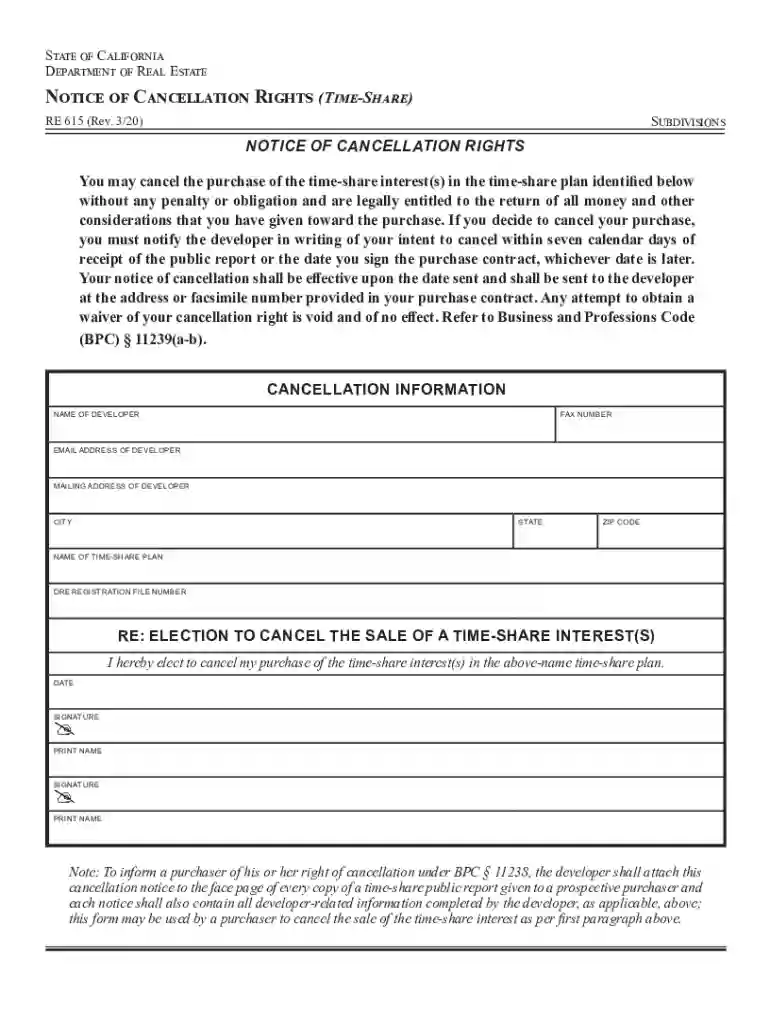
cancellation of listing agreement form california Preview on Page 1

Here's how it works

01. Edit your cancellation of listing agreement form california online
Type text, add images, blackout confidential details, add comments, highlights and more.

02. Sign it in a few clicks
Draw your signature, type it, upload its image, or use your mobile device as a signature pad.

03. Share your form with others
Send termination of listing agreement form via email, link, or fax. You can also download it, export it or print it out.

How to use or fill out cancellation of listing agreement form california with our platform

Form edit decoration
9.5
Ease of Setup
DocHub User Ratings on G2
9.0
Ease of Use
DocHub User Ratings on G2
  1. Click ‘Get Form’ to open the cancellation of listing agreement form in the editor.
  2. Begin by filling in the 'Name of Developer' field with the appropriate developer's name. This is crucial for identifying the party involved.
  3. Next, enter the 'Fax Number', 'Email Address', and 'Mailing Address' of the developer. Ensure these details are accurate for effective communication.
  4. Fill in the 'City', 'State', and 'Zip Code' fields to provide complete address information.
  5. In the section labeled 'Name of Time-Share Plan', specify the exact name of your time-share plan as it appears in your contract.
  6. Enter the 'DRE Registration File Number' which is essential for processing your cancellation request.
  7. Sign and date the form where indicated, ensuring that both signatures are provided if applicable. Print your names clearly beneath each signature.

Start using our platform today to fill out your cancellation of listing agreement form easily and for free!

See more cancellation of listing agreement form california versions

We've got more versions of the cancellation of listing agreement form california form. Select the right cancellation of listing agreement form california version from the list and start editing it straight away!
Versions Form popularity Fillable & printable
2020 4.8 Satisfied (132 Votes)
2017 4.3 Satisfied (259 Votes)
2005 4.4 Satisfied (173 Votes)
be ready to get more

Complete this form in 5 minutes or less

Get form

Got questions?

We have answers to the most popular questions from our customers. If you can't find an answer to your question, please contact us.
Contact us
If youve signed a listing agreement, you can probably back out of this and only have to pay a cancellation fee or some of the commission your agent is forfeiting. If youve signed a purchase agreement, walking away from the sale can be very difficult and incur severe penalties.
How to End a Listing Agreement in California Mutual Agreement. The easiest way is if both you and your agent agree to end the contract. Check the Expiration Date. Most agreements have an end date. BdocHub of Contract. Cancel on Your Own.
Parties can mutually agree to modify the terms, such as adjusting the listing price or extending the duration. Termination of the agreement before its structured expiration can also be done by mutual consent, or else specific legal grounds must be met, such as bdocHub of contract.
In California, listing agreements are important contracts that create a clear relationship between a home seller and their real estate agent. But sometimes, you as the seller may want or need to cancel the agreement. There is even a form to do so called Cancellation Of Listing (C.A.R. Form COL, Revised 4/11).

Security and compliance

At DocHub, your data security is our priority. We follow HIPAA, SOC2, GDPR, and other standards, so you can work on your documents with confidence.

Learn more
ccpa2
pci-dss
gdpr-compliance
hipaa
soc-compliance