




01. Edit your form online
Type text, add images, blackout confidential details, add comments, highlights and more.

Type text, add images, blackout confidential details, add comments, highlights and more.

Draw your signature, type it, upload its image, or use your mobile device as a signature pad.

Send it via email, link, or fax. You can also download it, export it or print it out.
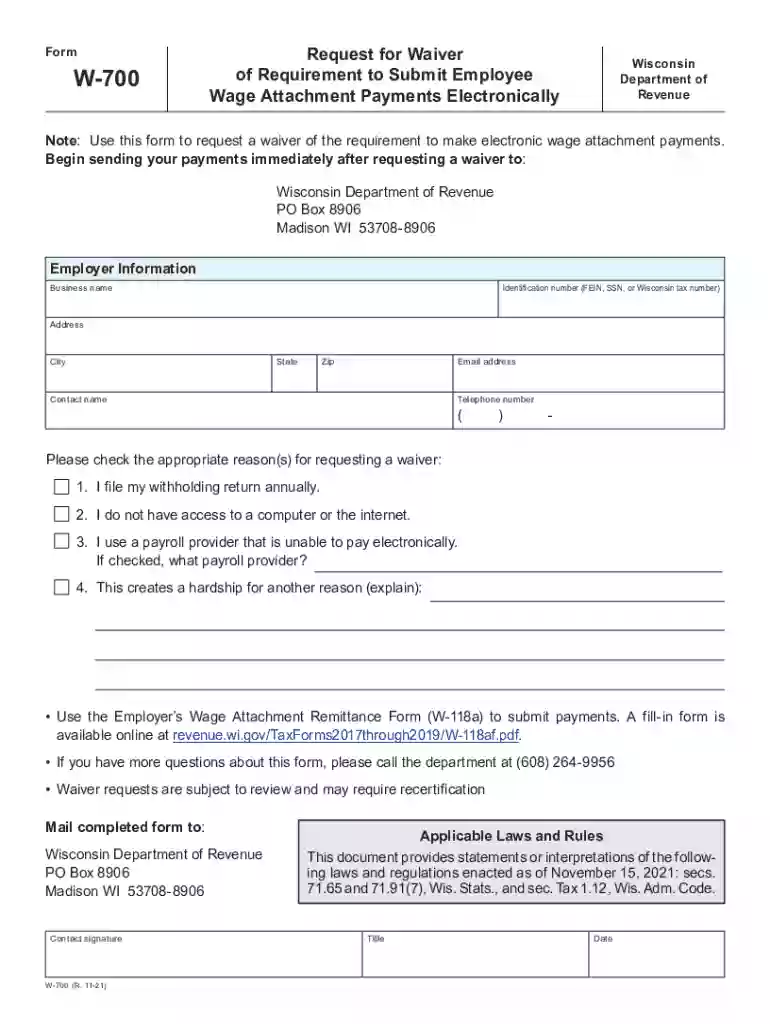
The W-700 form, officially known as the revenue wi PagesFAQSDOR Wage Attachments - Wisconsin Department of Revenue, serves a specific function within the Wisconsin Department of Revenue's administrative framework. This form allows employers to request a waiver for the electronic submission of employee wage attachment payments. Wage attachments typically refer to deductions that an employer must make from an employee’s salary to satisfy certain debts, often as part of legal judgements or government directives.
Employers may require this waiver for various reasons, such as technical limitations or organizational processes that prevent them from fulfilling the default electronic submission requirements. The form contains sections dedicated to capturing detailed employer information, the rationale behind the waiver request, and comprehensive instructions for both the submission of wage attachment payments and inquiries related to them.
Completing the W-700 form involves several precise steps to ensure accuracy and compliance. It is crucial to follow these steps to avoid errors or misunderstandings, which could delay the approval of a waiver request.
Employer Information Section:
Waiver Request Details:
Instructions for Payment Submissions:
Final Review and Submission:
The W-700 form is predominantly used by employers in Wisconsin who are responsible for processing employee wage attachments. These are typically small to medium-sized businesses that may encounter challenges in integrating digital payment submissions into their payroll systems.
Employers in specific industries where digital transformation is slower, or where manual processes remain entrenched, are more likely to use the W-700 form. Businesses experiencing financial difficulties or those undergoing organizational change can also benefit from seeking electronic submission waivers.


Understanding the core components of the W-700 form is essential for accurate completion and submission.
Wisconsin has specific rules that govern wage attachments and their processing, which the W-700 form adheres to. These state-specific regulations define how wage deductions should be managed and the conditions under which submissions should transition from analog to digital formats.
Employers must comply with Wisconsin laws that set permissible deductions from employee wages, based on percentages of disposable income, and ensure adherence to notification rules when adjusting payment methods.
The W-700 form is a legally recognized document within the Wisconsin Department of Revenue's portfolio of forms. It must be completed accurately to ensure compliance with state laws governing wage attachments. The form should only be used under circumstances where employers can substantiate their request for waivers based on genuine constraints or compliance-related issues.
Employers should maintain records of all correspondence and submissions related to the form, respecting privacy and retention laws pertinent to employee information and state revenue procedures.
Employers can submit the W-700 form through authorized channels, which include both traditional mail and specific electronic submission methods, depending on the Department of Revenue's guidelines.
Failing to comply with the requirement to submit wage attachment payments, or inaccurately completing the W-700 form, can result in penalties. These may include fines, interest on unpaid amounts, and potential legal action to enforce compliance. Employers are advised to ensure accurate and timely submissions to avoid such repercussions.
We've got more versions of the revenue wi PagesFAQSDOR Wage Attachments - Wisconsin Department of Revenue form. Select the right revenue wi PagesFAQSDOR Wage Attachments - Wisconsin Department of Revenue version from the list and start editing it straight away!
At DocHub, your data security is our priority. We follow HIPAA, SOC2, GDPR, and other standards, so you can work on your documents with confidence.


