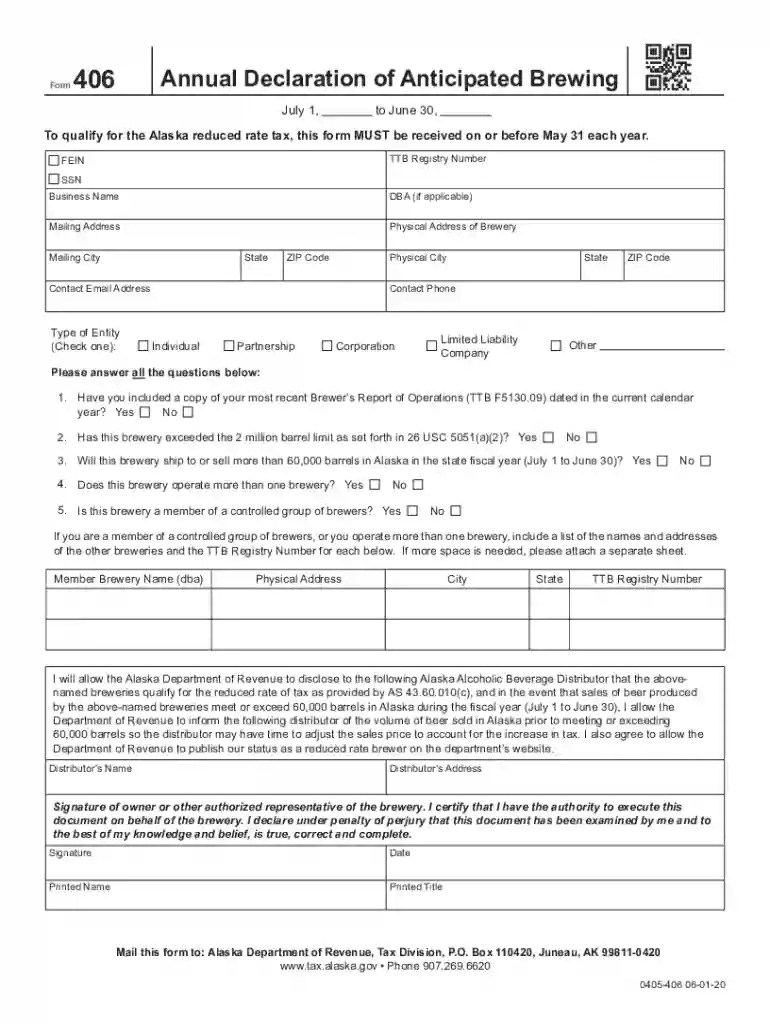
Alaska form annual declaration 2026

Get Form
alaska form annual declaration Preview on Page 1

Here's how it works

01. Edit your form online
Type text, add images, blackout confidential details, add comments, highlights and more.

02. Sign it in a few clicks
Draw your signature, type it, upload its image, or use your mobile device as a signature pad.

03. Share your form with others
Send it via email, link, or fax. You can also download it, export it or print it out.

How to use or fill out Alaska Form Annual Declaration with DocHub

Form edit decoration
9.5
Ease of Setup
DocHub User Ratings on G2
9.0
Ease of Use
DocHub User Ratings on G2
  1. Click ‘Get Form’ to open the Alaska Form Annual Declaration in our editor.
  2. Begin by entering your TTB Registry Number, FEIN, SSN, Business Name, and DBA (if applicable) in the designated fields.
  3. Fill in your Mailing Address and Physical Address of the Brewery, including City, State, and ZIP Code for both addresses.
  4. Select your Type of Entity by checking one of the options: Individual, Partnership, Corporation, Limited Liability Company, or Other.
  5. Answer all questions regarding your brewery's operations. Ensure you indicate whether you have included a copy of your most recent Brewer’s Report of Operations and if you exceed certain production limits.
  6. If applicable, provide details about other breweries you operate or are a member of a controlled group. Include their names and TTB Registry Numbers.
  7. Complete the section allowing the Alaska Department of Revenue to disclose information to distributors as needed.
  8. Finally, sign and date the form as an authorized representative of the brewery before submitting it to the specified address.

Start using our platform today to fill out your Alaska Form Annual Declaration easily and for free!

See more alaska form annual declaration versions

We've got more versions of the alaska form annual declaration form. Select the right alaska form annual declaration version from the list and start editing it straight away!
Versions Form popularity Fillable & printable
2020 4.8 Satisfied (192 Votes)
2016 4.4 Satisfied (272 Votes)
be ready to get more

Complete this form in 5 minutes or less

Get form

Got questions?

We have answers to the most popular questions from our customers. If you can't find an answer to your question, please contact us.
Contact us
State LLC Costs: Overview State:Filing Fee:Annual Fee: California 75$ 800$ Colorado 50$ 10$ Connecticut 120$ 80$ Delaware 110$ 300$47 more rows
You can get an LLC in Alaska immediately if you file online (or 4-5 weeks if you file by mail).
The state of Alaska doesnt collect individual income taxes, so sole proprietorships as well as most partnerships and limited liability companies (LLCs) wont have to pay taxes on their business income.
How to form an Alaska LLC in 7 steps Choose your business name. Appoint a registered agent. Determine your NAICS code. File articles of organization. Create an operating agreement. Obtain an EIN and open a business bank account. Register for state taxes and business licenses.
The cost of forming an LLC in Alaska Name reservation fee: $25. Articles of organization fee: $250. Alaska state business license fee: $50. Certificate of good standing fee: $10.

Security and compliance

At DocHub, your data security is our priority. We follow HIPAA, SOC2, GDPR, and other standards, so you can work on your documents with confidence.

Learn more
ccpa2
pci-dss
gdpr-compliance
hipaa
soc-compliance

People also ask

How do I change or update my registered agent and/or their address? Submit a Statement of Change form along with the $25.00 non-refundable filing fee to the Corporations Section.
Surplus lines tax: 2.7% for lines other than wet marine and transportation (+ 1% filing fee), . 75% (wet marine and transportation), payable by broker. Alaska does not allow the formation of domestic surplus lines insurers in the state. Alaska does not allow courtesy filings.

Related links