Type text, add images, blackout confidential details, add comments, highlights and more.
02. Sign it in a few clicks
Draw your signature, type it, upload its image, or use your mobile device as a signature pad.
03. Share your form with others
Send cms 460 via email, link, or fax. You can also download it, export it or print it out.
How to use or fill out cms 460 with our platform
Ease of Setup
DocHub User Ratings on G2
Ease of Use
DocHub User Ratings on G2
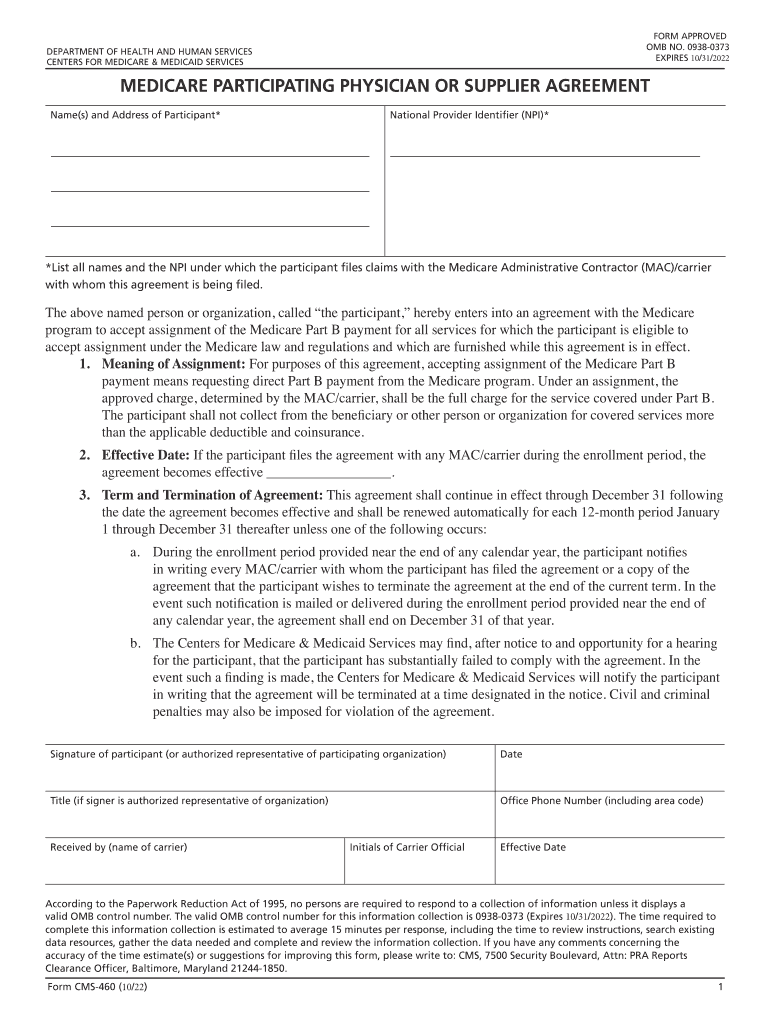
Click ‘Get Form’ to open the CMS-460 in the editor.
Begin by entering the name(s) and address of the participant in the designated fields. Ensure that all names are listed accurately as they will be used for claims.
Input the National Provider Identifier (NPI) number. This is crucial for processing your claims with Medicare.
Review the section regarding assignment acceptance. Make sure you understand that accepting assignment means you will receive direct payments from Medicare.
Fill in the effective date of your agreement, which is important for determining when your participation begins.
Complete the signature section, ensuring that it is signed by either the participant or an authorized representative, along with their title and contact information.
Finally, save your completed form and follow instructions to submit it to your MAC/carrier directly through our platform.
Start using our platform today to easily fill out and manage your CMS-460 form for free!
Detailed study of algorithm design and analysis, including greedy algorithms, divide and conquer, dynamic programming, backtracking, and brance and bound.Read more
2.3-460 mg/L, n/a, Not reported but several days, 250 mL, dark stirred CAs and CMs were recalcitrant at ambient pH, Chelated activation was moreRead more
Cookie consent notice
This site uses cookies to enhance site navigation and personalize your experience.
By using this site you agree to our use of cookies as described in our Privacy Notice.
You can modify your selections by visiting our Cookie and Advertising Notice.