




01. Edit your form online
Type text, add images, blackout confidential details, add comments, highlights and more.

Type text, add images, blackout confidential details, add comments, highlights and more.

Draw your signature, type it, upload its image, or use your mobile device as a signature pad.

Send it via email, link, or fax. You can also download it, export it or print it out.
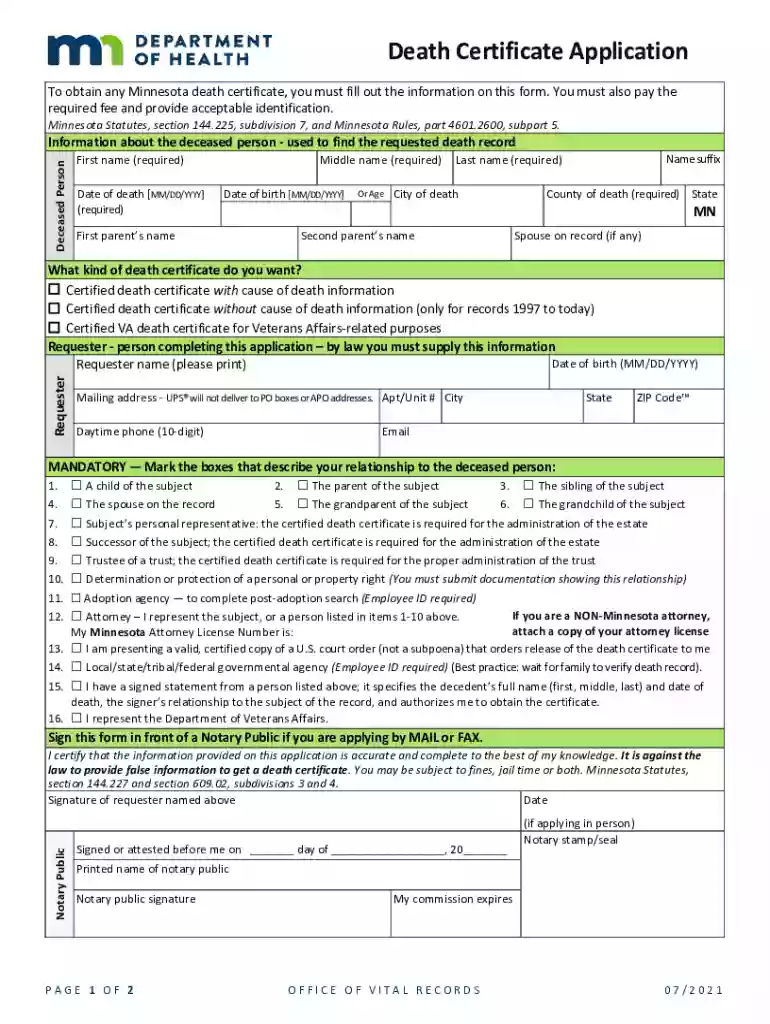
The document, "Death Certificates - Minnesota Dept. of Health," provides crucial information and guidelines for the issuance of death certificates in Minnesota. This document serves a dual purpose: to offer a procedural framework for obtaining such certificates and to furnish medical professionals with instructions on the certification of death. The document stands as a legal instrument that records vital statistics, serving as a certified proof of an individual’s death for legal, personal, and financial proceedings. It is an essential document for estate settlements, life insurance claims, and the transfer of property rights.
This document is utilized by diverse stakeholders, including family members of the deceased, legal representatives, and medical practitioners. For family members, it provides step-by-step instructions on how to request and use death certificates for various purposes. Legal representatives rely on it for understanding the formalities involved in estate settlements. Medical professionals use the Physicians' Handbook segment to ensure accuracy in the entry of cause of death, which is vital for public health data compilation and future medical research.
Obtaining a death certificate from the Minnesota Department of Health involves several essential steps to ensure compliance with state requirements. The application can be made by a qualified individual, which includes relatives, legal representatives, or authorized government agencies.
Completing a death certificate accurately is a critical part of medical and legal protocols. It consists of several key components that must be carefully documented.
Death certificates serve as legal documents necessary for a wide range of activities, including but not limited to proving death for legal and financial transactions.
Understanding the structure of death certificates can aid in their proper use and processing.
Each state in the U.S. might have different rules regarding death certificates. Minnesota’s statute prescribes particular guidelines.
The directed users of this document span a broad spectrum, including individuals and entities involved directly or indirectly with the deceased person.
Before applying, it is prudent to gather all necessary documents and information to streamline the process.
We've got more versions of the Death Certificates - Minnesota Dept. of HealthDeath Certificates - Minnesota Dept. of HealthPhysicians' Handbook on Medical Certification of Death (4/2003)Physicians' Handbook on Medical Certification of Death (4/2003) form. Select the right Death Certificates - Minnesota Dept. of HealthDeath Certificates - Minnesota Dept. of HealthPhysicians' Handbook on Medical Certification of Death (4/2003)Physicians' Handbook on Medical Certification of Death (4/2003) version from the list and start editing it straight away!
Sure, and it’s really easy! DocHub is a web-based PDF editor with advanced document management capabilities that allow you rapidly adjust your forms, fill out blank fields and drop new ones for others to fill out, and create electronic signatures in several ways. Import your Death Certificates - Minnesota Dept. of HealthDeath Certificates - Minnesota Dept. of HealthPhysicians' Handbook on Medical Certification of Death (4/2003)Physicians' Handbook on Medical Certification of Death (4/2003), provide information as requested, and decide how you want to eSign your template - by typing your name, drawing your signature, uploading its picture, or utilizing a QR code.
Document editing with DocHub is equally convenient on desktop and mobile devices. You only need an internet browser to edit your Death Certificates - Minnesota Dept. of HealthDeath Certificates - Minnesota Dept. of HealthPhysicians' Handbook on Medical Certification of Death (4/2003)Physicians' Handbook on Medical Certification of Death (4/2003) on Android. Open our website and sign in to access the instruments you need. Add your file and introduce your intended changes. After that, you can keep your form in your file storage or send it out instantly.
At DocHub, your data security is our priority. We follow HIPAA, SOC2, GDPR, and other standards, so you can work on your documents with confidence.


