Nys legally blind form 2026

Get Form
how to register as legally blind Preview on Page 1

Here's how it works

01. Edit your how to register as legally blind online
Type text, add images, blackout confidential details, add comments, highlights and more.

02. Sign it in a few clicks
Draw your signature, type it, upload its image, or use your mobile device as a signature pad.

03. Share your form with others
Send legally blind benefits new york via email, link, or fax. You can also download it, export it or print it out.

How to use or fill out nys legally blind form with our platform

Form edit decoration
9.5
Ease of Setup
DocHub User Ratings on G2
9.0
Ease of Use
DocHub User Ratings on G2
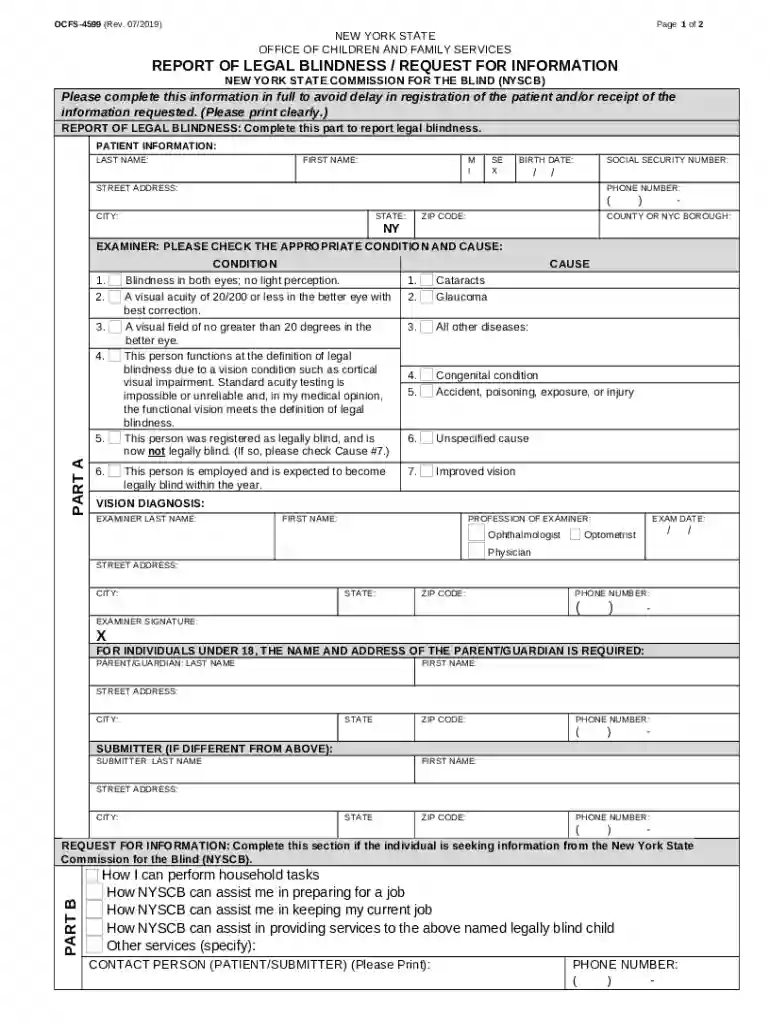
  1. Click ‘Get Form’ to open the nys legally blind form in the editor.
  2. Begin by filling out the 'Patient Information' section. Clearly enter the patient's last name, first name, street address, birth date, social security number, phone number, city, state (NY), zip code, and county or NYC borough.
  3. In 'Part A', check the appropriate condition that applies to the patient’s legal blindness. Ensure you select one of the six conditions listed.
  4. Provide details about the cause of blindness by checking any relevant options from the list provided in Part A.
  5. Complete the 'Vision Diagnosis' and 'Examiner' sections with accurate information about the examining professional and their findings.
  6. If applicable, fill out information for individuals under 18 by providing parent/guardian details.
  7. In 'Part B', if seeking information from NYSCB, indicate specific assistance needed by checking relevant boxes or specifying other services.
  8. Finally, review all entries for accuracy before submitting your completed form to ensure a smooth process.

Start using our platform today to easily complete your nys legally blind form online for free!

See more nys legally blind form versions

We've got more versions of the nys legally blind form form. Select the right nys legally blind form version from the list and start editing it straight away!
Versions Form popularity Fillable & printable
2019 4.8 Satisfied (75 Votes)
2018 4.4 Satisfied (164 Votes)
2005 4.4 Satisfied (259 Votes)
be ready to get more

Complete this form in 5 minutes or less

Get form

Got questions?

We have answers to the most popular questions from our customers. If you can't find an answer to your question, please contact us.
Contact us

With DocHub, you can quickly approve your nys commission for the blind or any other paperwork on iOS, even without installing extra programs. You can access your DocHub account from any internet-connected browser and fill out and sign your document in any way you like with just a couple of clicks.

It is a no-brainer on a computer or via a mobile device to complete a nys legally blind form with DocHub. All you need to do is open any installed browser on your smartphone and proceed to the DocHub site. Once authenticated, add your document and open it in editing mode. Use our toolbar to make your edits and save adjustments. Optionally, keep your file in your files or send it to a recipient immediately.

Security and compliance

At DocHub, your data security is our priority. We follow HIPAA, SOC2, GDPR, and other standards, so you can work on your documents with confidence.

Learn more
ccpa2
pci-dss
gdpr-compliance
hipaa
soc-compliance
be ready to get more

Complete this form in 5 minutes or less

Get form