



Here's how it works



How to use or fill out forbearance request form with our platform

- Click ‘Get Form’ to open the forbearance request form in the editor.
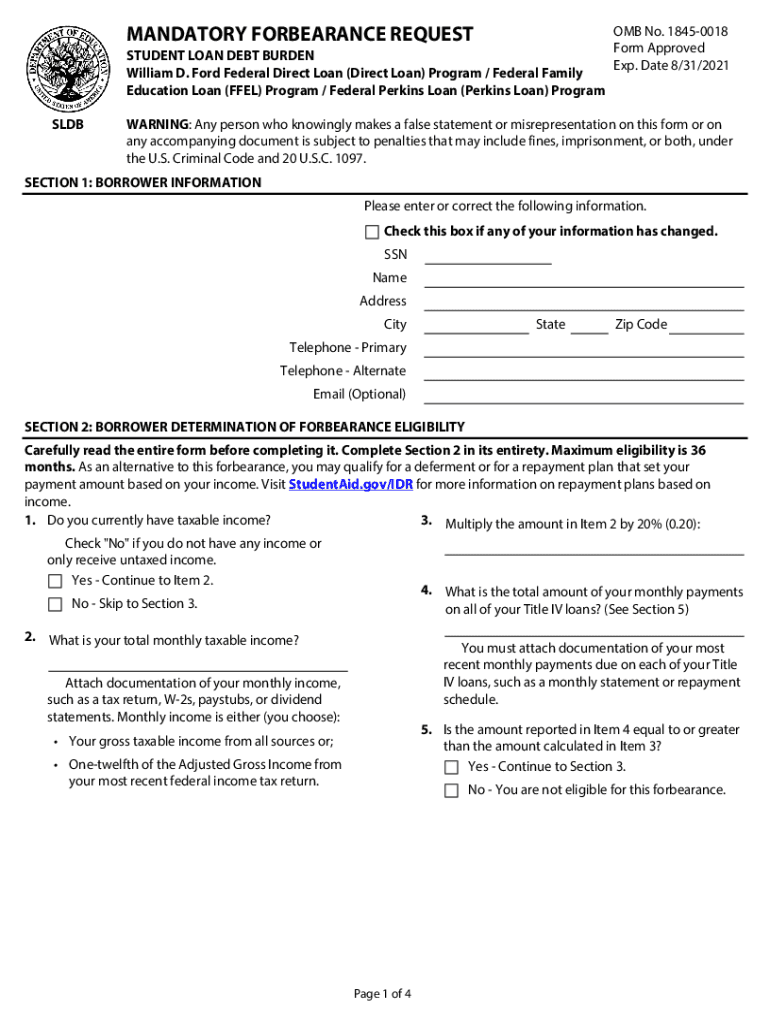
- In Section 1, enter your borrower information accurately. Ensure that your name, address, and contact details are correct. If any information has changed, check the box provided.
- Proceed to Section 2 to determine your eligibility for forbearance. Answer questions regarding your taxable income and monthly payments on Title IV loans. Attach necessary documentation as specified.
- In Section 3, indicate your requests regarding the forbearance period. Specify whether you wish to temporarily stop payments or make smaller payments, and provide a start date for the forbearance.
- Review Section 4 for instructions on completing the form correctly. Make sure to type or print using dark ink and follow the date format provided.
- Finally, return the completed form along with any required documentation to the address shown in Section 6.
Start filling out your forbearance request form today using our platform for free!
It's free
See more forbearance request form versions
Got questions?
What is the simplest way to electronically sign my forbearance loan meaning?
A lot of software applications are available on the market for document editing and signing. DocHub is one of the most popular online solutions that comply with all data protection and compliance requirements and guarantees your electronically signed documentation is legally enforceable. All you need to give it a try is to create an account, upload your forbearance loan meaning, fill out the required information, and click Sign. Generate your eSignature by typing, drawing it, uploading its picture to your template, or scanning a unique QR code.
How do you edit forbearance vs deferment on Android?
Document editing with DocHub is equally convenient on desktop and mobile devices. You just need an internet browser to revise your forbearance vs deferment on Android. Open our website and sign in to access the instruments you need. Add your file and introduce your intended modifications. After that, you can keep your form in your file storage or send it out right away.
Security and compliance
At DocHub, your data security is our priority. We follow HIPAA, SOC2, GDPR, and other standards, so you can work on your documents with confidence.
Learn more