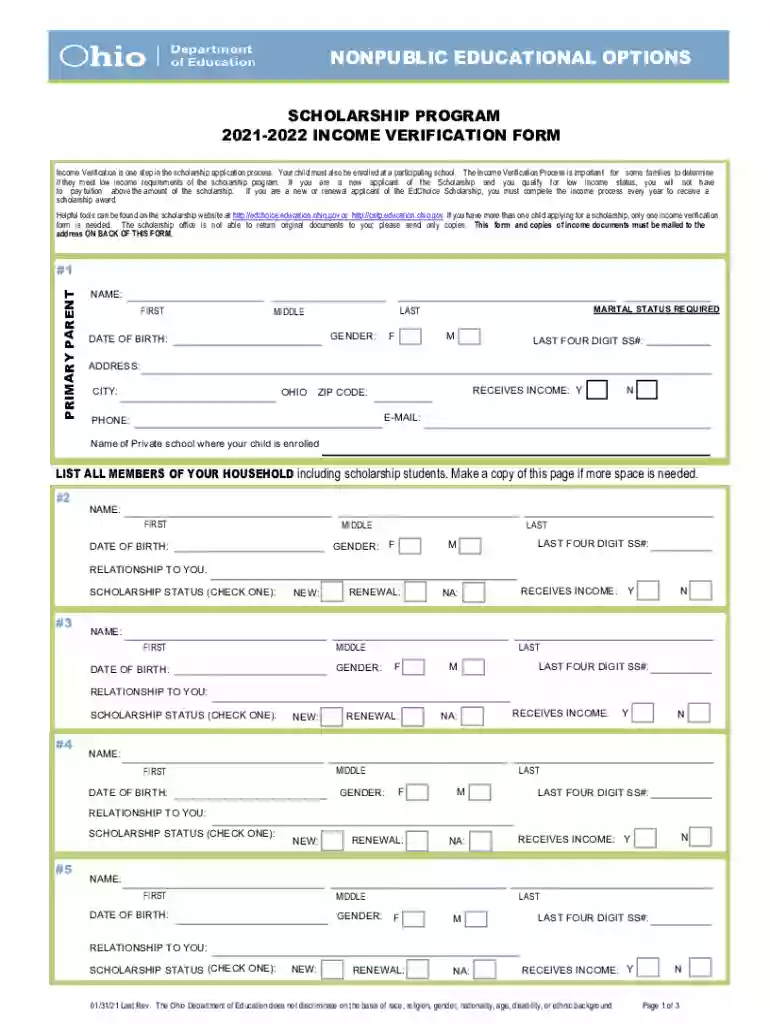
Oh I IO NONPUBLIC EDUCATIONAL OPTIONS Preview on Page 1

Oh I IO NONPUBLIC EDUCATIONAL OPTIONS 2026

Here's how it works

  • 01. Edit your form online

    Type text, add images, blackout confidential details, add comments, highlights and more.

  • 02. Sign it in a few clicks

    Draw your signature, type it, upload its image, or use your mobile device as a signature pad.

  • 03. Share your form with others

    Send it via email, link, or fax. You can also download it, export it or print it out.

How to use or fill out Oh I IO NONPUBLIC EDUCATIONAL OPTIONS

Form edit decoration
9.5
Ease of Setup
DocHub User Ratings on G2
9.0
Ease of Use
DocHub User Ratings on G2
  1. Click ‘Get Form’ to open it in our editor.
  2. Begin by filling out the primary parent information on page 1. Ensure you provide your full name, marital status, gender, date of birth, last four digits of your Social Security number, address, email, and phone number.
  3. List all household members including their names, relationships to you, scholarship statuses (new or renewal), and income status. If more space is needed, make a copy of this section.
  4. On page 2, document all sources of income for each household member. Include employer names and gross amounts before taxes. Remember to attach copies of supporting income documentation.
  5. Sign at the bottom of page 2 to validate the form. Do not return page 3 as instructed.
  6. Mail the completed form along with all required documents to the Ohio Department of Education at the specified address.

Start using our platform today for free to streamline your form completion process!

See more Oh I IO NONPUBLIC EDUCATIONAL OPTIONS versions

We've got more versions of the Oh I IO NONPUBLIC EDUCATIONAL OPTIONS form. Select the right Oh I IO NONPUBLIC EDUCATIONAL OPTIONS version from the list and start editing it straight away!

VersionsForm popularityFillable & printable
20234.7 Satisfied (53 Votes)
20214.8 Satisfied (220 Votes)
20194.1 Satisfied (38 Votes)
20104.3 Satisfied (162 Votes)

be ready to get more

Complete this form in 5 minutes or less

Security and compliance

At DocHub, your data security is our priority. We follow HIPAA, SOC2, GDPR, and other standards, so you can work on your documents with confidence.

Related links

Amazon Aurora vs ClickHouse Cloud (2026) - RFP.wiki

Jun 5, 2026 Some reviewers mention a real learning curve. Consistency and transactional semantics are not the main strength. Cost can still climb whenRead more

Learn more
Home | Ohio Department of Education and Workforce

View and compare district report cards, graduate from high school, understand the different school options, find sample test questions.Read more

Learn more
If you believe that this page should be taken down, please follow our DMCA take down process here