Bcbs disabled dependent 2026

Get Form
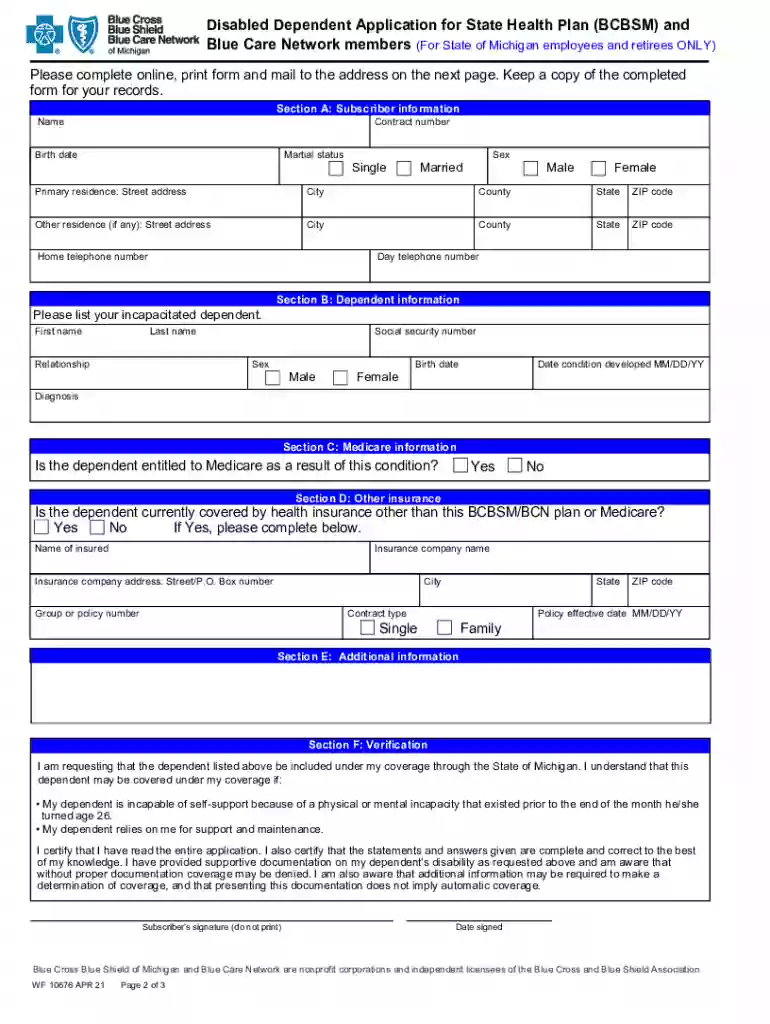
bcbs disabled dependent form Preview on Page 1

Here's how it works

01. Edit your bcbs disabled dependent form online
Type text, add images, blackout confidential details, add comments, highlights and more.

02. Sign it in a few clicks
Draw your signature, type it, upload its image, or use your mobile device as a signature pad.

03. Share your form with others
Send it via email, link, or fax. You can also download it, export it or print it out.

How to use or fill out bcbs disabled dependent with our platform

Form edit decoration
9.5
Ease of Setup
DocHub User Ratings on G2
9.0
Ease of Use
DocHub User Ratings on G2
  1. Click ‘Get Form’ to open the bcbs disabled dependent application in the editor.
  2. Begin with Section A: Subscriber Information. Fill in your name, contract number, marital status, birth date, sex, and primary residence details.
  3. Proceed to Section B: Dependent Information. Enter your incapacitated dependent's first and last name, relationship, social security number, sex, birth date, date condition developed, and diagnosis.
  4. In Section C: Medicare Information, indicate whether the dependent is entitled to Medicare due to their condition by selecting 'Yes' or 'No'.
  5. Complete Section D: Other Insurance if applicable. Provide details about any other health insurance coverage your dependent may have.
  6. Review and sign Section F: Verification. Ensure all information is accurate before signing and dating the form.
  7. If required, have your dependent’s physician complete Section G: Dependent’s Attending Physician Certification.
  8. Once completed, save your document and submit it via email or fax as instructed on the form.

Start using our platform today for free to streamline your bcbs disabled dependent application process!

See more bcbs disabled dependent versions

We've got more versions of the bcbs disabled dependent form. Select the right bcbs disabled dependent version from the list and start editing it straight away!
Versions Form popularity Fillable & printable
2021 4.8 Satisfied (90 Votes)
2019 4.4 Satisfied (83 Votes)
2018 4.1 Satisfied (34 Votes)
be ready to get more

Complete this form in 5 minutes or less

Get form

Got questions?

We have answers to the most popular questions from our customers. If you can't find an answer to your question, please contact us.
Contact us
If you have a family member who is permanently and totally disabled, you may be able to claim them as a dependent, regardless of age. Read IRS Publication 501. Explore the adoption credit. If you have adopted a child with special needs, you may be eligible for a credit.
You can claim a person with disabilities as a dependent when: They have lived with you for more than half of the tax year. You have provided at least half of their support for the tax year. They are either your: child, stepchild, foster child, or a descendant of these.
Dependents: You may be able to claim your child as a dependent regardless of age if they are permanently and totally disabled. Permanently and totally disabled: y He or she cannot engage in any substantial gainful activity because of a physical or mental condition.
You can claim someone as a dependent if they receive Social Security benefits as long as you provide over one-half of their support. Under the Qualifying Relative rules if they meet all the requirements to be claimed as a dependent then you should be able to claim them on your tax return.
Typically, these family members include: Legal spouse. Biological children and stepchildren. Legally adopted children and children placed with you or your covered spouse for adoption.

Security and compliance

At DocHub, your data security is our priority. We follow HIPAA, SOC2, GDPR, and other standards, so you can work on your documents with confidence.

Learn more
ccpa2
pci-dss
gdpr-compliance
hipaa
soc-compliance

People also ask

The Disabled Dependent Certification form is used to determine if your adult dependent child meets the plans eligibility requirements for continued coverage after the age limit is docHubed.
The credit is non-refundable, meaning it can lower your tax bill to zero, but you will not receive any part of it back as a tax refund. Its worth up to $1,050 for one qualifying dependent, maxing out at $2,100 for two or more qualifying dependents.

Related links