Request change insurability template 2025

Get Form
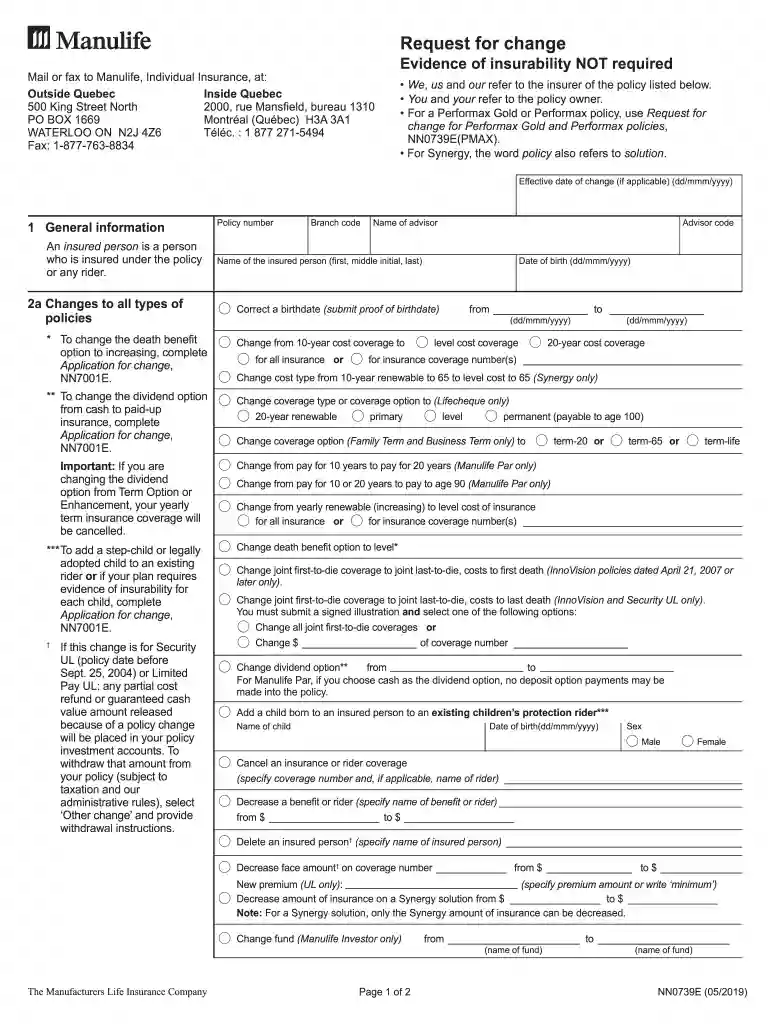
nn0739e Preview on Page 1

Here's how it works

01. Edit your nn0739e online
Type text, add images, blackout confidential details, add comments, highlights and more.

02. Sign it in a few clicks
Draw your signature, type it, upload its image, or use your mobile device as a signature pad.

03. Share your form with others
Send it via email, link, or fax. You can also download it, export it or print it out.

How to use or fill out request change insurability template

Form edit decoration
9.5
Ease of Setup
DocHub User Ratings on G2
9.0
Ease of Use
DocHub User Ratings on G2
  1. Click ‘Get Form’ to open the request change insurability template in our editor.
  2. Begin by filling out the 'General Information' section. Enter the policy number, branch code, and your advisor's details. Ensure that the name of the insured person and their date of birth are accurately provided.
  3. In section 2a, specify any changes you wish to make to your policy. For example, if you want to change the death benefit option or add a child to an existing rider, select the appropriate options and provide necessary details.
  4. If applicable, complete section 2b for additional changes specific to disability policies. Indicate any adjustments needed for benefits or periods.
  5. Finally, ensure all required signatures are completed in section 3. This includes signatures from the policy owner and any witnesses as necessary.

Start using our platform today for free to streamline your document editing and signing process!

See more request change insurability template versions

We've got more versions of the request change insurability template form. Select the right request change insurability template version from the list and start editing it straight away!
Versions Form popularity Fillable & printable
2019 4.8 Satisfied (52 Votes)
2018 4.1 Satisfied (61 Votes)
2013 4.3 Satisfied (118 Votes)
be ready to get more

Complete this form in 5 minutes or less

Get form

Got questions?

We have answers to the most popular questions from our customers. If you can't find an answer to your question, please contact us.
Contact us
This means it can include information like the requestors name, a description of the requested change, why the change is necessary, and the date of the request. A change request form may also contain a description of how the change could affect the project, such as its cost, duration, quality, risk, and scope.
Sometimes you will hear agents throw out the terms basic, Broad, or Special in regards to the coverage. These are called coverage forms, and they basically indicate what the policy will cover you for.
A team member planned to complete a task on Day 12 of a project. On Day 10, they realize that the previous task will take much longer than planned. They submit a change request to ask if its possible to reschedule the upcoming task from Day 12 to Day 20.
How to Create a Change Request Form Download the change request form template . Open the downloaded template file. Enter the Project Name, Requested by, Date, and Request No. Select the Priority level. Enter the Change Description and details about the Change Reason.
To prove insurability, you must provide information, such as medical history, lifestyle details, or test results, that helps an insurance company evaluate your health risk. This process is often required when applying for new coverage or increasing an existing policy.
be ready to get more

Complete this form in 5 minutes or less

Get form

People also ask

From the Application Settings list, select Change Management Template Template, and then click Open. On the Change Template form, in the Template Name field, enter a name for the template. In the Status field, select an appropriate status level for this template.

Related links