




Here's how it works

01. Edit your how long does maine tax refund take online
Type text, add images, blackout confidential details, add comments, highlights and more.

02. Sign it in a few clicks
Draw your signature, type it, upload its image, or use your mobile device as a signature pad.

03. Share your form with others
Send how long for maine state tax refund via email, link, or fax. You can also download it, export it or print it out.
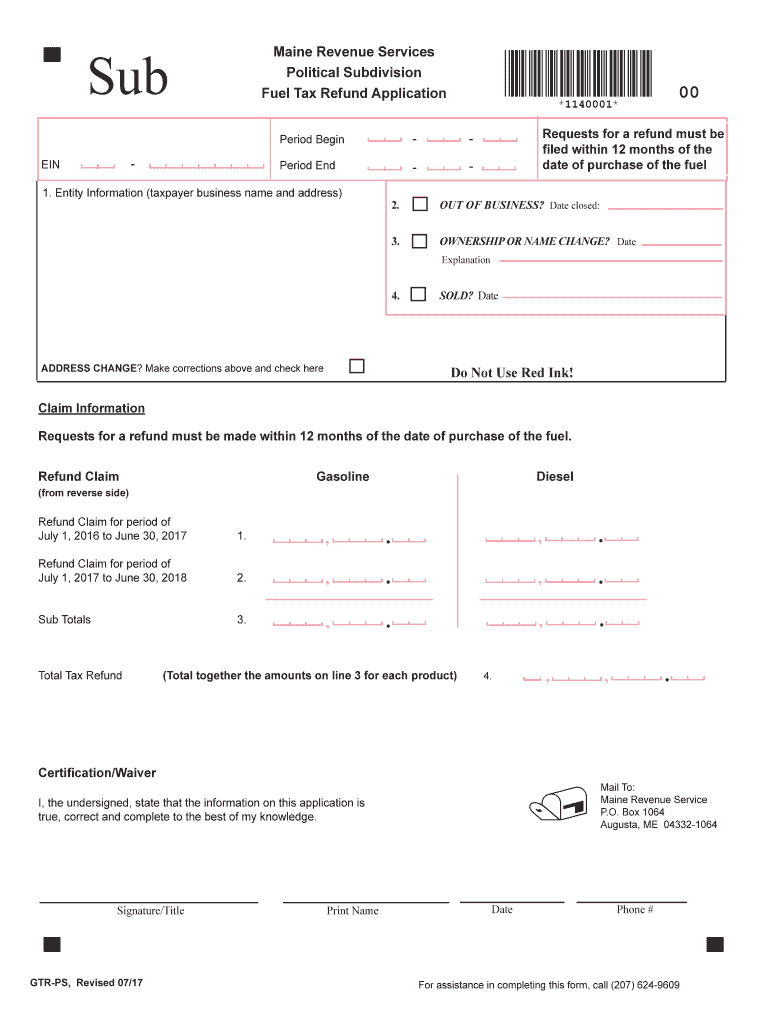
How to use or fill out Maine Revenue PS Refund with our platform

- Click ‘Get Form’ to open the Maine Revenue PS Refund application in the editor.
- Begin by filling out the Entity Information section. Enter your business name and address accurately to ensure proper processing.
- If applicable, indicate if your business is out of operation by providing the date closed in the designated field.
- For any ownership or name changes, specify the date and provide a brief explanation in the corresponding section.
- Make sure to update your address if it has changed. Correct any errors above and check the box provided.
- In the Claim Information section, enter your refund claims for gasoline and diesel for each specified period. Ensure you total these amounts correctly.
- Complete the Certification/Waiver section by signing, printing your name, and dating the form before submission.
Start using our platform today to fill out your Maine Revenue PS Refund application easily and for free!
Fill out maine revenue ps refund online
It's free
It's free
See more maine revenue ps refund versions
We've got more versions of the maine revenue ps refund form. Select the right maine revenue ps refund version from the list and start editing it straight away!
Security and compliance
At DocHub, your data security is our priority. We follow HIPAA, SOC2, GDPR, and other standards, so you can work on your documents with confidence.
Learn more


Related forms
THE RIGHT TO CHANGE
The document outlines the rights and processes for consumers regarding health insurance changes in Australia. It emphasi ...

Maurice Blackburn, Slater and Gordon and Shine Lawyers - pc gov
The document is a final report by Access Economics Pty Limited, commissioned to explore the feasibility of a national no ...
NATIONAL CO:MPETITION POLICY
The document is a final report reviewing the Public Trustee Act 1995 in South Australia, as part of the National Competi ...
REFERENCES COMMITTEE - aph gov
The document is a transcript of the Senate Employment, Workplace Relations and Education References Committee hearing he ...

Canberra: US commissions first Navy warship in foreign port
The document is a newsletter from the Royal Australian Navy, featuring various articles about recent events and achievem ...
ACSSA Newsletter No 13 December 2006 - Australian Institute of
The December 2006 edition of the ACSSA Aware newsletter from the Australian Centre for the Study of Sexual Assault focus ...

Review of the powers and functions of the Board of Teacher
The document is a comprehensive review of the powers and functions of the Board of Teacher Registration in Queensland, A ...

The determinants of employment for Australian mothers
The document presents a detailed analysis of the factors influencing employment among Australian mothers, specifically c ...