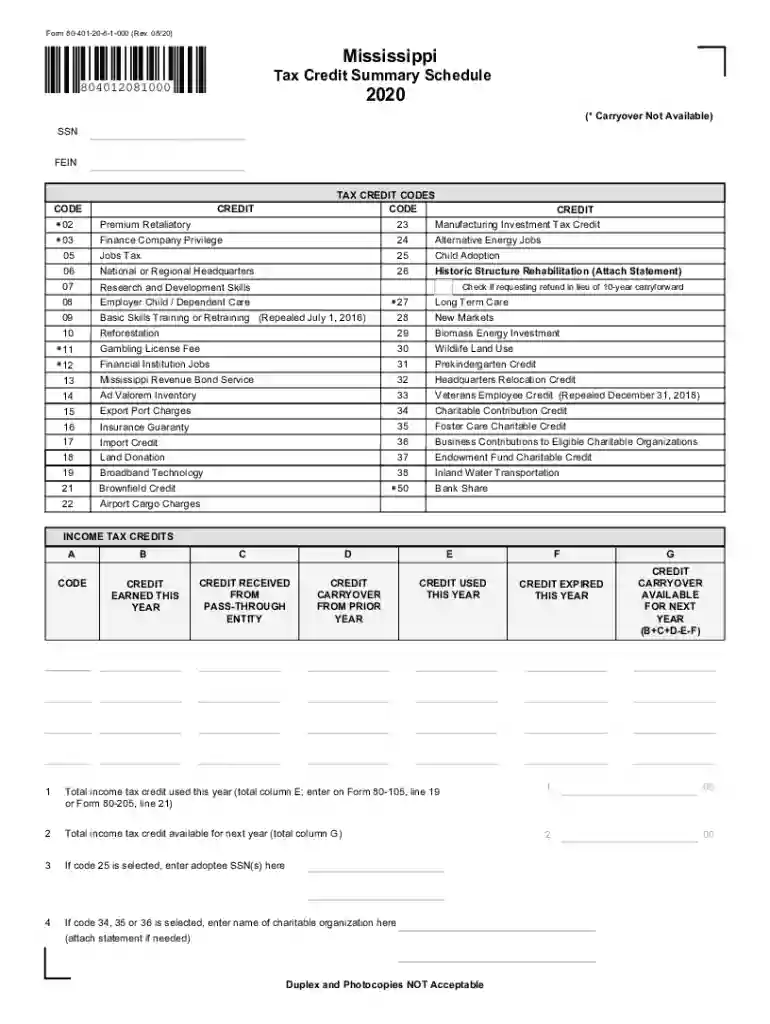
80 401 2026

Get Form
80 401 Preview on Page 1

Here's how it works

01. Edit your form online
Type text, add images, blackout confidential details, add comments, highlights and more.

02. Sign it in a few clicks
Draw your signature, type it, upload its image, or use your mobile device as a signature pad.

03. Share your form with others
Send it via email, link, or fax. You can also download it, export it or print it out.

How to use or fill out 80 401 with our platform

Form edit decoration
9.5
Ease of Setup
DocHub User Ratings on G2
9.0
Ease of Use
DocHub User Ratings on G2
  1. Click ‘Get Form’ to open the 80 401 in the editor.
  2. Begin by entering your Social Security Number (SSN) or Federal Employer Identification Number (FEIN) at the top of the form.
  3. Review the Tax Credit Codes section. Identify and enter the relevant codes for tax credits you are claiming, such as Manufacturing Investment Tax Credit or Child Adoption.
  4. In the Income Tax Credits section, fill out columns A through G for each credit code selected. Ensure you accurately report credits earned this year, received from pass-through entities, and any carryover amounts.
  5. If applicable, provide additional information such as adoptee SSNs or names of charitable organizations in the designated fields.
  6. Once all fields are completed, review your entries for accuracy before saving or exporting your document.

Start using our platform today to easily complete your 80 401 form online for free!

See more 80 401 versions

We've got more versions of the 80 401 form. Select the right 80 401 version from the list and start editing it straight away!
Versions Form popularity Fillable & printable
2023 4.9 Satisfied (40 Votes)
2022 4.1 Satisfied (51 Votes)
2021 4.8 Satisfied (250 Votes)
2020 4.2 Satisfied (54 Votes)
be ready to get more

Complete this form in 5 minutes or less

Get form

Got questions?

We have answers to the most popular questions from our customers. If you can't find an answer to your question, please contact us.
Contact us
Basically, any amount you withdraw from your 401(k) account has taxes withheld at 20%, and if youre under age 59, youll be taxed an additional 10% when you file your return. Any amount you withdraw from your 457 account has taxes withheld at 20%.
Form 80-105 is the Mississippi Resident Individual Income Tax Return used to report your income earned and taxes owed to the state of Mississippi for the 2024 tax year.
Form 1099-R is used to report distribution (withdrawal) amounts from a 401(k) plan or IRA. Note you will only receive this if you took a distribution or completed a direct rollover.
How are 401(k) withdrawals taxed? When you withdraw from traditional 401(k)s or similar workplace retirement plans, you have to pay taxes on it, like regular income. Thats because you contributed pretax dollars into the account. Any earnings you made from the investments are also tax-deferred until you withdraw.
If you havent received your 1099 by now, theres a chance it was either delayed in the mail, sent electronically instead of by paper, or not issued due to low distribution amounts. If you cant docHub the issuer, the IRS can help. Starting February 15, you can call the IRS at 1-***-***-**** and request a copy.

Security and compliance

At DocHub, your data security is our priority. We follow HIPAA, SOC2, GDPR, and other standards, so you can work on your documents with confidence.

Learn more
ccpa2
pci-dss
gdpr-compliance
hipaa
soc-compliance
be ready to get more

Complete this form in 5 minutes or less

Get form

People also ask

Youll receive a Form 1099-R Distributions From Pensions, Annuities, Retirement or Profit-Sharing Plans, IRAs, Insurance Contracts, etc. from the payer of your 401(k) distribution. A copy of that form is also sent to the IRS.
Yes, the amount you contribute to a traditional 401(k) plan is automatically deducted from your taxable income for the year, reducing your current tax liability. However, youll pay taxes on these funds when you withdraw them during retirement.
The IRS requires that Form 1099-R be sent by January 31 of the year following any 401(k) distribution amount of $10 or more. If you didnt take any distributions last year or the amount of your distribution was less than $10, Ascensus will not send you a 1099-R.

Related links