Type text, add images, blackout confidential details, add comments, highlights and more.
02. Sign it in a few clicks
Draw your signature, type it, upload its image, or use your mobile device as a signature pad.
03. Share your form with others
Send tc return letter via email, link, or fax. You can also download it, export it or print it out.
How to use or fill out tc 20s with our platform
Ease of Setup
DocHub User Ratings on G2
Ease of Use
DocHub User Ratings on G2
Click ‘Get Form’ to open the TC-20S in the editor.
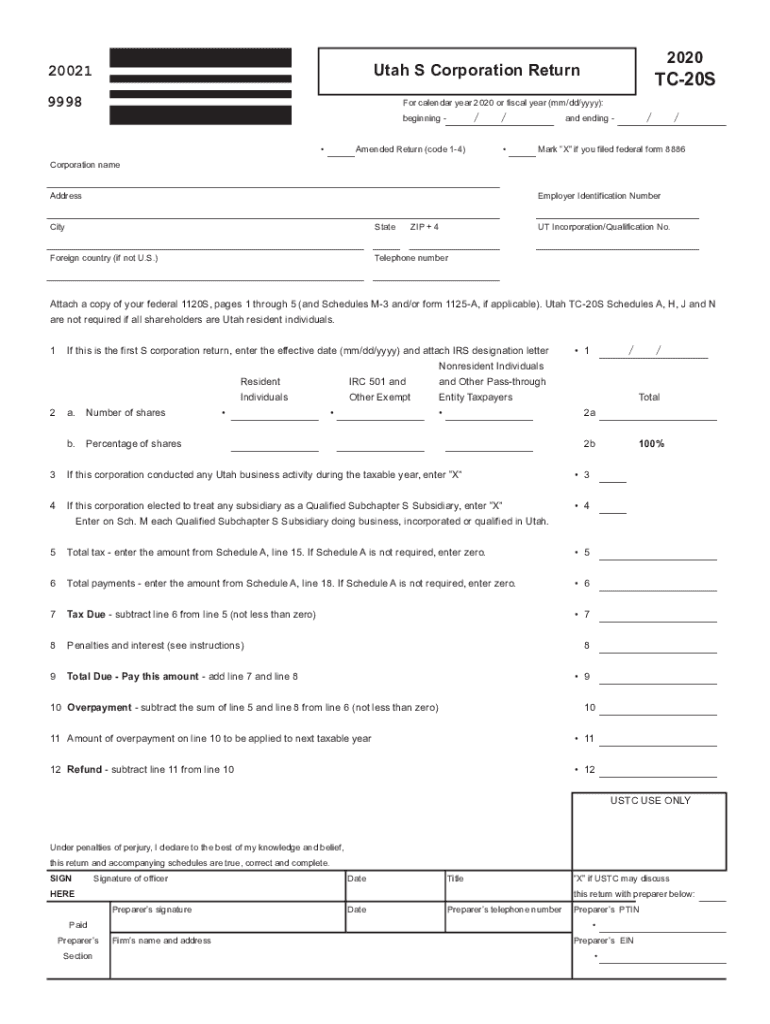
Begin by entering the corporation name, address, and Employer Identification Number (EIN) in the designated fields. Ensure all information is accurate for proper identification.
Fill in the calendar year or fiscal year dates at the top of the form. This is crucial for tax reporting purposes.
Complete sections regarding shareholders, including their number of shares and percentage ownership. This information is vital for calculating tax liabilities.
If applicable, indicate if this is an amended return and whether you filed federal form 8886 by marking the appropriate boxes.
Proceed to enter financial details such as total tax, payments, and any penalties or interest due. Use the provided schedules to assist with calculations.
Finally, ensure that all signatures are completed before submitting your form. This includes both the officer's signature and preparer's information if applicable.
Start using our platform today to streamline your TC-20S completion process for free!
Each year, S corporations must file Form 1120-S to report income, gains, losses, deductions, and credits to the IRS. They also have to provide each shareholder with a Schedule K-1, detailing each shareholders share of the businesss profits and losses.
What forms do I need to file my taxes as an S Corp?
All California S corporations and LLCs companies treated as S corporations for federal, should file Form 100S (California S Corporation Franchise or Income Tax Return).
Should I file form 8832 or 2553?
An eligible entity might use Form 8832 to elect to be taxed as a corporation and then file Form 2553 to elect S corporation status, but Form 8832 itself does not grant S status. Therefore, for re-electing S status for a company that was previously an S corp, Form 2553 is the correct form.
What is the form for Utah sales tax registration?
Use form TC-69 to register with the Utah State Tax Commission for all taxes listed below. For registration of a DBA, use Department of Commerce form, Business Name Registration / DBA Application, available at all registration locations, online at commerce.utah.gov, or by telephone at (801) 530-4849.
Do S Corps file their own tax returns?
Even though the S corporation does not pay income tax, it has a responsibility to file an annual tax return on Form 1120S. This tax form is for informational purposes only and provides the IRS with an aggregate view of the business earnings and expenses.
The TC-40 is the official form used by Utah residents to file your individual income tax returns for the tax year 2025.
Is 1120 a form for S Corp or C Corp?
C corporations use Form 1120 to calculate their taxes due. S corporations use Form 1120S as an information return.
Related links
Artist Spotlight from the 2022 TC-AAE Summer Artist-in-
Sep 21, 2022 Being diagnosed with PTSD in her late 20s, Courtney has grown up using art to process emotions and difficult life experiences, creating aRead more
Utah TC-20S Schedules A, H, J and N are not required if all shareholders are Utah resident individuals. 1. If this is the first S corporation return, enter theRead more
Cookie consent notice
This site uses cookies to enhance site navigation and personalize your experience.
By using this site you agree to our use of cookies as described in our Privacy Notice.
You can modify your selections by visiting our Cookie and Advertising Notice.