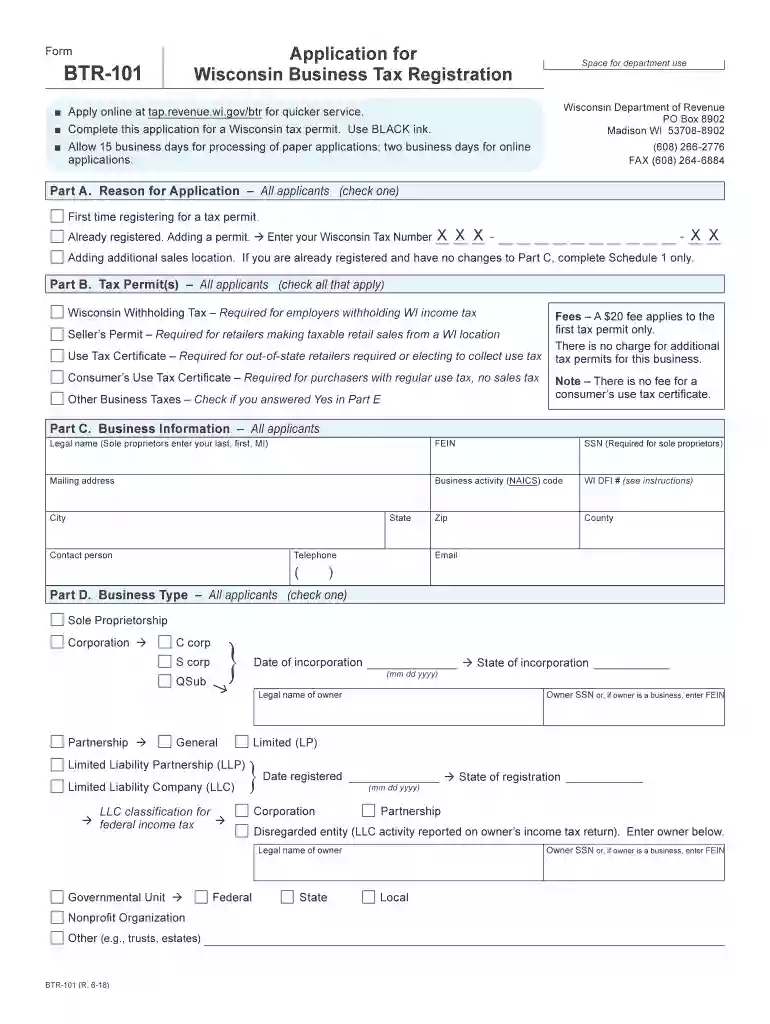
btr 101 Preview on Page 1

Btr 101 2026

Here's how it works

  • 01. Edit your btr 101 online

    Type text, add images, blackout confidential details, add comments, highlights and more.

  • 02. Sign it in a few clicks

    Draw your signature, type it, upload its image, or use your mobile device as a signature pad.

  • 03. Share your form with others

    Send it via email, link, or fax. You can also download it, export it or print it out.

How to use or fill out btr 101 with our platform

Form edit decoration
9.5
Ease of Setup
DocHub User Ratings on G2
9.0
Ease of Use
DocHub User Ratings on G2
  1. Click ‘Get Form’ to open the BTR-101 application in the editor.
  2. Begin with Part A, where you will select your reason for applying. Choose from options like 'First time registering' or 'Adding a permit'.
  3. In Part B, check all applicable tax permits you need, such as Wisconsin Withholding Tax or Seller’s Permit.
  4. Proceed to Part C to enter your business information. Fill in details like legal name, FEIN, mailing address, and business activity code.
  5. For Part D, indicate your business type by checking the appropriate box for Sole Proprietorship, Corporation, etc.
  6. In Part E, provide your business location information including trade name and physical address.
  7. Complete Parts F through I by entering sales estimates, withholding tax details, and listing business owners or partners as required.

Start filling out your BTR-101 form online for free today!

See more btr 101 versions

We've got more versions of the btr 101 form. Select the right btr 101 version from the list and start editing it straight away!

VersionsForm popularityFillable & printable
20214.8 Satisfied (66 Votes)
20204.3 Satisfied (48 Votes)
20184.4 Satisfied (119 Votes)
20164.3 Satisfied (137 Votes)
20144 Satisfied (64 Votes)
20104 Satisfied (29 Votes)
20074 Satisfied (34 Votes)

be ready to get more

Complete this form in 5 minutes or less

Security and compliance

At DocHub, your data security is our priority. We follow HIPAA, SOC2, GDPR, and other standards, so you can work on your documents with confidence.

Related links

March 2026 BTR-101 Application for Wisconsin Business

Apply online at tap.revenue.wi.gov/btr for quicker service. □ Complete this application for a Wisconsin tax permit. Use BLACK ink. □ Allow 15 business days forRead more

Learn more
BTR 101 - Safety and Tools - - Mohave Community College

This course provides essential training for construction safety, including proper use of personal protective equipment, safe handling of tools, and OSHA 10

Learn more
If you believe that this page should be taken down, please follow our DMCA take down process here