502v 2026

Get Form
502v Preview on Page 1

Here's how it works

01. Edit your form online
Type text, add images, blackout confidential details, add comments, highlights and more.

02. Sign it in a few clicks
Draw your signature, type it, upload its image, or use your mobile device as a signature pad.

03. Share your form with others
Send it via email, link, or fax. You can also download it, export it or print it out.

How to use or fill out 502v with our platform

Form edit decoration
9.5
Ease of Setup
DocHub User Ratings on G2
9.0
Ease of Use
DocHub User Ratings on G2
  1. Click ‘Get Form’ to open the 502v in the editor.
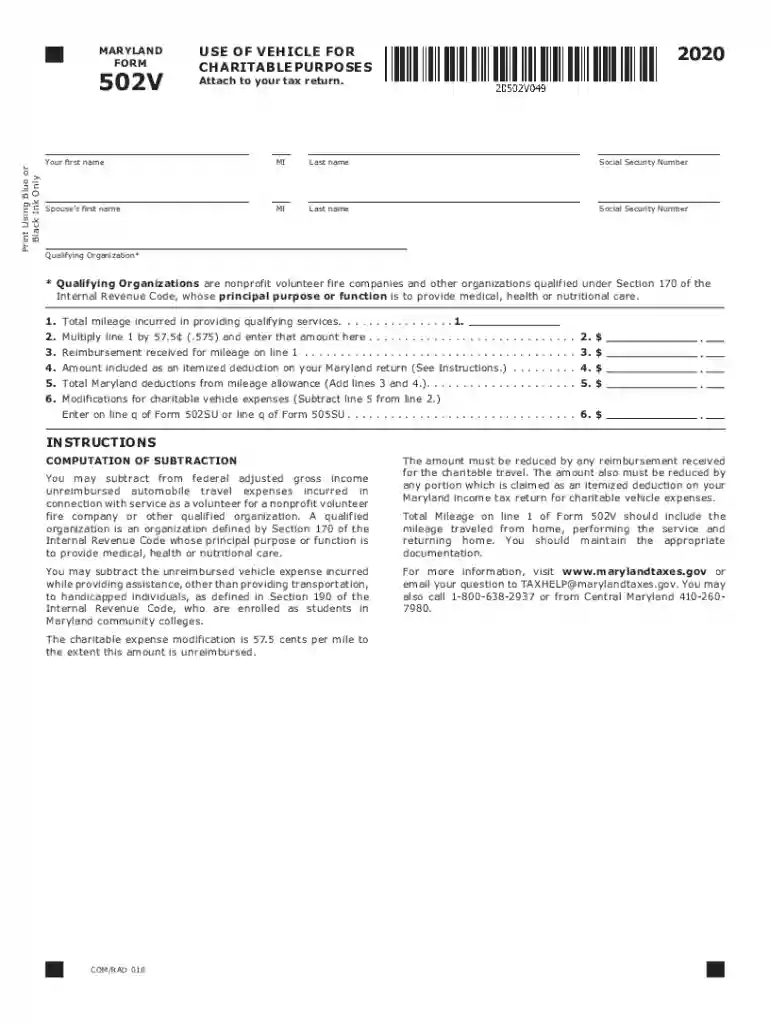
  2. Begin by entering your first name, middle initial, and last name in the designated fields. Ensure accuracy as this information is crucial for your tax return.
  3. Input your Social Security Number followed by your spouse’s details if applicable. This section is essential for identifying your tax records.
  4. In the 'Qualifying Organization' field, specify the nonprofit organization you are volunteering with. Remember, it must be recognized under Section 170 of the Internal Revenue Code.
  5. Record the total mileage incurred while providing qualifying services in line 1. This should include all travel from home to service locations and back.
  6. Multiply the mileage from line 1 by 57.5 cents and enter that amount on line 2. This calculation reflects your charitable vehicle expense.
  7. If you received any reimbursement for mileage, document that amount on line 3 to ensure accurate deductions.
  8. Complete lines 4 and 5 by entering any itemized deductions related to charitable vehicle expenses as instructed.
  9. Finally, calculate modifications for charitable vehicle expenses on line 6 and ensure all entries are correct before submission.

Start filling out your 502v form online for free today!

See more 502v versions

We've got more versions of the 502v form. Select the right 502v version from the list and start editing it straight away!
Versions Form popularity Fillable & printable
2023 4.1 Satisfied (56 Votes)
2022 4.4 Satisfied (33 Votes)
2021 4.8 Satisfied (245 Votes)
2020 4.4 Satisfied (200 Votes)
be ready to get more

Complete this form in 5 minutes or less

Get form

Got questions?

We have answers to the most popular questions from our customers. If you can't find an answer to your question, please contact us.
Contact us
If you must file a paper tax return, consider sending it by certified mail, with a return receipt. This will be your proof of the date you mailed your tax return and when the IRS received it. You may also use certain private delivery services designated by the IRS.
S Corporations, Partnerships, and Limited Liability Companies. Every pass-through entity (PTE) that does business in Virginia or receives income from Virginia sources must file an annual Virginia income tax return on Form 502 or Form 502PTET.
The address is PO Box 942867, Sacramento CA 94267-0008. When you make the payment online or send the money order to the California Franchise Tax Board, you also need to put down your ITIN or SSN.
Virginia Estimated and/or State Income Taxes need to be mailed directly to the Department of Taxation: Refund: P.O. Box 1498. Richmond, VA 23218-1498. Tax Due: P.O. Box 760. Richmond, VA 23218-0760. Checks made payable to the Treasurer of Virginia.
Based on the type of payment(s) you want to make, you can choose to pay by these options: Directly from your bank account (direct debit) ACH credit initiated from your bank account. Credit or debit card. Check or money order.

Security and compliance

At DocHub, your data security is our priority. We follow HIPAA, SOC2, GDPR, and other standards, so you can work on your documents with confidence.

Learn more
ccpa2
pci-dss
gdpr-compliance
hipaa
soc-compliance

People also ask

You may send estimated tax payments with Form 1040-ES by mail, or you can pay online, by phone or from your mobile device using the IRS2Go app. You can also make your estimated tax payments through your online account, where you can see your payment history and other tax records. Go to IRS.gov/account.

Related links