Ct tpg 138 2026

Get Form
ct tpg 138 Preview on Page 1

Here's how it works

01. Edit your form online
Type text, add images, blackout confidential details, add comments, highlights and more.
02. Sign it in a few clicks
Draw your signature, type it, upload its image, or use your mobile device as a signature pad.
03. Share your form with others
Send it via email, link, or fax. You can also download it, export it or print it out.

How to use or fill out ct tpg 138 with our platform

Form edit decoration
9.5
Ease of Setup
DocHub User Ratings on G2
9.0
Ease of Use
DocHub User Ratings on G2
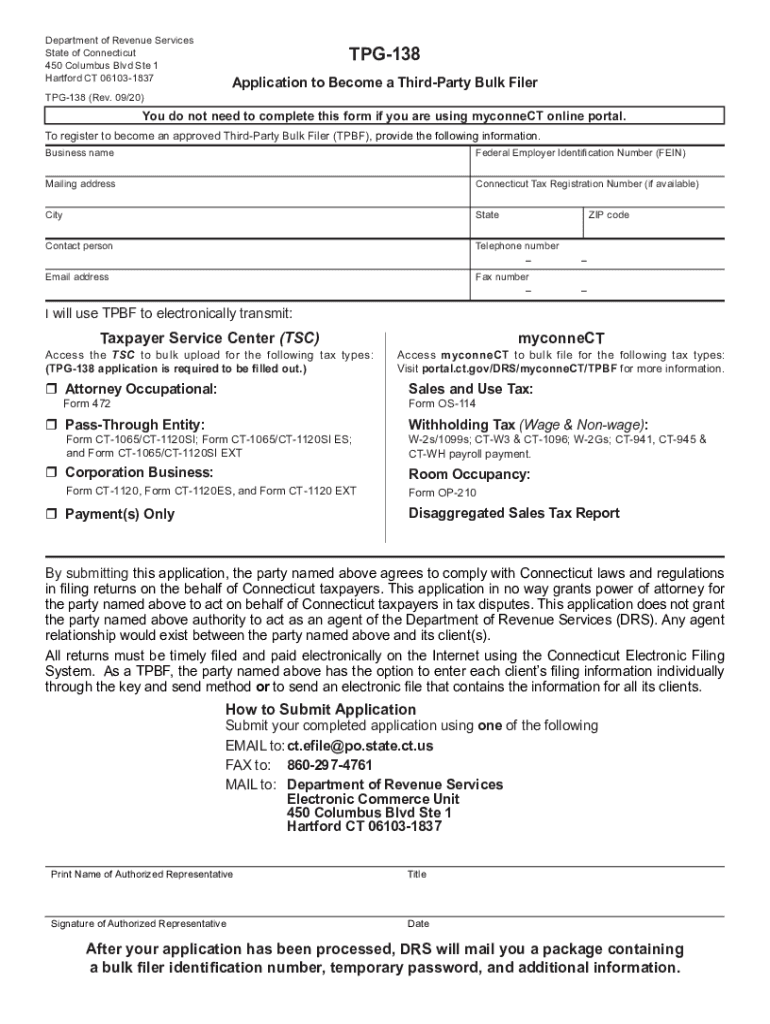
  1. Click ‘Get Form’ to open the ct tpg 138 in the editor.
  2. Begin by entering your business name and Federal Employer Identification Number (FEIN) in the designated fields.
  3. Fill in your mailing address, including city, state, and ZIP code. Ensure all information is accurate for correspondence.
  4. Provide the contact person's name along with their telephone number and fax number if applicable.
  5. Enter your email address to receive updates regarding your application status.
  6. Indicate which tax types you will be transmitting electronically by checking the appropriate boxes and providing any required details.
  7. Complete the signature section by printing the name of the authorized representative, their title, and signing with the date.
  8. Once completed, submit your application via email, fax, or mail as instructed at the bottom of the form.

Start using our platform today to streamline your form completion process for free!

See more ct tpg 138 versions

We've got more versions of the ct tpg 138 form. Select the right ct tpg 138 version from the list and start editing it straight away!
Versions Form popularity Fillable & printable
2021 4.9 Satisfied (32 Votes)
2020 4.3 Satisfied (97 Votes)
2018 4.3 Satisfied (68 Votes)
2008 4.3 Satisfied (285 Votes)
be ready to get more

Complete this form in 5 minutes or less

Get form

Got questions?

We have answers to the most popular questions from our customers. If you can't find an answer to your question, please contact us.
Contact us

Yes, you can utilize DocHub for signing any business and private paperwork, including your ct tpg 138. All electronic signatures you create with our tool are legally binding and court-admissible, as DocHub complies with criteria required by ESIGN and UETA. Save your completed document with a detailed Audit Trail if needed.

You may easily complete, edit, and even eSign your ct tpg 138 utilizing DocHub. Create a new profile and begin your free trial. After that, you may add the document with the form and easily make all the necessary edits. No need to print on paper or use a third-party application to sign it, as you can place your electronic signature on your document faster through DocHub.

Errors in your tax return calculations can cause delays as the IRS may need to correct them. A mismatch between your Social Security Number and the records can docHubly delay your refund. Filing your tax return too early or too late can lead to delays due to IRS system updates or high processing volumes.
Call our automated refund system 24 hours a day and check the status of your refund by calling 800-382-9463(Connecticut calls outside the Greater Hartford calling area only) or 860-297-5962(from anywhere).
Santa Barbara Tax Products Group, also known as TPG products, is used to process your refund when you elect to have your tax preparation fees deducted from your refund. Therefore, your review page is showing a TPG products deposit to them.

Security and compliance

At DocHub, your data security is our priority. We follow HIPAA, SOC2, GDPR, and other standards, so you can work on your documents with confidence.

Learn more
ccpa2
pci-dss
gdpr-compliance
hipaa
soc-compliance

People also ask

TELEPHONE: Call our automated refund system 24 hours a day and check the status of your refund by calling 800-382-9463(Connecticut calls outside the Greater Hartford calling area only) or 860-297-5962(from anywhere).

Related links