It 238 form 2026

Get Form
it 238 form Preview on Page 1

Here's how it works

01. Edit your form online
Type text, add images, blackout confidential details, add comments, highlights and more.

02. Sign it in a few clicks
Draw your signature, type it, upload its image, or use your mobile device as a signature pad.

03. Share your form with others
Send it via email, link, or fax. You can also download it, export it or print it out.

How to use or fill out IT-238 form with our platform

Form edit decoration
9.5
Ease of Setup
DocHub User Ratings on G2
9.0
Ease of Use
DocHub User Ratings on G2
  1. Click ‘Get Form’ to open the IT-238 form in the editor.
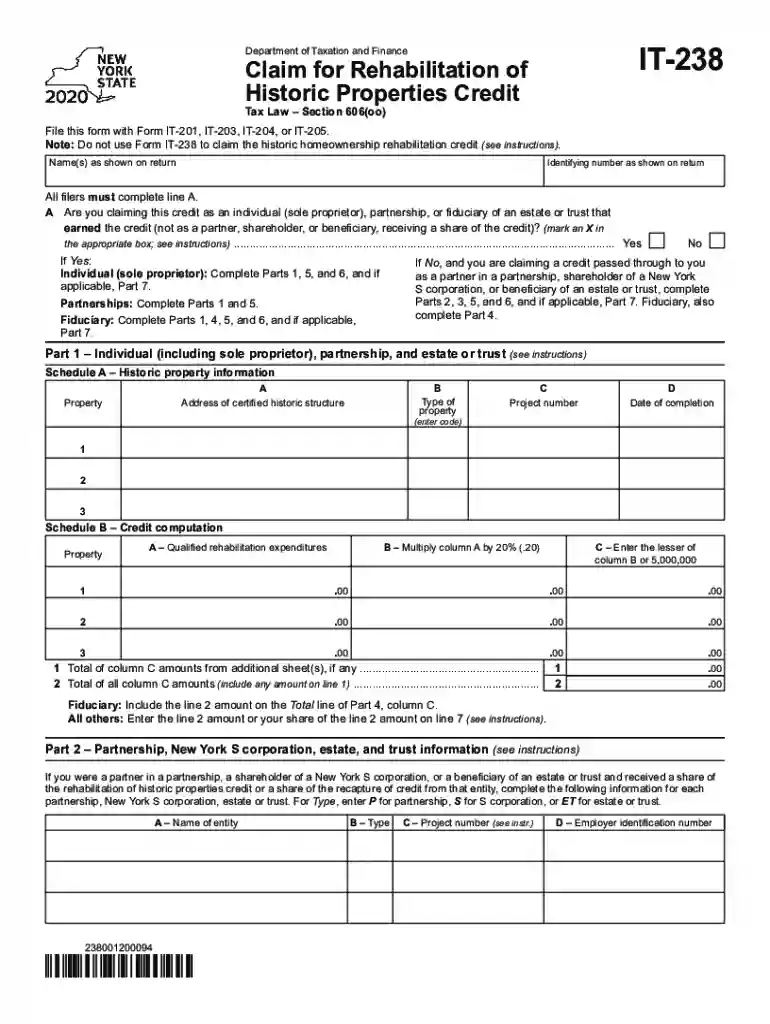
  2. Begin by entering your identifying number and name as shown on your return. Ensure that you complete line A, indicating whether you are claiming the credit as an individual, partnership, or fiduciary.
  3. For Part 1, provide details about the historic property including its address, type, project number, and date of completion. This information is crucial for determining eligibility.
  4. In Schedule B, input your qualified rehabilitation expenditures. Multiply these amounts by 20% and enter the lesser of this total or $5,000,000 in the appropriate fields.
  5. If applicable, complete Parts 2 and 3 based on your status as a partner or shareholder. Make sure to accurately report your share of credits received from partnerships or S corporations.
  6. Finally, review all entries for accuracy before submitting. Use our platform’s features to save and export your completed form seamlessly.

Start using our platform today to fill out your IT-238 form online for free!

See more it 238 form versions

We've got more versions of the it 238 form form. Select the right it 238 form version from the list and start editing it straight away!
Versions Form popularity Fillable & printable
2023 4.2 Satisfied (50 Votes)
2022 4.5 Satisfied (57 Votes)
2021 4.9 Satisfied (55 Votes)
2020 4.3 Satisfied (252 Votes)
be ready to get more

Complete this form in 5 minutes or less

Get form

Got questions?

We have answers to the most popular questions from our customers. If you can't find an answer to your question, please contact us.
Contact us
IT-203-I (Instructions) Nonresident and Part-Year Resident Income Tax Return; Description of Form IT-203. This is the only return for taxpayers who are nonresidents or part-year residents of New York State, whether they are itemizing their deductions or claiming the standard deduction.
You must file Form Y-203, Yonkers Nonresident Earnings Tax Return, if you file or are required to file a New York State return, and you are a nonresident of Yonkers who earns wages or carries on a trade or business there, or are a member of a partnership that carries on a trade or business there.
You must file Form IT-203 if you meet any of the following conditions: You have income from a New York State source (see Nonresidents: New York source income) and your New York adjusted gross income (Federal amount column) is more than your New York State standard deduction.
If taxpayers thought they were supposed to receive a tax refund but it is determined that they owe a certain unpaid debt, tax law allows a portion or all of their tax refund to be offset and paid toward their tax debt obligation, which is outlined by Tax Topic 203.
Navigating New York State Tax Returns: IT-201 and IT-203 It depends on your residency status. If you were a full-year resident of New York, youd file IT-201. If you moved during the year, IT-203 is more likely applicable.

Security and compliance

At DocHub, your data security is our priority. We follow HIPAA, SOC2, GDPR, and other standards, so you can work on your documents with confidence.

Learn more
ccpa2
pci-dss
gdpr-compliance
hipaa
soc-compliance

People also ask

IT-2104.1 Nonresidence of New York State, City of New York or City of Yonkers Certificate. Employee certifies that they are not a resident of New York State, New York City or City of Yonkers for tax purposes.

Related links