




Here's how it works

01. Edit your dochub com fillable form online
Type text, add images, blackout confidential details, add comments, highlights and more.

02. Sign it in a few clicks
Draw your signature, type it, upload its image, or use your mobile device as a signature pad.

03. Share your form with others
Send contractor registration form document via email, link, or fax. You can also download it, export it or print it out.
How to use or fill out application for construction contractor registration with our platform

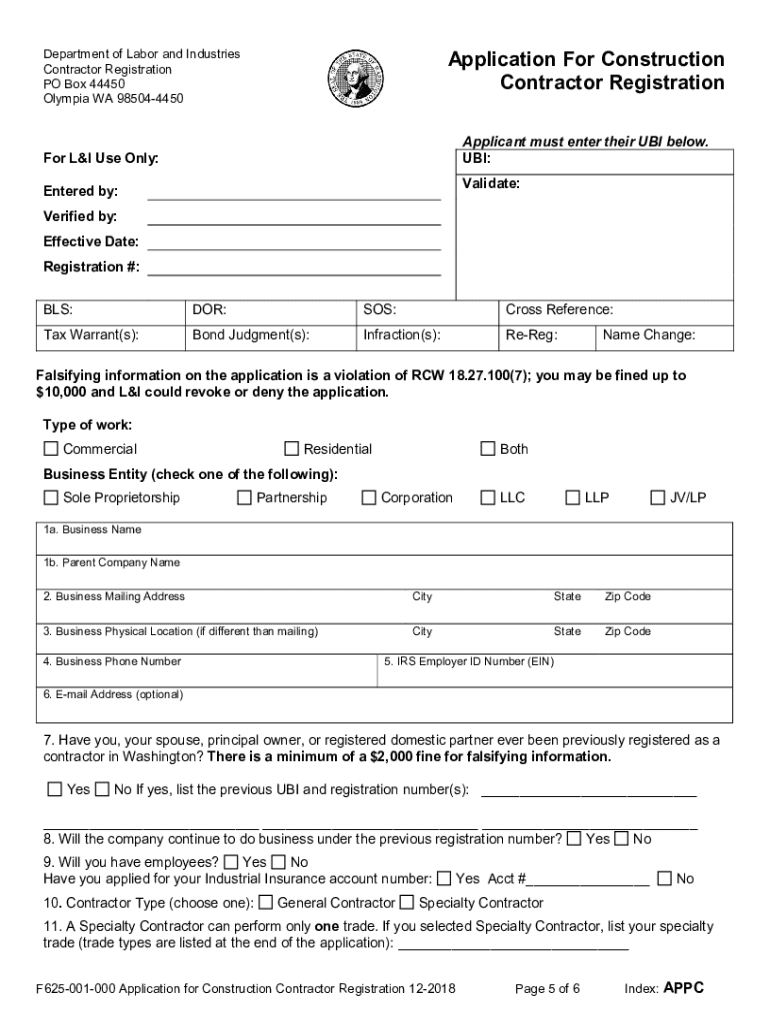
- Click ‘Get Form’ to open the application for construction contractor registration in the editor.
- Begin by selecting your business structure. Choose from options like Sole Proprietorship, Partnership, Corporation, LLC, etc. Ensure you have registered with the Secretary of State if applicable.
- Fill in your Business Name and Parent Company Name. Make sure these match exactly with your registered names to avoid issues.
- Provide your Business Location and Mailing Address. Remember, PO Boxes are not accepted for the physical location.
- Enter your Employer Identification Number (EIN) and Business Telephone Number. An optional email address can be added for notifications.
- Indicate if you or any associated individuals have been previously registered as a contractor. This is crucial to avoid fines.
- Complete all required fields including Contractor Type and Specialty Code if applicable. Ensure accuracy as alterations will not be accepted.
- Review all entries carefully before submitting the form to ensure compliance with regulations and avoid delays.
Start filling out your application today using our platform for free!
Fill out application for construction contractor registration online
It's free
It's free
See more application for construction contractor registration versions
We've got more versions of the application for construction contractor registration form. Select the right application for construction contractor registration version from the list and start editing it straight away!
Security and compliance
At DocHub, your data security is our priority. We follow HIPAA, SOC2, GDPR, and other standards, so you can work on your documents with confidence.
Learn more


Related forms

Empirical Analysis of Retail Competition: - Stanford Graduate School
The document presents an empirical analysis of retail competition, focusing on spatial differentiation among various ret ...

Networks class
The document outlines the CS144 course, 'Introduction to Computer Networking,' which aims to teach fundamental concepts ...

Teacher Preparation and Teacher Learning
The document discusses the evolving landscape of teacher preparation and learning over the past two decades, highlightin ...
Race, income, and enrollment patterns in highly selective colleges
The document analyzes enrollment patterns in highly selective colleges from 1982 to 2004, focusing on racial and income ...

Answer of Harris - Election 2000
The document is an answer brief submitted by the appellees, Katherine Harris and the Florida Elections Canvassing Commis ...

In re BankAmerica Corporation Securities Litigation 02-3780-Appellants Brief In re BankAmerica Corpo
In re BankAmerica Corporation Securities Litigation 02-3780-Appellants Brief In re BankAmerica Corpo
The document is an appellate brief concerning a securities fraud class action against Bank of America, where lead plaint ...

Statesman, V 25, n 65
The document discusses various events and updates at Stony Brook University, including the challenges faced by the finan ...

Discontinuity in Organizations: Impacts of Knowledge Flows on
The document explores the impacts of knowledge flows on organizational performance, particularly in organizations with d ...