Type text, add images, blackout confidential details, add comments, highlights and more.

02. Sign it in a few clicks
Draw your signature, type it, upload its image, or use your mobile device as a signature pad.

03. Share your form with others
Send it via email, link, or fax. You can also download it, export it or print it out.

How to use or fill out ca jv590 form with DocHub
Ease of Setup
DocHub User Ratings on G2
Ease of Use
DocHub User Ratings on G2
Click ‘Get Form’ to open the ca jv590 form in our platform's editor.
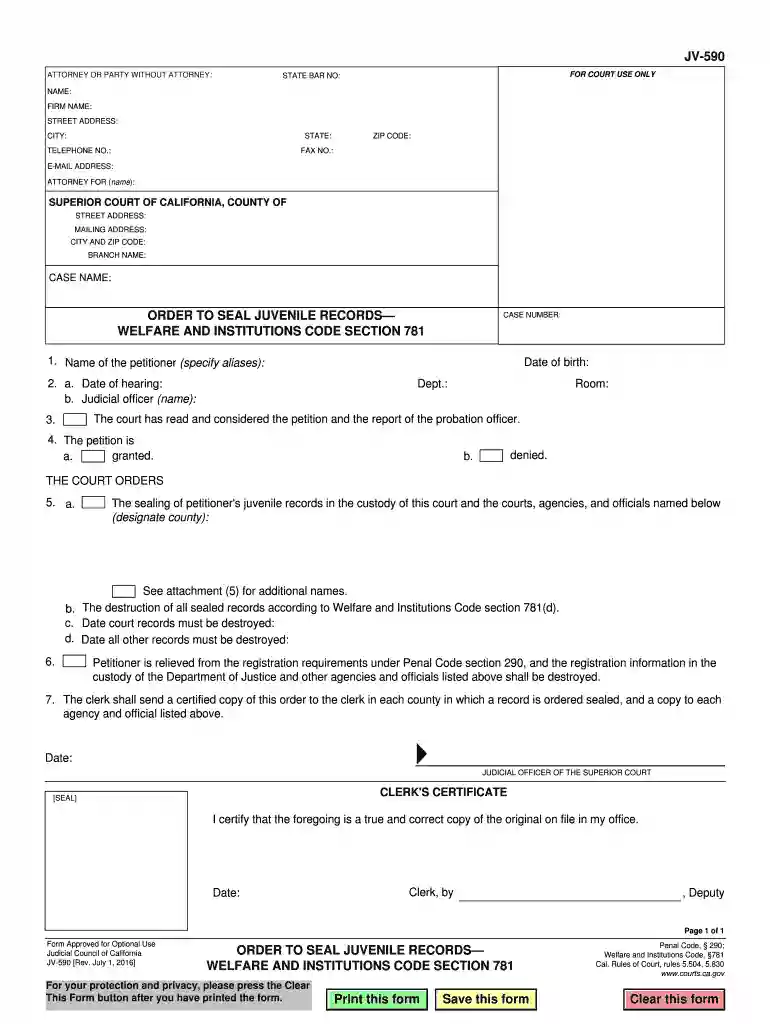
Begin by filling in your details as the attorney or party without an attorney. Include your name, firm name, address, and contact information in the designated fields.
Next, specify the case details including the case name and number. Ensure accuracy as this information is crucial for processing.
In section 1, provide the name of the petitioner along with any aliases they may have used.
For section 2, enter the date of hearing and the name of the judicial officer presiding over the case.
Review sections 3 through 7 carefully. Indicate whether the petition is granted or denied and fill in any additional required information regarding record sealing and destruction dates.
Finally, ensure all fields are completed accurately before saving or printing your form using our platform’s features.
Start using our platform today to fill out your ca jv590 form easily and for free!
Order to Seal Juvenile RecordsWelfare and Institutions
States the courts decisions (orders) about a request to keep private (seal) a childs juvenile delinquency records. Get form JV-590 espaolGet formRead more
Cookie consent notice
This site uses cookies to enhance site navigation and personalize your experience.
By using this site you agree to our use of cookies as described in our Privacy Notice.
You can modify your selections by visiting our Cookie and Advertising Notice.