




Here's how it works

01. Edit your schedule s tax form online
Type text, add images, blackout confidential details, add comments, highlights and more.

02. Sign it in a few clicks
Draw your signature, type it, upload its image, or use your mobile device as a signature pad.

03. Share your form with others
Send kansas schedule s instructions via email, link, or fax. You can also download it, export it or print it out.
How to use or fill out ks schedule s with our platform

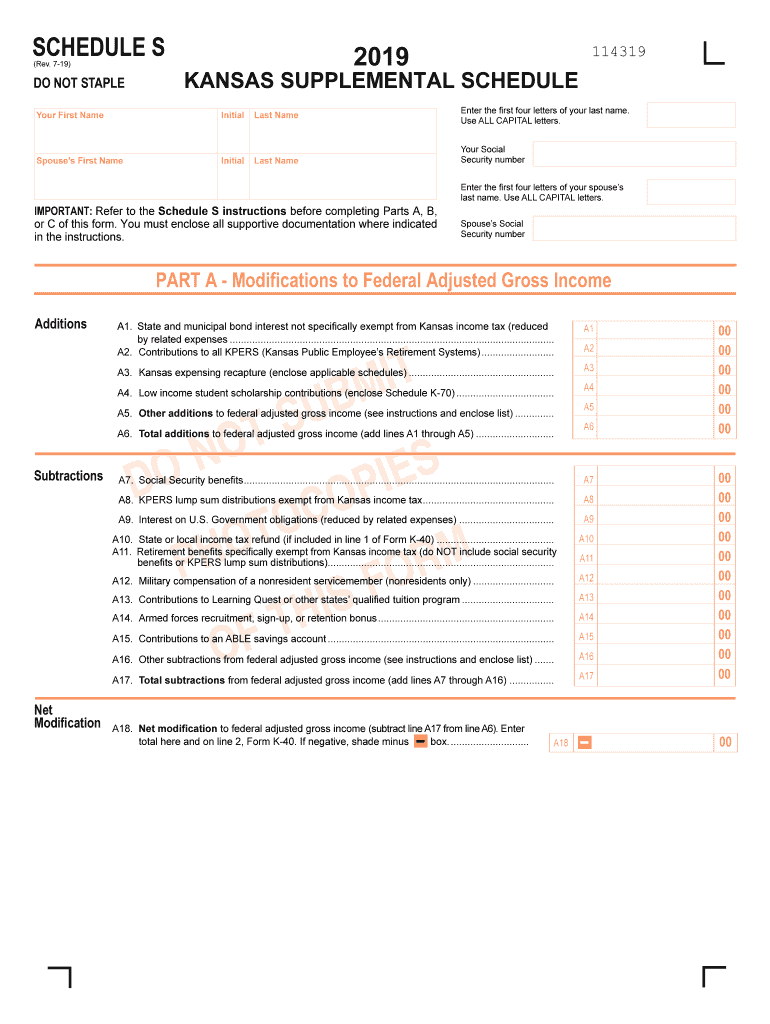
- Click ‘Get Form’ to open the KS Schedule S in the editor.
- Begin by entering your first name, middle initial, and last name in the designated fields. Ensure all entries are in capital letters.
- Input your Social Security number and your spouse’s details if applicable, following the same format.
- Proceed to Part A, where you will list any modifications to your federal adjusted gross income. Carefully add any relevant additions and subtractions as instructed.
- In Part B, allocate income for nonresidents or part-year residents. Fill in each income source accurately and shade boxes for negative amounts as needed.
- Complete Part C by calculating Kansas itemized deductions based on your federal Schedule A entries. Remember to enter only 75% of each amount.
Start using our platform today for free to streamline your KS Schedule S completion!
Fill out ks schedule s online
It's free
It's free
See more ks schedule s versions
We've got more versions of the ks schedule s form. Select the right ks schedule s version from the list and start editing it straight away!
| Versions | Form popularity | Fillable & printable |
|---|---|---|
| 2025 | 4.5 Satisfied (25 Votes) | |
| 2024 | 4.9 Satisfied (58 Votes) | |
| 2023 | 4.7 Satisfied (54 Votes) | |
| 2022 | 4.1 Satisfied (56 Votes) | |
| 2021 | 4.8 Satisfied (87 Votes) | |
| 2020 | 4.4 Satisfied (81 Votes) | |
| 2019 | 4.4 Satisfied (238 Votes) | |
| 2015 | 4.3 Satisfied (159 Votes) | |
| 2012 | 4.4 Satisfied (312 Votes) |
Security and compliance
At DocHub, your data security is our priority. We follow HIPAA, SOC2, GDPR, and other standards, so you can work on your documents with confidence.
Learn more


Related forms
Gid 010 rs
The document is an application form for the renewal of a Certificate of Authority for insurance companies in Georgia, is ...

40SP - Sponsorship for a partner to migrate to Australia 40SP - Sponsorship for a partner to migrate
40SP - Sponsorship for a partner to migrate to Australia 40SP - Sponsorship for a partner to migrate
The document provides detailed instructions and requirements for individuals wishing to sponsor a fiancé(e) or partner f ...

2023 TC-20MC, Utah Tax Return for Misc Corporations Forms and Publications
The document is a tax return form (TC-20MC) for miscellaneous corporations in Utah for the year 2023. It includes sectio ...

OTSUKA PATIENT EDUCATION LIAISON ENROLLMENT FORM
The document is an enrollment form for the Otsuka Patient Education Liaison Program, requiring patient information, insu ...
Cdl vision waiver
The CDL Vision Exemption Form is a document for applicants seeking an exemption from federal vision standards to operate ...

Application for Wholesalers Located In Ohio - Ohio State Board of - pharmacy ohio
The document outlines the application process for obtaining a Wholesale Distributor of Dangerous Drugs (WDDD) license in ...

Utah transfer on death deed form
The document outlines the form and instructions for creating a Transfer on Death (TOD) deed in Utah, effective from May ...

PAYROLL - BONUS COMMISSION FORM - HR Service, Inc
The document is a Payroll Bonus/Commission Form used to request and process various types of employee bonuses and commis ...