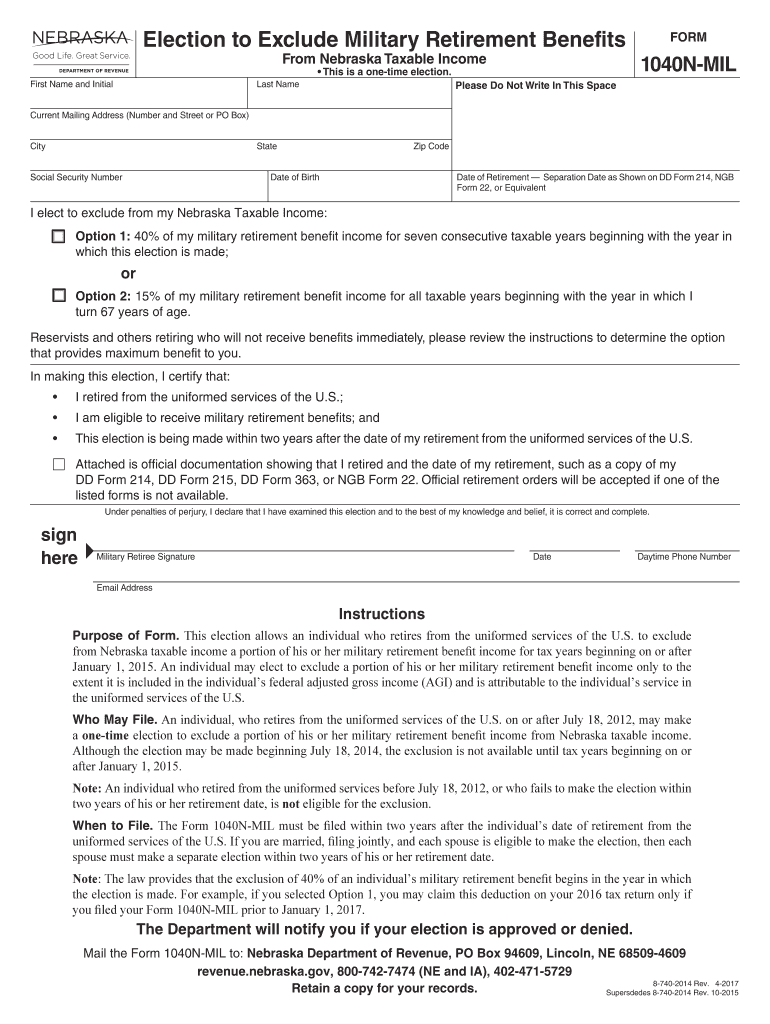
Election to Exclude Military Retirement Benefits - Nebraska ... 2026

Get Form
Election to Exclude Military Retirement Benefits - Nebraska ... Preview on Page 1

Here's how it works

01. Edit your form online
Type text, add images, blackout confidential details, add comments, highlights and more.
02. Sign it in a few clicks
Draw your signature, type it, upload its image, or use your mobile device as a signature pad.
03. Share your form with others
Send it via email, link, or fax. You can also download it, export it or print it out.

How to use or fill out Election to Exclude Military Retirement Benefits - Nebraska with our platform

Form edit decoration
9.5
Ease of Setup
DocHub User Ratings on G2
9.0
Ease of Use
DocHub User Ratings on G2
  1. Click ‘Get Form’ to open the Election to Exclude Military Retirement Benefits form in the editor.
  2. Begin by entering your First Name, Initial, and Last Name in the designated fields. Ensure that you print clearly for accurate processing.
  3. Fill in your Current Mailing Address, including Number and Street or PO Box, City, State, and Zip Code.
  4. Provide your Social Security Number and Date of Birth. This information is crucial for identification purposes.
  5. Indicate your Date of Retirement by referencing your DD Form 214 or equivalent documentation.
  6. Choose between Option 1 (40% exclusion for seven years) or Option 2 (15% exclusion starting at age 67) based on what benefits you wish to elect.
  7. Attach any required official documentation proving your retirement date and eligibility. This may include a copy of your DD Form 214 or retirement orders.
  8. Sign and date the form where indicated, providing your daytime phone number and email address for any necessary follow-up from the Department.

Start using our platform today to complete your Election to Exclude Military Retirement Benefits form easily and for free!

See more Election to Exclude Military Retirement Benefits - Nebraska ... versions

We've got more versions of the Election to Exclude Military Retirement Benefits - Nebraska ... form. Select the right Election to Exclude Military Retirement Benefits - Nebraska ... version from the list and start editing it straight away!
Versions Form popularity Fillable & printable
2020 4.8 Satisfied (46 Votes)
2018 4.3 Satisfied (123 Votes)
2017 4.4 Satisfied (125 Votes)
2014 4.4 Satisfied (108 Votes)
be ready to get more

Complete this form in 5 minutes or less

Get form

Got questions?

We have answers to the most popular questions from our customers. If you can't find an answer to your question, please contact us.
Contact us

According to eSignature regulations, documents approved electronically have the same validity as those approved with pen and paper. You can eSign almost any business and private paperwork. Four types of documents still call for handwritten signatures only - wills and testamentary trusts, court orders and other court forms, state statutes governing divorce, adoption, or other family law, and notice of cancellation of utility services. If you follow the regulations and utilize a safe and compliant software solution, like DocHub, you can eSign your Election to Exclude Military Retirement Benefits - Nebraska ... without printing it.

If you want to edit your Election to Exclude Military Retirement Benefits - Nebraska ... online easily, it does not matter what internet browser you use. DocHub’s simple editing instruments are accessible using any internet browser. Simply open the appropriate tab in the editor, add your document, and fill it out without stress.

A Payments you receive as a member of a military service generally are taxed as wages except for retirement pay, which is taxed as a pension. If your retirement pay is based on age or length of service, it is taxable and must be included in your income as a pension on lines 5a and 5b of Form 1040 or Form 1040-SR.
Beginning in 2023, though, military retirement income is fully exempt from tax. However, this exemption and the general retirement plan exemption cant exceed the amount of military retirement income received in the tax year.
The following states already do not tax military retirement pay at all: Alabama, Connecticut, Hawaii, Illinois, Iowa, Kansas, Louisiana, Maine, Massachusetts, Michigan, Minnesota, Missouri, New York, North Dakota, Ohio, Pennsylvania, West Virginia and Wisconsin.

Security and compliance

At DocHub, your data security is our priority. We follow HIPAA, SOC2, GDPR, and other standards, so you can work on your documents with confidence.

Learn more
ccpa2
pci-dss
gdpr-compliance
hipaa
soc-compliance

People also ask

Military pensions are fully exempt if you retired before 1997. Personnel retiring after 1997 are subject to taxation to the extent their pension exceeds $41,110. Retirees are able to exclude the first $5,000 ($15,000 if 55 and older) of their military pension benefits. Military retirement pay exempt as of 2022.
States that dont tax military retirement pay include: Alabama. Arkansas. Connecticut. Hawaii. Illinois. Iowa. Kansas. Louisiana.
Our commitment to one-on-one interactions is a cornerstone to this success and one of the many reasons Nebraska is truly a military-friendly institution.
Stationed in California Military servicemembers whose domicile is California are residents of California and are subject to tax on all income, regardless of source, while stationed in California on permanent military orders.
Income Tax Brackets Head of HouseholdNebraska Taxable IncomeRate$0 - $6,2202.46%$6,220 - $31,9903.51%$31,990 - $47,7605.01%1 more row Dec 23, 2021

Related links