Magnetic media reporting - Ohio Department of Taxation - Ohiogov - tax ohio 2026

Get Form
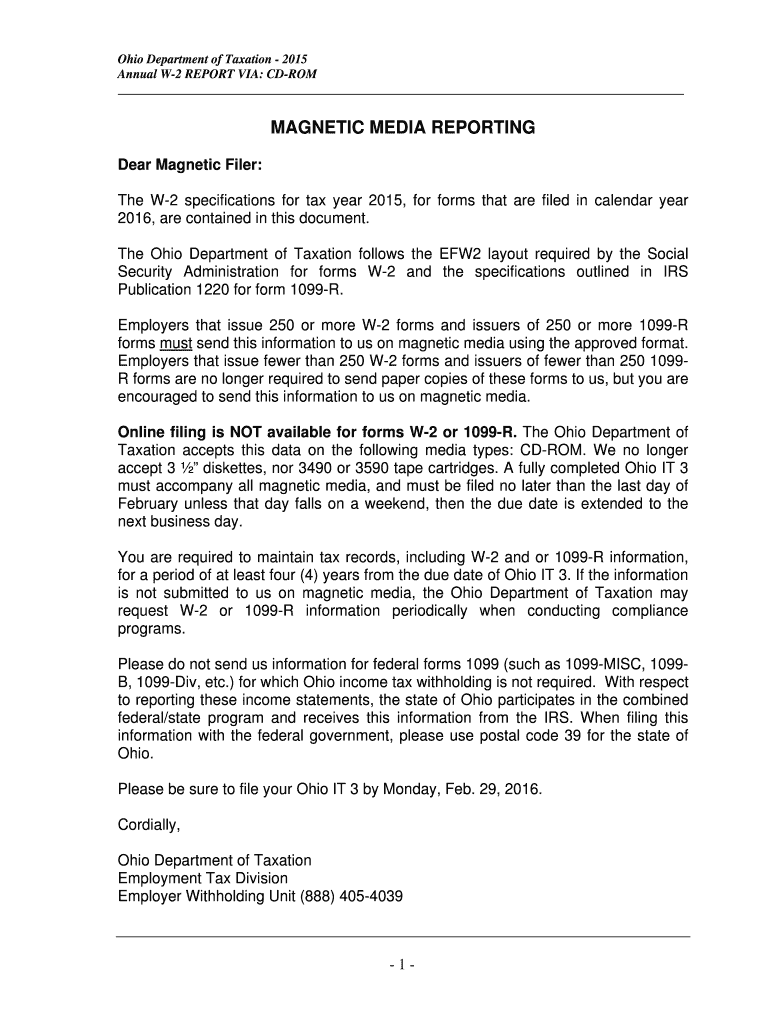
Magnetic media reporting - Ohio Department of Taxation - Ohiogov - tax ohio Preview on Page 1

Here's how it works

01. Edit your form online
Type text, add images, blackout confidential details, add comments, highlights and more.
02. Sign it in a few clicks
Draw your signature, type it, upload its image, or use your mobile device as a signature pad.
03. Share your form with others
Send it via email, link, or fax. You can also download it, export it or print it out.

How to use or fill out Magnetic media reporting - Ohio Department of Taxation - Ohiogov - tax ohio with DocHub

Form edit decoration
9.5
Ease of Setup
DocHub User Ratings on G2
9.0
Ease of Use
DocHub User Ratings on G2
  1. Click ‘Get Form’ to open it in the editor.
  2. Begin by filling out the Submitter Record (Code RA). Enter your Employer Identification Number (EIN) and ensure that all fields are completed accurately, including your company name and address.
  3. Next, complete the Employer Record (Code RE). This includes entering the tax year and your EIN as reported on IRS forms. Make sure to indicate if this is the last year you will file under this EIN.
  4. Proceed to fill out Employee Wage Records (Code RW) for each employee. Include their Social Security Number, wages, and any taxes withheld. Ensure that all amounts are right justified and zero-filled where necessary.
  5. Finally, complete the Total Record (Code RT) summarizing all employee records. This should include totals for wages, federal income tax withheld, and other relevant figures.

Start using our platform today to streamline your Magnetic media reporting process effortlessly!

See more Magnetic media reporting - Ohio Department of Taxation - Ohiogov - tax ohio versions

We've got more versions of the Magnetic media reporting - Ohio Department of Taxation - Ohiogov - tax ohio form. Select the right Magnetic media reporting - Ohio Department of Taxation - Ohiogov - tax ohio version from the list and start editing it straight away!
Versions Form popularity Fillable & printable
2018 4.8 Satisfied (114 Votes)
2017 4.3 Satisfied (49 Votes)
2016 4.3 Satisfied (168 Votes)
2015 4.3 Satisfied (127 Votes)
2014 4 Satisfied (42 Votes)
2013 4.1 Satisfied (70 Votes)
be ready to get more

Complete this form in 5 minutes or less

Get form

Got questions?

We have answers to the most popular questions from our customers. If you can't find an answer to your question, please contact us.
Contact us
Online Notice Response Service. The Online Notice Response Service (ONRS) allows you to securely respond to certain notices received from the Ohio Department of Taxation. If you already have an account through OHID (e.g., Ohio Business Gateway), utilize the same Username and Password to access this service.
Tax Services | Ohio.gov | Official Website of the State of Ohio.
Did You Receive an Income Tax Non-Remittance Billing Notice? This notice means the Ohio Department of Taxation didnt receive full payment for the tax amount you reported on your individual and/or school district income tax return.
Call us: 1-888-405-4039 - Business. 1-800-282-1780 - Individual/School district income tax.

Security and compliance

At DocHub, your data security is our priority. We follow HIPAA, SOC2, GDPR, and other standards, so you can work on your documents with confidence.

Learn more
ccpa2
pci-dss
gdpr-compliance
hipaa
soc-compliance