Sc estimated tax payments 2022-2026

Get Form
sc estimated tax payments online Preview on Page 1

Here's how it works

01. Edit your sc estimated tax payments online online
Type text, add images, blackout confidential details, add comments, highlights and more.

02. Sign it in a few clicks
Draw your signature, type it, upload its image, or use your mobile device as a signature pad.

03. Share your form with others
Send south carolina individual estimated tax payments 2022 via email, link, or fax. You can also download it, export it or print it out.

How to use or fill out SC Estimated Tax Payments 2022 with our platform

Form edit decoration
9.5
Ease of Setup
DocHub User Ratings on G2
9.0
Ease of Use
DocHub User Ratings on G2
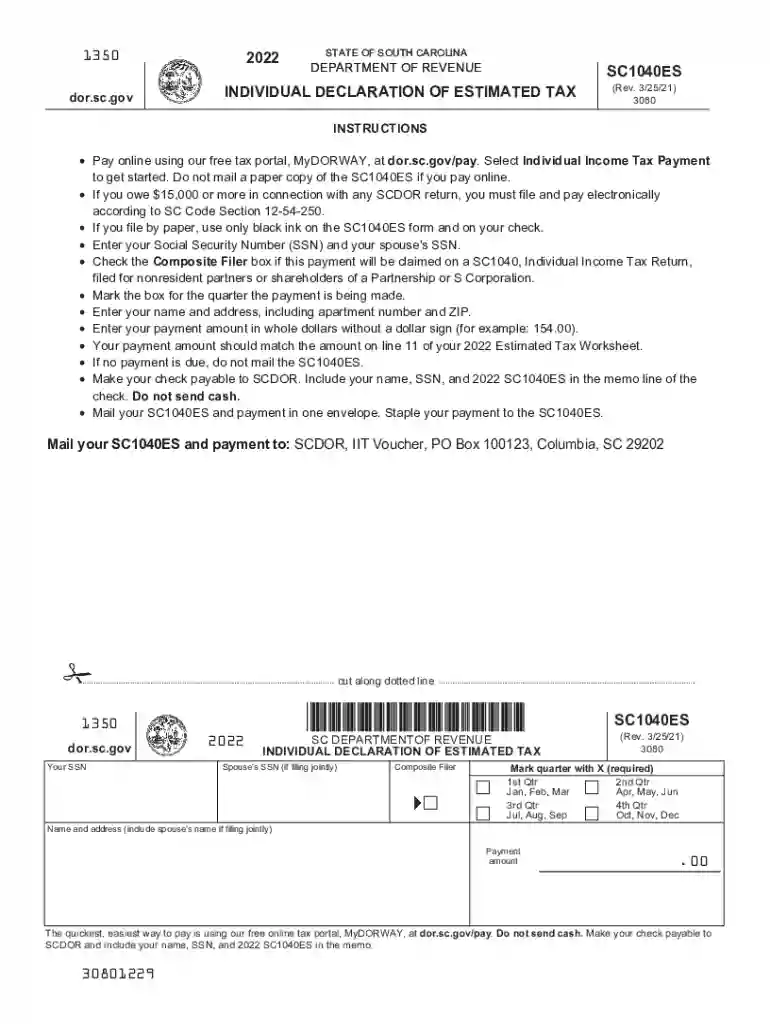
  1. Click ‘Get Form’ to open the SC1040ES in the editor.
  2. Begin by entering your Social Security Number (SSN) and your spouse's SSN if filing jointly. This is crucial for identification.
  3. Check the 'Composite Filer' box if applicable, indicating that this payment will be claimed on a SC1040 for nonresident partners or shareholders.
  4. Select the quarter for which you are making the payment by marking the appropriate box.
  5. Fill in your name and address, ensuring to include any apartment number and ZIP code for accurate processing.
  6. Enter your payment amount in whole dollars without a dollar sign. Ensure this matches line 11 of your Estimated Tax Worksheet.
  7. If no payment is due, do not submit the SC1040ES. Otherwise, make your check payable to SCDOR and include necessary details in the memo line.
  8. Mail your completed SC1040ES along with your payment in one envelope, stapling them together for convenience.

Start using our platform today to streamline your tax payment process effortlessly!

See more sc estimated tax payments 2022 versions

We've got more versions of the sc estimated tax payments 2022 form. Select the right sc estimated tax payments 2022 version from the list and start editing it straight away!
Versions Form popularity Fillable & printable
2023 4.9 Satisfied (28 Votes)
2022 4.8 Satisfied (86 Votes)
2021 4.3 Satisfied (160 Votes)
2020 4.4 Satisfied (199 Votes)
2019 4.2 Satisfied (48 Votes)
2018 4.2 Satisfied (26 Votes)
2017 4.3 Satisfied (121 Votes)
2016 4.4 Satisfied (416 Votes)
2015 4 Satisfied (53 Votes)
2013 4 Satisfied (20 Votes)
2012 4.3 Satisfied (71 Votes)
be ready to get more

Complete this form in 5 minutes or less

Get form

Got questions?

We have answers to the most popular questions from our customers. If you can't find an answer to your question, please contact us.
Contact us
When to pay estimated tax Payment periodDue date Jan. 1March 31 April 15 April 1May 31 June 15 June 1Aug. 31 Sept. 15 Sept. 1Dec. 31 Jan. 15* of the following year. *See January payment in Chapter 2 of Publication 505, Tax Withholding and Estimated Tax2 more rows
If you prefer, you may pay 100% of your 2022 estimated tax (line 18). California income tax withheld and estimated to be withheld during 2022 (include withholding on pensions, annuities, etc.) Balance.
Its quick and easy! Use our free online tax portal, MyDORWAY, at dor.sc.gov/pay. Do not send cash. Make your check payable to SCDOR and include your name, SSN, and 2025 SC1040ES in the memo.
HOMESTEAD EXEMPTION The Homestead Exemption is a complete ​exemption of taxes on the first $50,000 in Fair Market Value of your Legal Residence for homeowners over age 65, totally and permanently disabled, or legally blind. Contact your county auditors office for more information.
Many taxpayers make quarterly estimated tax payments during the year to stay current on their taxes. Anyone who paid too little tax in 2022 needs to make a fourth quarter payment on or before January 17 to avoid an unexpected potential tax bill or penalty when they file in 2023.

Security and compliance

At DocHub, your data security is our priority. We follow HIPAA, SOC2, GDPR, and other standards, so you can work on your documents with confidence.

Learn more
ccpa2
pci-dss
gdpr-compliance
hipaa
soc-compliance

People also ask

Paying your balance due online using MyDORWAY on or before the due date. Choose the individual payment option, enter your taxpayer information, and then choose the Extension Payment option on the following screen.
To make estimated tax payments online, first establish an account with the IRS at the EFTPS website. Once you have an EFTPS account established, you can schedule automatic withdrawals for your quarterly estimated taxes, specifying the amounts and the dates of the payments.

south carolina estimated tax payments online