



Here's how it works



How to use or fill out hcc student parent agreement with our platform

- Click ‘Get Form’ to open the hcc student parent agreement in the editor.
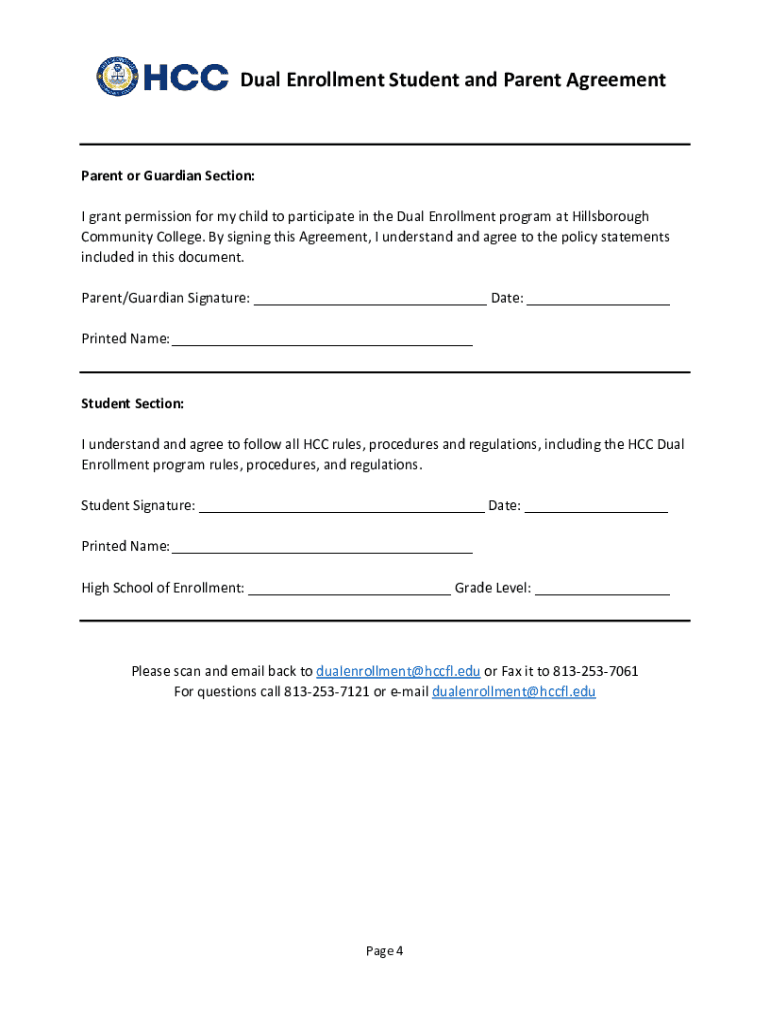
- Begin by filling out the 'Parent or Guardian Section'. Enter your printed name and sign where indicated, along with the date.
- Next, move to the 'Student Section'. The student should provide their printed name, signature, and date. Additionally, include the high school of enrollment and grade level.
- Review all sections carefully to ensure that both parties understand and agree to the policies outlined in the document.
- Once completed, save your changes. You can then scan and email the signed document back to dualenrollment@hccfl.edu or fax it to 813-253-7061.
Start using our platform today for free to streamline your document editing and signing process!
It's free
See more hcc student parent agreement versions
Got questions?
Is it secure to sign my hcc parent agreement electronically?
You should use only trusted software solutions with strong data protection compliance to approve your documents electronically. DocHub is just the type of service you need! It stores data on Amazon Web Servers and complies with all essential security criteria and eSignature regulations, so it’s a reliable way to eSign your hcc parent agreement or other forms with this tool.
How to fill out hcc parent student agreement online free of charge in 2024?
Having a swift editing system like DocHub, you do not require anything but a web browser and internet connection to edit your hcc parent student agreement online swiftly. Add your document or get the appropriate form in DocHub’s catalog, open our editor with one click, and complete it electronically. To edit your forms at any time, sign up a free account with DocHub.
Security and compliance
At DocHub, your data security is our priority. We follow HIPAA, SOC2, GDPR, and other standards, so you can work on your documents with confidence.
Learn more


Related forms