



Here's how it works



How to use or fill out la wage reporting with our platform

- Click ‘Get Form’ to open the Employer’s Quarterly Wage and Tax Report in the editor.
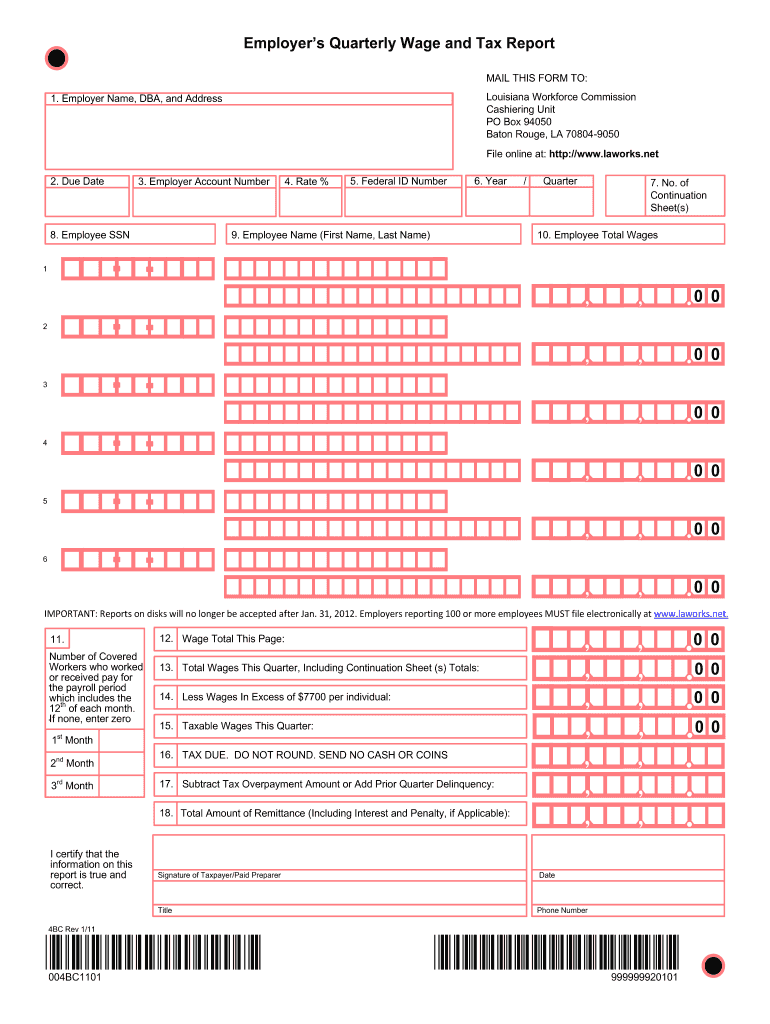
- Begin by entering your Employer Name, DBA, and Address in the designated fields. Ensure this information is clear and legible.
- Fill in the Due Date and Employer Account Number as pre-printed on the form. Do not alter any pre-printed information.
- In Items 8, 9, and 10, enter each employee's Social Security Number, their total wages (including tips), and their full names. Remember to round total wages to the nearest dollar.
- If you have more than six employees, download a continuation sheet from our platform to report additional wages.
- Complete Item 11 by entering the number of covered workers who worked or received pay during the payroll period that includes the 12th of each month.
- Total all wages reported on this page in Item 12 and carry this total over to Item 13 for quarterly totals.
- Sign and date the report at the bottom, providing your title and phone number for verification purposes.
Start using our platform today for free to streamline your la wage reporting process!
It's free
See more la wage reporting versions
| Versions | Form popularity | Fillable & printable |
|---|---|---|
| 2011 | 4.9 Satisfied (49 Votes) |
Got questions?
Can I sign my wage reporting louisiana on a mobile?
Sure, you’ll find numerous apps for this on the web. However, if you need to eSign your wage reporting louisiana without installing additional software, DocHub is the optimum choice you can make. This robust editor works on mobile devices just as on desktops. Open our editor in any internet browser, register or log in to your account, and start processing your paperwork.
How to complete hirev20 online for free in 2024?
Using a swift editing platform like DocHub, you do not need anything but a browser and connection to the internet to edit your hirev20 online easily. Add your file or find the relevant form in DocHub’s catalog, open our editor with a single click, and complete it digitally. To edit your forms anytime, sign up a free profile with DocHub.
Security and compliance
At DocHub, your data security is our priority. We follow HIPAA, SOC2, GDPR, and other standards, so you can work on your documents with confidence.
Learn more