Enrollee Prescription Drug Claim Form - Cigna - Thank You Macyand#39;s 2026

Get Form
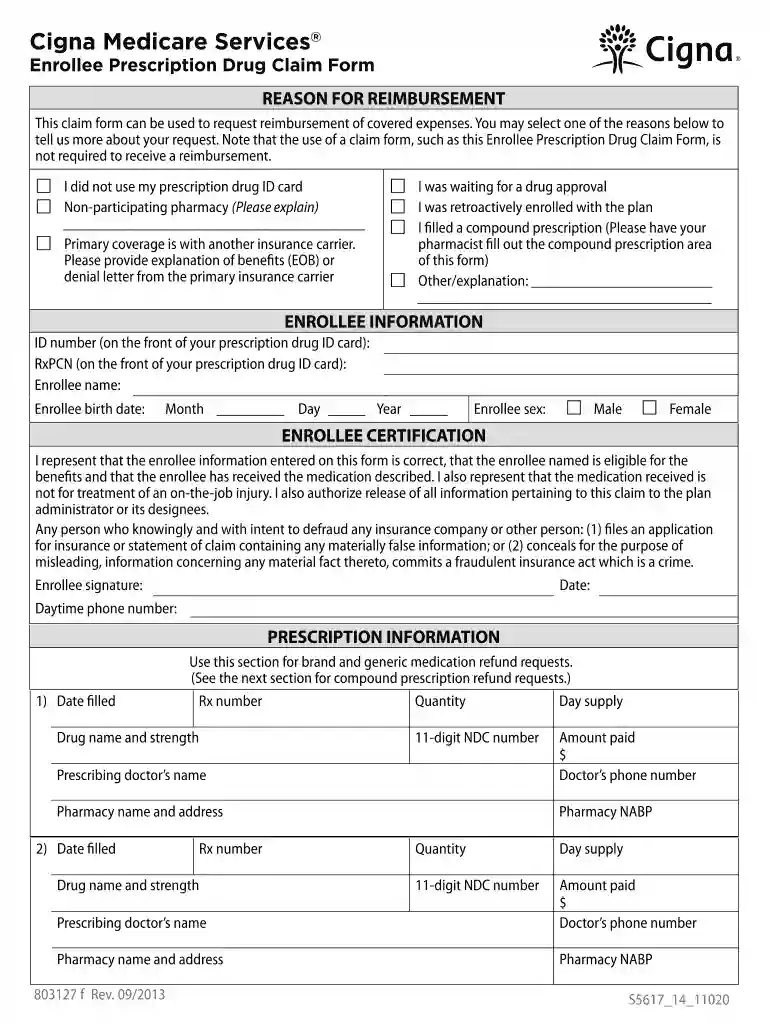
Enrollee Prescription Drug Claim Form - Cigna - Thank You Macyand#39;s Preview on Page 1

Here's how it works

01. Edit your form online
Type text, add images, blackout confidential details, add comments, highlights and more.

02. Sign it in a few clicks
Draw your signature, type it, upload its image, or use your mobile device as a signature pad.

03. Share your form with others
Send it via email, link, or fax. You can also download it, export it or print it out.

How to use or fill out Enrollee Prescription Drug Claim Form - Cigna - Thank You Macy's with our platform

Form edit decoration
9.5
Ease of Setup
DocHub User Ratings on G2
9.0
Ease of Use
DocHub User Ratings on G2
  1. Click ‘Get Form’ to open it in the editor.
  2. Begin by selecting the reason for reimbursement from the options provided. This helps clarify your request.
  3. Fill in your enrollee information, including ID number, RxPCN, name, birth date, and sex. Ensure accuracy for a smooth processing.
  4. In the Enrollee Certification section, confirm that all information is correct and sign where indicated. This step is crucial for validating your claim.
  5. Complete the Prescription Information section for each medication you are claiming reimbursement for. Include details like date filled, drug name, quantity, and amount paid.
  6. If applicable, fill out the Compound Prescription Information section with details provided by your pharmacy.
  7. Review all sections to ensure completeness and accuracy before submitting your claim.

Start using our platform today to easily complete your Enrollee Prescription Drug Claim Form!

See more Enrollee Prescription Drug Claim Form - Cigna - Thank You Macyand#39;s versions

We've got more versions of the Enrollee Prescription Drug Claim Form - Cigna - Thank You Macyand#39;s form. Select the right Enrollee Prescription Drug Claim Form - Cigna - Thank You Macyand#39;s version from the list and start editing it straight away!
Versions Form popularity Fillable & printable
2015 4.8 Satisfied (42 Votes)
2013 4.2 Satisfied (71 Votes)
2012 4.3 Satisfied (76 Votes)
be ready to get more

Complete this form in 5 minutes or less

Get form

Got questions?

We have answers to the most popular questions from our customers. If you can't find an answer to your question, please contact us.
Contact us
Correct claims address means the address appearing on an enrollees or insureds current identification card issued by the health insurance issuer as the current address at which claims are received, or, if no address appears on the identification card, the current address for receipt of claims provided by the health
If you use a pharmacy that does not participate in your plans network, your prescription may not be covered, or reimbursement may be limited by your plans copayment, coinsurance or deductible requirements. Refer to your plan documents for costs and complete details of your plans prescription drug coverage.
You may submit out-of-network claims electronically by going to myCigna.com* or through the mail to Cigna Claims, P.O. Box 182223, Chatanooga, TN, 37422-7223 or the address on the back of your ID card.
To submit a supplemental health claim: Email: SuppHealthClaims@Cigna.com. Fax: 1 (860) 730-6460. Mail: Cigna Healthcare Phoenix Claim Services. PO Box 55290. Phoenix, AZ 85078.
Prescription Drug Claim Form. This claim form is to be used for reimbursement on covered medications provided by pharmacies.

Security and compliance

At DocHub, your data security is our priority. We follow HIPAA, SOC2, GDPR, and other standards, so you can work on your documents with confidence.

Learn more
ccpa2
pci-dss
gdpr-compliance
hipaa
soc-compliance

People also ask

When to File Your Claims If you aresubmit by A participating health care provider 90 days after the date of service An out-of-network provider 180 days after the date of service

Related links