Notice of Commencement - Individual - Michigan 2026

Get Form
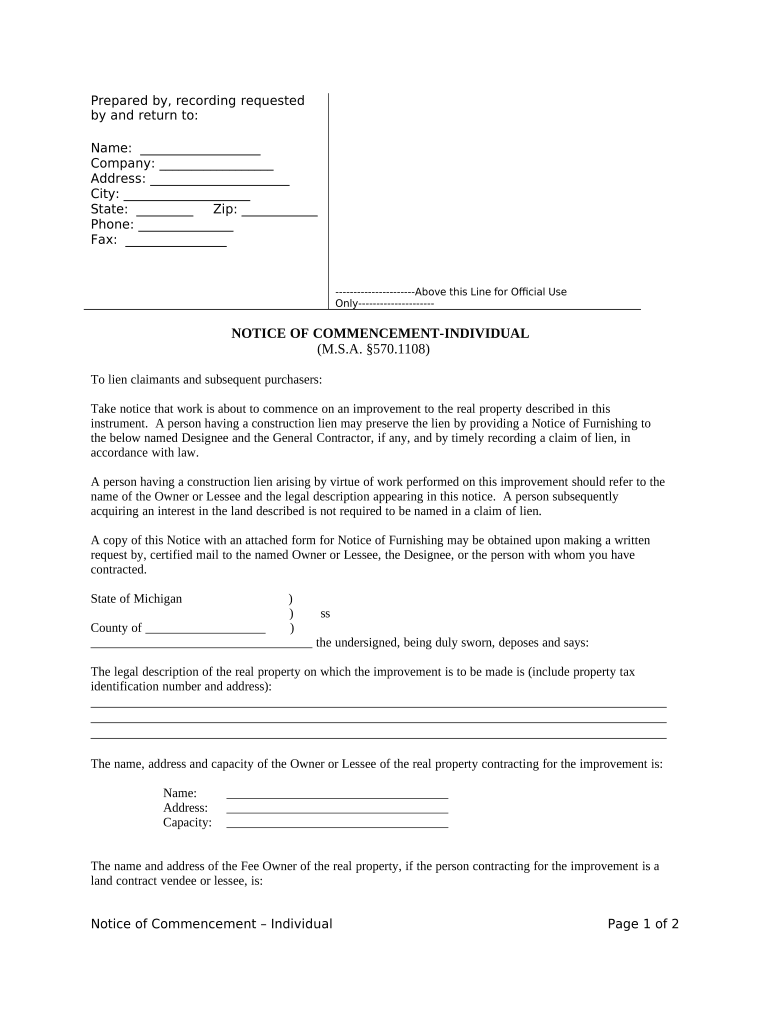
notice of commencement michigan Preview on Page 1

Here's how it works

01. Edit your notice of commencement michigan online
Type text, add images, blackout confidential details, add comments, highlights and more.
02. Sign it in a few clicks
Draw your signature, type it, upload its image, or use your mobile device as a signature pad.
03. Share your form with others
Send it via email, link, or fax. You can also download it, export it or print it out.

How to use or fill out Notice of Commencement - Individual - Michigan with our platform

Form edit decoration
9.5
Ease of Setup
DocHub User Ratings on G2
9.0
Ease of Use
DocHub User Ratings on G2
  1. Click ‘Get Form’ to open it in the editor.
  2. Begin by filling in the 'Prepared by, recording requested by and return to' section. Enter your name, company, address, city, state, zip code, phone number, and fax number.
  3. In the 'NOTICE OF COMMENCEMENT-INDIVIDUAL' section, provide a clear description of the real property where the improvement will take place. Include the property tax identification number and full address.
  4. Complete the details for the Owner or Lessee of the property. Fill in their name, address, and capacity (e.g., owner or lessee).
  5. If applicable, provide information about the Fee Owner if you are a land contract vendee or lessee.
  6. Identify the Designee and General Contractor by entering their names and addresses as required.
  7. Sign and date the document in the designated area. Ensure that it is notarized as per Michigan law.

Start using our platform today to easily complete your Notice of Commencement form online for free!

be ready to get more

Complete this form in 5 minutes or less

Get form

Got questions?

We have answers to the most popular questions from our customers. If you can't find an answer to your question, please contact us.
Contact us
Where can I find the notice of commencement for a project? The short answer to this question is that you can find any commencement notices at the recorders office where NOCs are typically filed. These are public records, and you can access them directly.
The short answer to this question is that you can find any commencement notices at the recorders office where NOCs are typically filed. These are public records, and you can access them directly.
A Commencement Notice is a notification to a Building Control Authority that a person intends to carry out either works or a material change of use to which the Building Regulations apply.
Why Does a Notice of Commencement Need to Be docHubd? Most states that require an NOC also mandate that it be signed and docHubd before it is filed. The notarization ensures that the property owner or authorized agent truly signed the document and that it is legally valid.
(5) An owner, lessee, or designee required to provide a notice of commencement under this section, within 10 days after the date of mailing of a written request by certified mail from a contractor, subcontractor, supplier, or laborer, shall prepare and provide a copy of the notice of commencement, with an attached

Security and compliance

At DocHub, your data security is our priority. We follow HIPAA, SOC2, GDPR, and other standards, so you can work on your documents with confidence.

Learn more
ccpa2
pci-dss
gdpr-compliance
hipaa
soc-compliance

People also ask

A Notice of Commencement is a legal document that informs the local government of an upcoming construction project and must be filed and posted before commencing work. This document provides information about the contractor, property owner, type of work to be performed, and start and end dates of the project.
A Notice of Commencement (NOI) is a legal document filed by general contractors (GCs) to formally declare the start of a construction project.
Florida Notice of Commencement Laws It is not required for any public or government projects. Filed by the property owner unless the project has a construction loan on it. In this case, it must be filed by the lender. Signed by the owner, regardless of who files it, and docHubd.

Related links