Non Contractor's Notice of Furnishing - Individual - Massachusetts 2026

Get Form
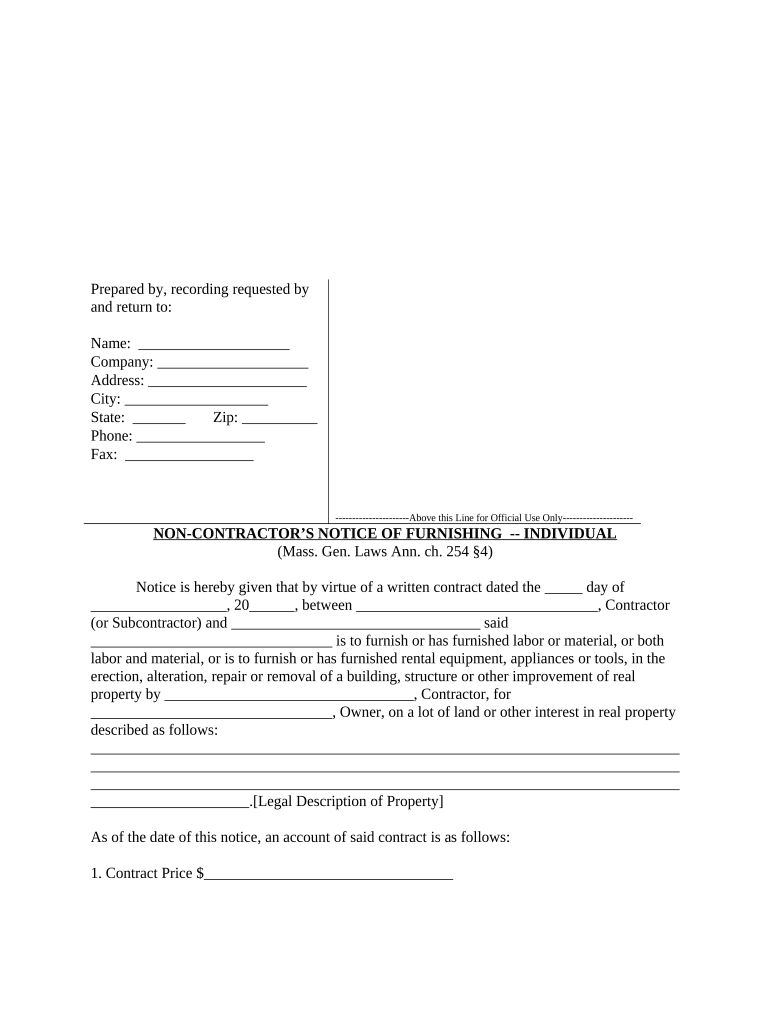
Non Contractor's Notice of Furnishing - Individual - Massachusetts Preview on Page 1

Here's how it works

01. Edit your form online
Type text, add images, blackout confidential details, add comments, highlights and more.
02. Sign it in a few clicks
Draw your signature, type it, upload its image, or use your mobile device as a signature pad.
03. Share your form with others
Send it via email, link, or fax. You can also download it, export it or print it out.

How to use or fill out Non Contractor's Notice of Furnishing - Individual - Massachusetts with our platform

Form edit decoration
9.5
Ease of Setup
DocHub User Ratings on G2
9.0
Ease of Use
DocHub User Ratings on G2
  1. Click ‘Get Form’ to open it in the editor.
  2. Begin by filling in your name, company, address, city, state, zip code, phone number, and fax number at the top of the form. This information identifies you as the individual providing notice.
  3. In the section titled 'Notice is hereby given', enter the date of your written contract and the names of both the contractor (or subcontractor) and yourself. This establishes the context for your notice.
  4. Provide a legal description of the property where labor or materials were furnished. This is crucial for clarity regarding which property is involved.
  5. Fill out the financial details including contract price, agreed change orders (indicating if they are additions or subtractions), pending change orders, disputed claims, and payments received. Accurate financial reporting is essential.
  6. Complete your mailing address for recording purposes and sign at the designated area. Ensure that all information is correct before finalizing.
  7. If required, have a notary public witness your signature and complete their section to validate your document.
  8. Finally, certify delivery by filling in details about how you delivered a copy of this notice to the owner.

Start using our platform today to easily fill out and manage your documents online for free!

be ready to get more

Complete this form in 5 minutes or less

Get form

Got questions?

We have answers to the most popular questions from our customers. If you can't find an answer to your question, please contact us.
Contact us
Subcontractors and suppliers may file a notice of contract on the land records. A subcontractor has a lien when the notice is filed and the owner is given actual notice.
The notice of furnishing is only required to be filed by subcontractors and suppliers. For subcontractors, closely review the Contract Documents to identify any indication of the project being registered.
A notice of furnishings is a document served from a subcontractor on a property owner which essentially puts the property owner on notice that he or she may be entitled to a lien against the property if they are not paid for labor or materials furnished on the property.
A Notice of Furnishing must be filed by a specified date and is used to inform the General Contractor and property Owner that you have been hired to provide labor, services or material for this particular project. In Ohio, failing to send a Notice of Furnishing does not defeat your lien rights, but it might limit them.
Subcontractors may not have a contract with you, but they can place liens on your property. You might pay the contractor in full but if he fails to pay the subcontractors, they would have the right to file a lien.

Security and compliance

At DocHub, your data security is our priority. We follow HIPAA, SOC2, GDPR, and other standards, so you can work on your documents with confidence.

Learn more
ccpa2
pci-dss
gdpr-compliance
hipaa
soc-compliance