Type text, add images, blackout confidential details, add comments, highlights and more.
02. Sign it in a few clicks
Draw your signature, type it, upload its image, or use your mobile device as a signature pad.
03. Share your form with others
Send it via email, link, or fax. You can also download it, export it or print it out.
How to Use or Fill Out Letter Professionals with Our Platform
Ease of Setup
DocHub User Ratings on G2
Ease of Use
DocHub User Ratings on G2
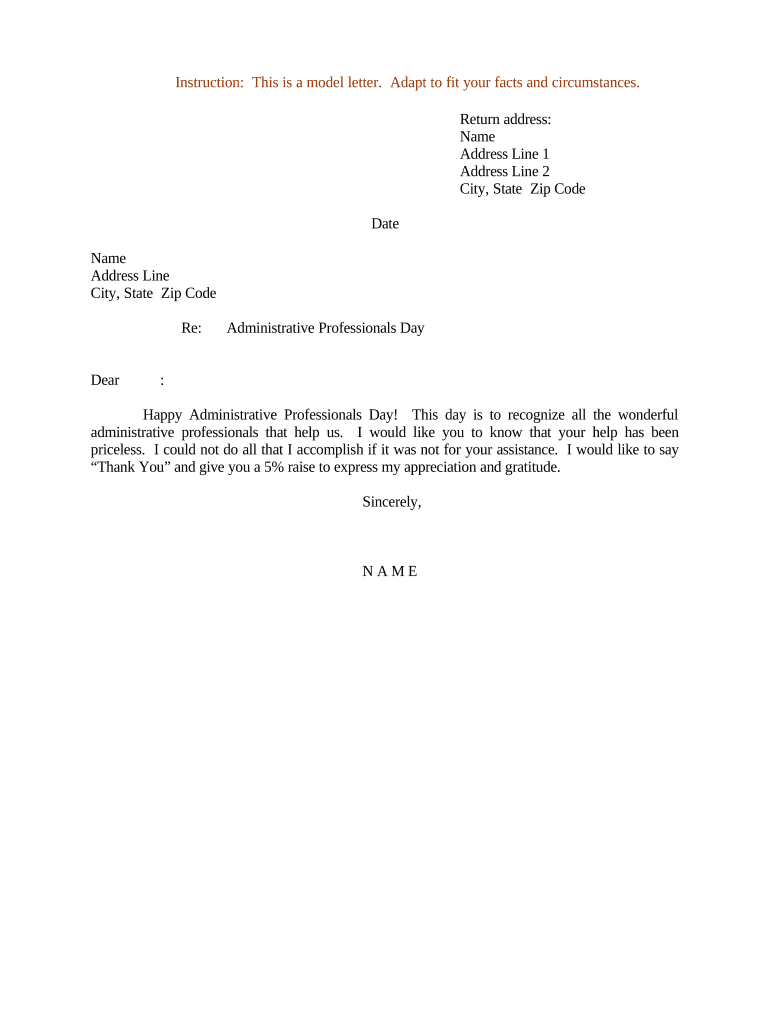
Click ‘Get Form’ to open the letter professionals template in the editor.
Begin by entering your return address at the top of the document. Fill in your name, address line 1, address line 2 (if applicable), city, state, and zip code.
Next, input the date on which you are sending the letter. This should be placed below your return address.
In the recipient section, enter the name and address of the administrative professional you are addressing. Ensure accuracy for a personal touch.
Proceed to fill in the subject line with 'Re: Administrative Professionals Day' to clearly indicate the purpose of your letter.
Craft your message starting with a greeting such as 'Dear [Name]'. Express your appreciation and include any specific details about their contributions.
Conclude with a closing statement like 'Sincerely,' followed by your name at the bottom of the letter.
Start using our platform today to create and customize your letters for free!
Letter professionals salaryHow to write a professional letterBest letter professionalsHow to start a professional letter without DearHow to write letter to friendHow to write a letter envelopeWrite letter online freeLetter format
Security and compliance
At DocHub, your data security is our priority. We follow HIPAA, SOC2, GDPR, and other standards, so you can work on your documents with confidence.
In this module, you will learn how to write Thank You Notes, LinkedIn Messages, Professional Emails, Messages to Recruiters, and Job Acceptance RejectionRead more
Effectiveness of personal letters to healthcare professionals in
by A Grimani 2021 Cited by 3 Letters are regularly sent by healthcare organisations to healthcare professionals to encourage them to take action, change practice or implement guidance.Read more
Cookie consent notice
This site uses cookies to enhance site navigation and personalize your experience.
By using this site you agree to our use of cookies as described in our Privacy Notice.
You can modify your selections by visiting our Cookie and Advertising Notice.