Site Work Contract for Contractor - New Hampshire 2026

Get Form
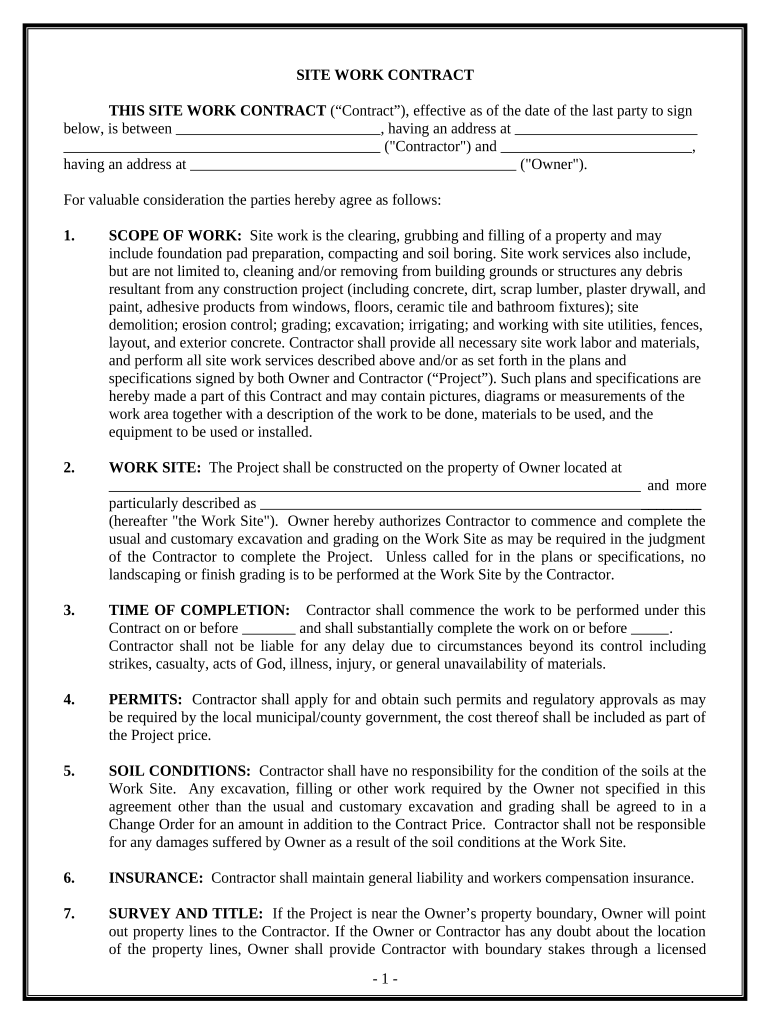
Site Work Contract for Contractor - New Hampshire Preview on Page 1

Here's how it works

01. Edit your form online
Type text, add images, blackout confidential details, add comments, highlights and more.
02. Sign it in a few clicks
Draw your signature, type it, upload its image, or use your mobile device as a signature pad.
03. Share your form with others
Send it via email, link, or fax. You can also download it, export it or print it out.

How to use or fill out Site Work Contract for Contractor - New Hampshire

Form edit decoration
9.5
Ease of Setup
DocHub User Ratings on G2
9.0
Ease of Use
DocHub User Ratings on G2
  1. Click 'Get Form' to open the Site Work Contract in our editor.
  2. Begin by filling in the Contractor's name and address at the top of the form. This identifies who will be performing the work.
  3. Next, enter the Owner's name and address. This section establishes who is hiring the Contractor.
  4. In the 'SCOPE OF WORK' section, detail all tasks to be performed, including site clearing, grading, and any specific requirements outlined in plans or specifications.
  5. Specify the 'WORK SITE' by providing the property address and any additional descriptions necessary for clarity.
  6. Fill in the 'TIME OF COMPLETION' with start and completion dates to set clear expectations for project timelines.
  7. Complete sections on permits, soil conditions, insurance, and changes to scope as applicable to your project needs.
  8. Finally, review all entries for accuracy before signing. Ensure both parties sign and date at the end of the document.

Start using our platform today to easily complete your Site Work Contract for free!

be ready to get more

Complete this form in 5 minutes or less

Get form

Got questions?

We have answers to the most popular questions from our customers. If you can't find an answer to your question, please contact us.
Contact us

Approving documents on a mobile device is fast, simple, and doesn’t require software installation when you have an account with DocHub. Log in from any browser, complete your blank fields with your information, and click on Sign → Create your signature. You can draw your electronic signature just as you usually do on paper, add its picture to your Site Work Contract for Contractor - New Hampshire, or type in your name and stylize its look. No matter what option you select, your paperwork will be valid.

If you store your paperwork in Google Drive, there is no need to download your Site Work Contract for Contractor - New Hampshire on the computer and upload it back to our editor. A significantly easier way is to set up a browser extension developed by DocHub to streamline this flow. The extension allows editing PDFs in your web browser. Alternatively, you can integrate your DocHub and Gmail accounts for more efficient editing.

There are several types of construction contracts, but the most common include four primary types: Stipulated Sum Contract, Cost Plus Contract, Design-Build Contract, and Integrated Project Delivery Contract. Each serves distinct purposes within the industry.
A lump sum contract is a suitable if the scope and schedule of the project are sufficiently defined to allow the contractor to fully estimate project costs. In a unit price contract, the work to be performed is broken into various parts, usually by construction trade.
Standard construction contracts should have the following information and clauses: Name of contractor and contact information. Name of homeowner and contact information. Describe property in legal terms. List attachments to the contract. The cost. Failure of homeowner to obtain financing.

Security and compliance

At DocHub, your data security is our priority. We follow HIPAA, SOC2, GDPR, and other standards, so you can work on your documents with confidence.

Learn more
ccpa2
pci-dss
gdpr-compliance
hipaa
soc-compliance

People also ask

Lump sum contracts (also sometimes known as fixed price contracts) are usually considered the most popular type of contract when it comes to building and engineering agreements, however they do have minor differences.
Fixed Price Contract With a Fixed Price Contract, the government agrees to pay you a specific pre-determined price for your product or service. This type of contract is more risky for the contractor as you would be responsible for any cost overruns.
Bilateral contracts are agreements in which both parties exchange mutual promises to perform certain obligations, making this type of contract the most common in business transactions.
Best Contract Types for Different Project Owners Government Owners: Lump Sum (Fixed-Price Contract) Private Developers: Cost-Plus with Guaranteed Maximum Price (GMP) Corporate Institutional Owners: Cost-Plus with Incentives. First-Time Owners: Lump Sum or Unit Price.
How do I create an Independent Contractor Agreement? Step 1: State the location of the contract. Step 2: Note client and contractor details. Step 3: Describe the services provided. Step 4: Include billing and payment information. Step 5: Add any clauses and conditions for the contract. Step 6: Add signing details.

Related links