Type text, add images, blackout confidential details, add comments, highlights and more.
02. Sign it in a few clicks
Draw your signature, type it, upload its image, or use your mobile device as a signature pad.
03. Share your form with others
Send it via email, link, or fax. You can also download it, export it or print it out.
How to use or fill out minnesota client with our platform
Ease of Setup
DocHub User Ratings on G2
Ease of Use
DocHub User Ratings on G2
Click ‘Get Form’ to open the minnesota client in the editor.
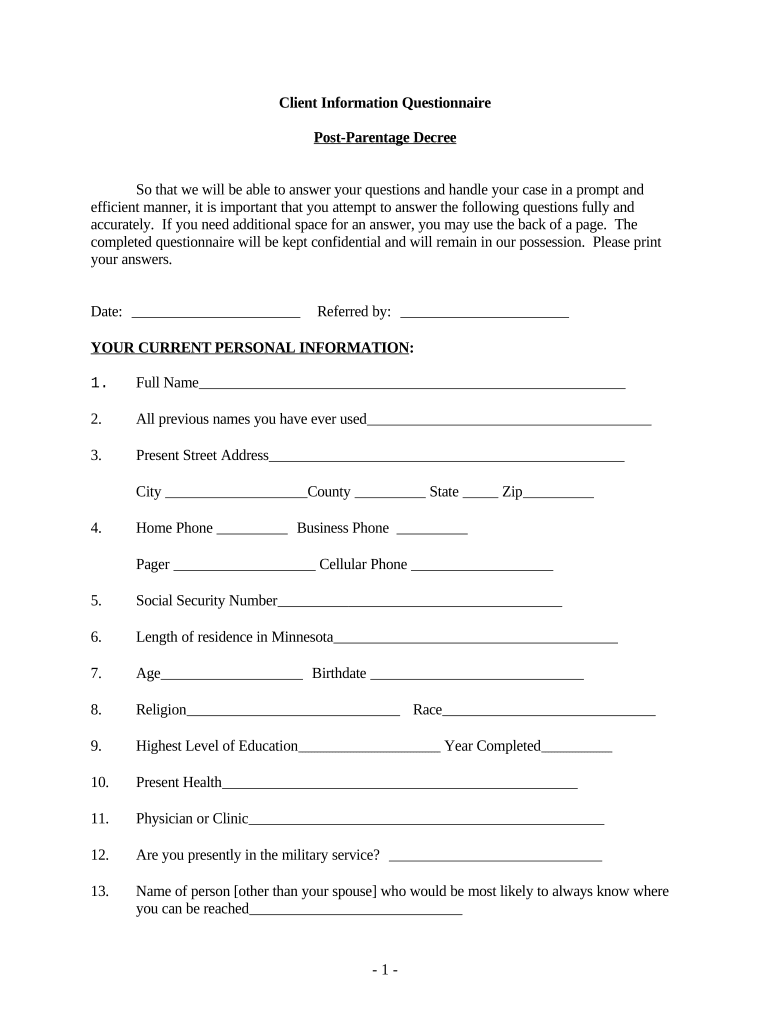
Begin by entering your current personal information. Fill in your full name, previous names, and address details accurately.
Provide your contact numbers and Social Security Number. Ensure that you include your length of residence in Minnesota and other personal details like age and education level.
Next, move on to the section regarding children. List all children born to or adopted by you, including their names, birth dates, and custody arrangements.
Continue with your current employment information. Fill out employer details, occupation, earnings, and any additional income sources.
Lastly, complete the financial information section by detailing assets, liabilities, and monthly expenses. This will help provide a comprehensive overview of your financial situation.
Start using our platform today for free to streamline your document completion process!
Minnesota Client Security BoardMn client bill of rightsMinnesota Board of LawyersMN resourcesMN OmbudsmanMn death reportsOmbudsman mn phone numberClient rights
Security and compliance
At DocHub, your data security is our priority. We follow HIPAA, SOC2, GDPR, and other standards, so you can work on your documents with confidence.
The Case for Strengthening Healthcare Client Portal Data
by MD McCord 2018 Cited by 2 Minnesota Journal of Law, Science Technology Bleeding Out: The Case for Strengthening Healthcare Client Portal Data Privacy Regulations. Authors. Matthew DRead more
MINNESOTA ASSOCIATION OF COMMUNITY - Congress.wiki
Client is explicitly an association for community-based mental health providers (a membership group representing healthcare providers). That maps primarily to
The Client Security Board and its related Fund were established by the Minnesota Supreme Court to aid people who suffer a loss because of dishonest conduct onRead more
Cookie consent notice
This site uses cookies to enhance site navigation and personalize your experience.
By using this site you agree to our use of cookies as described in our Privacy Notice.
You can modify your selections by visiting our Cookie and Advertising Notice.