Minnesota request 2026

Get Form
minnesota request Preview on Page 1

Here's how it works

01. Edit your form online
Type text, add images, blackout confidential details, add comments, highlights and more.
02. Sign it in a few clicks
Draw your signature, type it, upload its image, or use your mobile device as a signature pad.
03. Share your form with others
Send it via email, link, or fax. You can also download it, export it or print it out.

How to use or fill out the Minnesota Request with Our Platform

Form edit decoration
9.5
Ease of Setup
DocHub User Ratings on G2
9.0
Ease of Use
DocHub User Ratings on G2
  1. Click ‘Get Form’ to open the Minnesota Request in the editor.
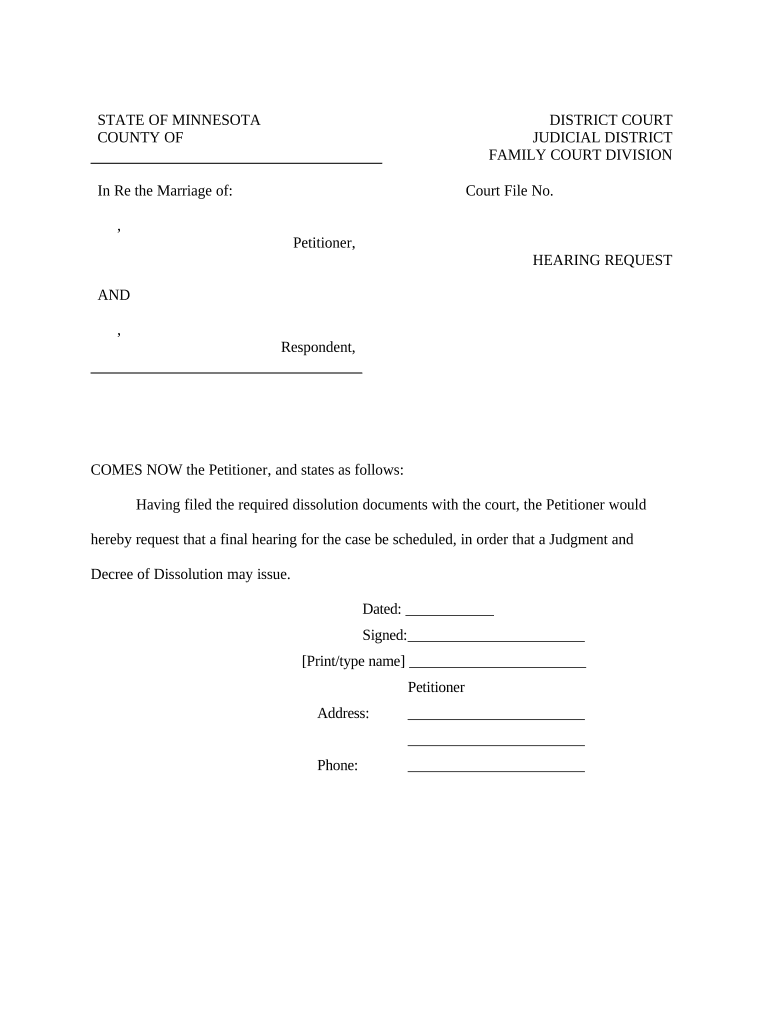
  2. Begin by entering the 'Court File No.' at the top of the form. This number is essential for identifying your case within the court system.
  3. In the section labeled 'Petitioner,' input your name as it appears on official documents. Ensure accuracy to avoid any delays.
  4. Next, fill in the 'Respondent' section with the name of your spouse. This is crucial for proper notification and processing of your request.
  5. In the body of the form, clearly state your request for a final hearing. You may customize this text if needed, but ensure it reflects your intention accurately.
  6. Date and sign the document at the bottom. Make sure to print or type your name clearly beneath your signature for verification purposes.
  7. Finally, provide your address and phone number in the designated fields to ensure that you can be contacted regarding your hearing.

Start using our platform today to easily complete and submit your Minnesota Request for free!

be ready to get more

Complete this form in 5 minutes or less

Get form

Got questions?

We have answers to the most popular questions from our customers. If you can't find an answer to your question, please contact us.
Contact us
Interpleader. Persons having claims against the plaintiff may be joined as defendants and required to interplead, in an action brought for that purpose, when their claims are such that the plaintiff is or may be exposed to multiple liability.
Rule 33. Interrogatories to Parties Interrogatories may, without leave of court, be served upon any party after service of the summons and complaint. No party may serve more than a total of 50 interrogatories upon any other party unless permitted to do so by the court upon motion, notice and a showing of good cause.
Rule 40. Assignment of Cases for Trial The judges of the court may, by order or by rule of court, provide for the setting of cases for trial upon the calendar, the order in which they shall be heard, and the resetting thereof.
On January 1, 2025, Minnesota opened the door to brighter futures for an estimated 500,000 Minnesotans with the implementation of its Clean Slate law. This landmark policy automates the sealing of eligible arrest or conviction records, giving hundreds of thousands of people a second chance.
Public Access to Records. (a) Except as provided in these Special Rules, the Rules of Public Access to Records of the Judicial Branch, or as limited by court order, all court files relating to civil commitment shall be available to the public for inspection, copying, printing, or downloading.

Security and compliance

At DocHub, your data security is our priority. We follow HIPAA, SOC2, GDPR, and other standards, so you can work on your documents with confidence.

Learn more
ccpa2
pci-dss
gdpr-compliance
hipaa
soc-compliance
be ready to get more

Complete this form in 5 minutes or less

Get form

People also ask

Rule 69. In aid of the judgment or execution, the judgment creditor, or successor in interest when that interest appears of record, may obtain discovery from any person, including the judgment debtor, in the manner provided by these rules.
Rule 38. Jury Trial of Right In actions for the recovery of money only, or of specific real or personal property, the issues of fact shall be tried by a jury, unless a jury trial is waived or a reference is ordered.

Related links