Affidavit of Service regarding Marriage - Oregon 2026

Get Form
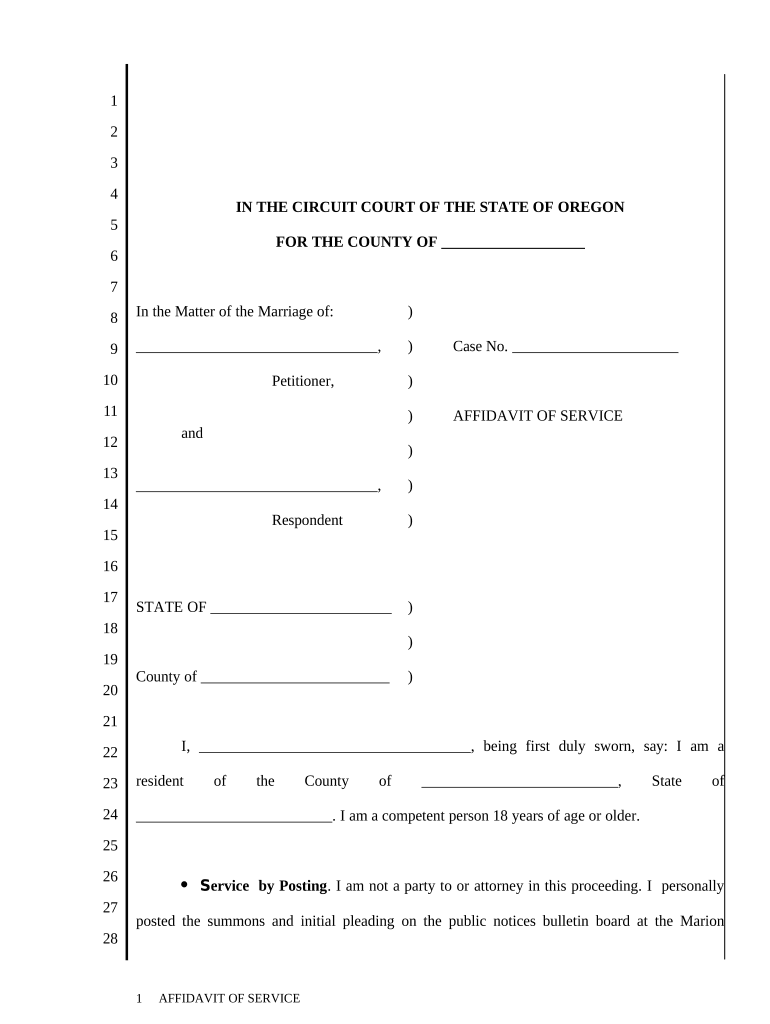
Affidavit of Service regarding Marriage - Oregon Preview on Page 1

Here's how it works

01. Edit your form online
Type text, add images, blackout confidential details, add comments, highlights and more.
02. Sign it in a few clicks
Draw your signature, type it, upload its image, or use your mobile device as a signature pad.
03. Share your form with others
Send it via email, link, or fax. You can also download it, export it or print it out.

How to use or fill out Affidavit of Service regarding Marriage - Oregon with our platform

Form edit decoration
9.5
Ease of Setup
DocHub User Ratings on G2
9.0
Ease of Use
DocHub User Ratings on G2
  1. Click ‘Get Form’ to open the Affidavit of Service regarding Marriage - Oregon in the editor.
  2. Begin by filling in the County where the marriage is taking place. This is crucial for jurisdiction purposes.
  3. In the section labeled 'Petitioner', enter your name as the individual initiating the service.
  4. Next, provide details about the Respondent, including their name and case number, ensuring accuracy for legal compliance.
  5. Indicate your method of service by checking either 'Service by Posting' or 'Service by Mailing'. If mailing, specify if it was certified or registered mail and include the date.
  6. Complete your personal information at the bottom, including signature, printed name, address, and telephone number.
  7. Finally, have a Notary Public witness your signature and complete their section to finalize the document.

Start using our platform today to easily fill out and manage your Affidavit of Service regarding Marriage - Oregon for free!

be ready to get more

Complete this form in 5 minutes or less

Get form

Got questions?

We have answers to the most popular questions from our customers. If you can't find an answer to your question, please contact us.
Contact us
After the documents are served, the process server signs the affidavit, has their signature properly docHubd, and files the affidavit with the court. A person who signs an affidavit containing false information can be subject to criminal penalties.
How to Fill Out an Affidavit of Service Provide Process Server Information. Include the name and address of the process server delivering the papers. Add a Description of Service. List the Receiving Partys Information. Choose a Service Method. Obtain Notary Acknowledgment.
An Affidavit of Service is created once your papers have been served to the defendant. It will contain the following information (typically): Name of the case and the case number. A description of the documents that were served.
In the case of personal service, the affidavit is signed by a process server, or person who delivers the documents. A process server is often a law enforcement officer but may also be a private process server. In the case of service by publication, an employee of the newspaper signs the affidavit of publication.
When Is an Affidavit of Service Used? An affidavit of service is typically required in both civil and criminal cases to confirm that court documents were served properly. These documents can include: Complaints and summonses.

Security and compliance

At DocHub, your data security is our priority. We follow HIPAA, SOC2, GDPR, and other standards, so you can work on your documents with confidence.

Learn more
ccpa2
pci-dss
gdpr-compliance
hipaa
soc-compliance

People also ask

You can make an affidavit at any police station, where an officer will provide you with a standard form and help you complete the process.
An Affidavit of Service is a formal sworn statement that you have either personally served or mailed specific documents to another individual. A Certificate of Service also indicates that copies of legal documents have been served, however, it can generally be found as a section at the bottom of a pleading or motion.

Related links