2008 form-2026

Get Form
2008 form Preview on Page 1

Here's how it works

01. Edit your form online
Type text, add images, blackout confidential details, add comments, highlights and more.

02. Sign it in a few clicks
Draw your signature, type it, upload its image, or use your mobile device as a signature pad.

03. Share your form with others
Send it via email, link, or fax. You can also download it, export it or print it out.

How to use or fill out the 2008 form with our platform

Form edit decoration
9.5
Ease of Setup
DocHub User Ratings on G2
9.0
Ease of Use
DocHub User Ratings on G2
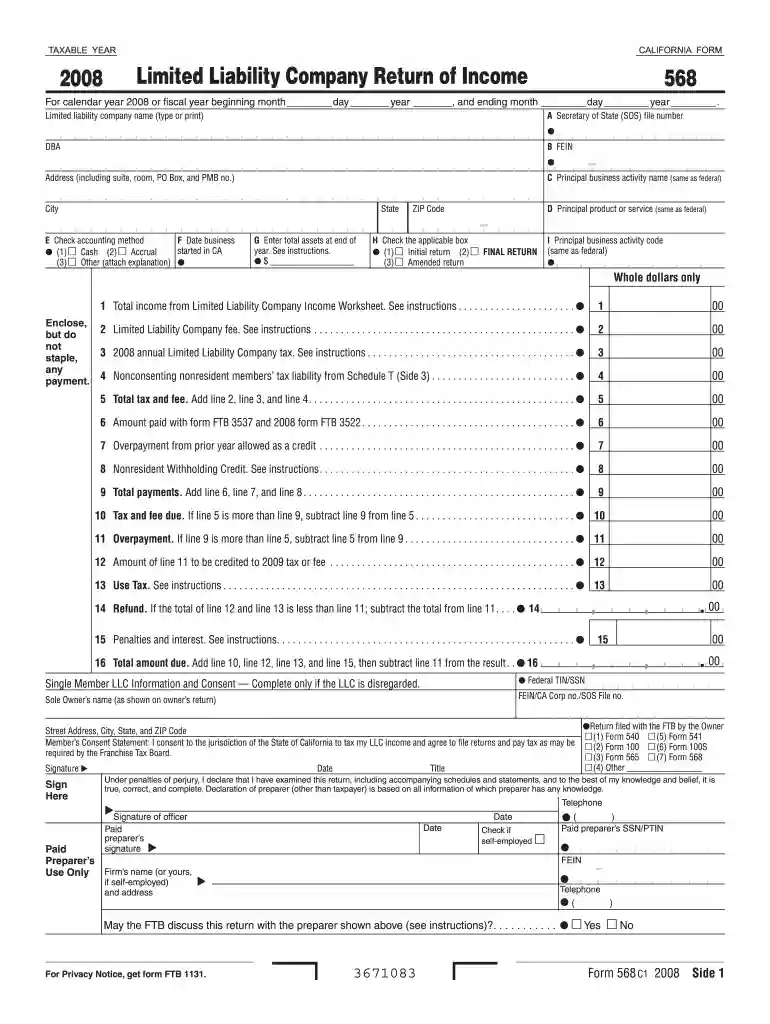
  1. Click ‘Get Form’ to open the 2008 Limited Liability Company Return of Income in the editor.
  2. Begin by entering the taxable year at the top of the form. Specify whether it is for calendar year 2008 or a fiscal year, and fill in the corresponding dates.
  3. In section A, type or print the limited liability company name and provide your Secretary of State file number and FEIN.
  4. Complete the address section, including city, state, and ZIP code. In section C, specify your principal business activity name as per federal records.
  5. Select your accounting method in section E by checking either Cash, Accrual, or Other. Provide details if you select 'Other'.
  6. Fill out total assets at the end of the year in section G and check applicable boxes in section H regarding return types.
  7. Continue filling out income and deductions on subsequent schedules as instructed, ensuring all calculations are accurate before submission.

Start using our platform today to streamline your form completion process for free!

See more 2008 form versions

We've got more versions of the 2008 form form. Select the right 2008 form version from the list and start editing it straight away!
Versions Form popularity Fillable & printable
2022 4.4 Satisfied (53 Votes)
2021 4.3 Satisfied (49 Votes)
2020 4.8 Satisfied (120 Votes)
2019 4.3 Satisfied (148 Votes)
2018 4.4 Satisfied (99 Votes)
2017 4.2 Satisfied (27 Votes)
2016 4.4 Satisfied (354 Votes)
2015 4.2 Satisfied (35 Votes)
2014 4 Satisfied (27 Votes)
2013 4 Satisfied (60 Votes)
2012 4.4 Satisfied (33 Votes)
2011 4 Satisfied (41 Votes)
2009 4 Satisfied (21 Votes)
2008 4.9 Satisfied (55 Votes)
2008 4.4 Satisfied (570 Votes)
be ready to get more

Complete this form in 5 minutes or less

Get form

Got questions?

We have answers to the most popular questions from our customers. If you can't find an answer to your question, please contact us.
Contact us
Form 1040 is used by U.S. taxpayers to file an annual income tax return. Form 1040-SR is available as an optional alternative to using Form 1040 for taxpayers who are age 65 or older.
You can retrieve a 1040 form from IRS.gov, by calling 1-800-TAX-FORM or through tax filing software.
Form 1040: This is the one the majority of taxpayers will use to report income and determine their tax for the year and any refund or additional tax owed. Form 1040-SR: This version is for senior taxpayers (age 65 and older).
Is Form 1040 the Same As a W-2? Form 1040 is different from a W-2. A W-2 is a wage and tax statement that an employee receives from a company they worked for during the tax year. The information listed on the W-2 is used to fill out Form 1040.
Form 1040, officially, the U.S. Individual Income Tax Return, is an IRS tax form used for personal federal income tax returns filed by United States residents.

People also ask

Form 1040-A: This was a shorter version of Form 1040, available to taxpayers with straightforward tax situations. You could use it if you didnt itemize deductions and only had income from wages, interest, dividends, pensions, or certain other sources.
The IRS 1040 form is one of the official documents that U.S. taxpayers use to file their annual income tax return. The 1040 form is divided into sections where you report your income and deductions to determine the amount of tax you owe or the refund you can expect to receive.

Related links