Type text, add images, blackout confidential details, add comments, highlights and more.
02. Sign it in a few clicks
Draw your signature, type it, upload its image, or use your mobile device as a signature pad.
03. Share your form with others
Send it via email, link, or fax. You can also download it, export it or print it out.
How to use or fill out agreement secure online
Ease of Setup
DocHub User Ratings on G2
Ease of Use
DocHub User Ratings on G2
Click ‘Get Form’ to open it in the editor.
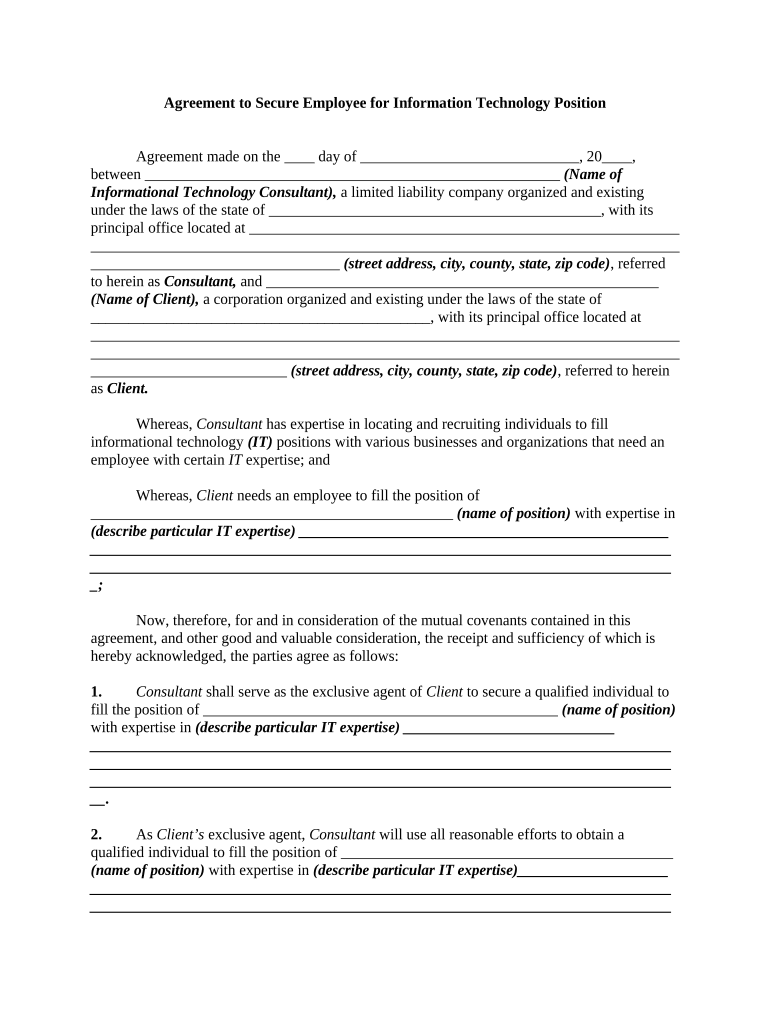
Begin by entering the date of the agreement in the designated field. This is crucial for establishing the timeline of your contract.
Fill in the name and details of the Consultant, including their business structure and address. Ensure accuracy as this identifies your partner in this agreement.
Next, input the Client's information similarly, including their corporate structure and address.
Specify the position that needs to be filled along with the required IT expertise. This section is vital for clarity on expectations.
Complete each section regarding payment terms, including commission percentages and payment timelines. Be precise to avoid future disputes.
Review all fields for completeness and accuracy before finalizing your document. Utilize our platform’s editing tools for any necessary adjustments.
Start filling out your agreement secure online today for free!
Electronic contracts and signatures are just as enforceable and legally binding as traditional signatures signed on paper.
Are online contracts legally binding?
Make rental agreements tenants can sign online with Acrobat. Then, send an email and collect signatures on nearly any device. You can make changes after you send the document before it is fully executed, and youll get a notification as soon as the signature comes through.
Is a contract valid if signed online?
A contract cant be denied legal effect or enforceability simply because an electronic record was used in its formation. If a law requires a record to be in writing, an electronic record satisfies the law. If a law requires a signature, an electronic signature satisfies the law.
Is an emailed contract legally binding?
In many jurisdictions, courts recognize emails as written contracts. This means that if the necessary elements of a contract are present in an email exchange, it can be deemed legally binding.
Are online contracts legit?
And, now that you know online contracts are just as legally binding as those dusty paper versions, you need to go all out to make them enforceable. Unless you had a lawyer walk you through everything your online business needs, chances are youre missing something. Thats totally normal!
To make sure everyone stays safe and responsible on the Internet, its important for kids and adults to agree on the ways that personal devices and technology
Grant of Security Interest. To secure the Obligations, the Debtor, as debtor, hereby assigns and grants to the Secured Party, as secured party, a continuing
Cookie consent notice
This site uses cookies to enhance site navigation and personalize your experience.
By using this site you agree to our use of cookies as described in our Privacy Notice.
You can modify your selections by visiting our Cookie and Advertising Notice.