01. Edit your motion to dismiss injunction florida form online
Type text, add images, blackout confidential details, add comments, highlights and more.
02. Sign it in a few clicks
Draw your signature, type it, upload its image, or use your mobile device as a signature pad.
03. Share your form with others
Send motion to dismiss injunction florida via email, link, or fax. You can also download it, export it or print it out.
How to use or fill out motion to dismiss injunction florida with our platform
Ease of Setup
DocHub User Ratings on G2
Ease of Use
DocHub User Ratings on G2
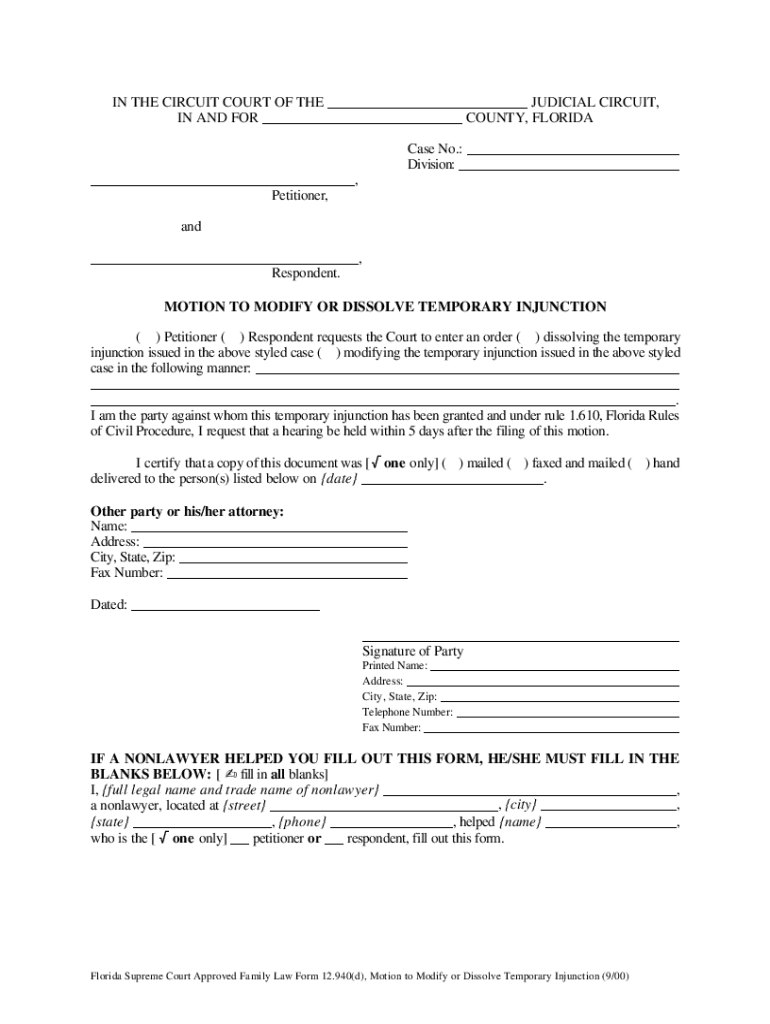
Click ‘Get Form’ to open the motion to dismiss injunction form in the editor.
Begin by filling in the case details at the top, including the judicial circuit, county, and case number. This information is crucial for identifying your specific case.
Indicate whether you are the Petitioner or Respondent by checking the appropriate box. Clearly state your request to either dissolve or modify the temporary injunction.
In the designated section, provide a brief explanation of how you wish to modify or dissolve the injunction. Be concise yet thorough in your reasoning.
Certify that you have sent a copy of this document to the other party by selecting how it was delivered (mailed, faxed, or hand-delivered) and include their contact information.
Finally, sign and date the form. If a nonlawyer assisted you, ensure they complete their section at the bottom of the form.
Start using our platform today for free to streamline your motion process!
Fill out motion to dismiss injunction florida online It's free
See more motion to dismiss injunction florida versions
We've got more versions of the motion to dismiss injunction florida form. Select the right motion to dismiss injunction florida version from the list and start editing it straight away!
motion to dismiss domestic violence injunction florida
Motion to dismiss domestic violence injunction FloridaMotion to dismiss injunction Florida formHow to win an injunction hearing in FloridaVoluntary dismissal injunction FloridaHow to get a temporary injunction dismissedMotion to dissolve injunctionDissolve Modify Injunction 12.940 Forms d eForm 12.940 d
Security and compliance
At DocHub, your data security is our priority. We follow HIPAA, SOC2, GDPR, and other standards, so you can work on your documents with confidence.
by KJ Lynch 2014 Cited by 73 For example, in a motion to dismiss, the plaintiff need only show that a claim is plausible, not that it is certain to prevail. See Ashcroft v. Iqbal, 129 S. CtRead more
A default under a contract for the sale and purchase of real estate in Florida must be material to be legally justified. If a material default occurs,Read more
Cookie consent notice
This site uses cookies to enhance site navigation and personalize your experience.
By using this site you agree to our use of cookies as described in our Privacy Notice.
You can modify your selections by visiting our Cookie and Advertising Notice.