Type text, add images, blackout confidential details, add comments, highlights and more.
02. Sign it in a few clicks
Draw your signature, type it, upload its image, or use your mobile device as a signature pad.
03. Share your form with others
Send it via email, link, or fax. You can also download it, export it or print it out.
How to use or fill out close estate with our platform
Ease of Setup
DocHub User Ratings on G2
Ease of Use
DocHub User Ratings on G2
Click ‘Get Form’ to open the close estate document in the editor.
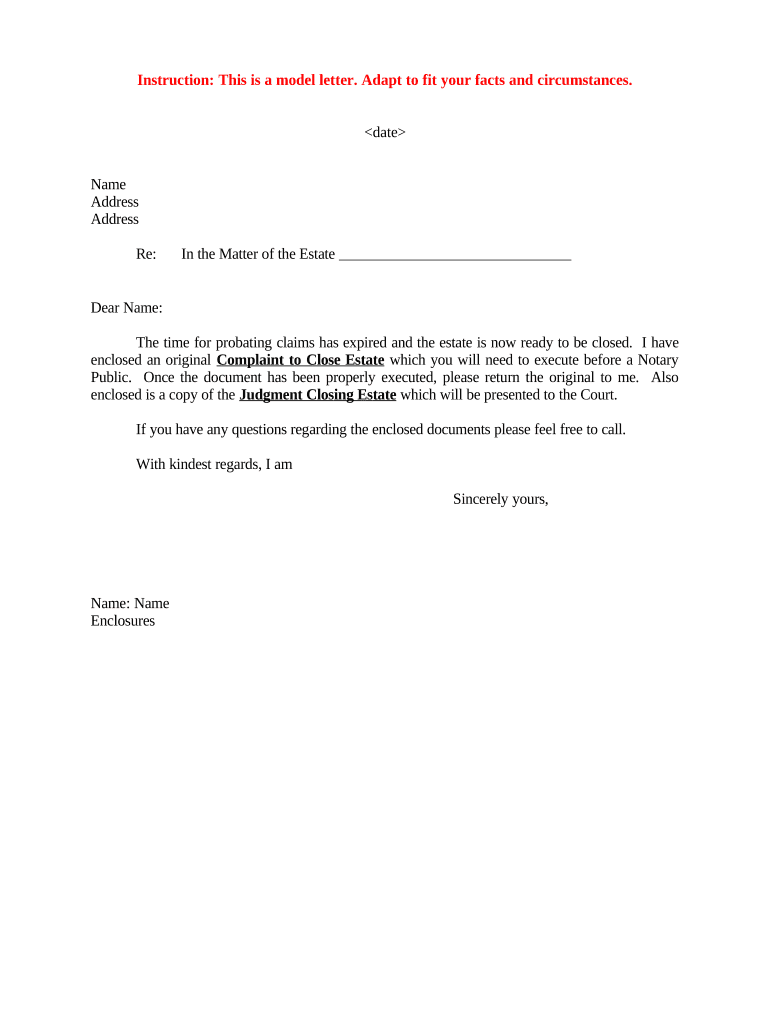
Begin by filling in the date at the top of the form. This is essential for record-keeping and legal purposes.
Next, enter your name and address in the designated fields. Ensure that all information is accurate to avoid any delays.
In the section labeled 'In the Matter of the Estate', clearly state the name of the estate you are closing. This identifies which estate is being referenced.
Review any enclosed documents, such as the original Complaint to Close Estate, and ensure you understand what needs to be executed before a Notary Public.
Once completed, save your changes and prepare to print or share your document for notarization as required.
After notarization, return the original document as instructed. Keep a copy for your records.
Start using our platform today to streamline your close estate process for free!
Close estate floridaHow does an executor close an estateClose estate texasFailure to close estateHow to close an estate with the IRSDo you need a lawyer to close an estateHow to close an estate in NJDo you have to close an estate
Security and compliance
At DocHub, your data security is our priority. We follow HIPAA, SOC2, GDPR, and other standards, so you can work on your documents with confidence.
By closing on any sale with knowledge of a default under the contract, the non- defaulting party may be deemed to have waived any right to enforce the default,Read more
You can file your paperwork to close the estate informally 6 months after the date that the court named you as the Personal Representative, or one year afterRead more
Cookie consent notice
This site uses cookies to enhance site navigation and personalize your experience.
By using this site you agree to our use of cookies as described in our Privacy Notice.
You can modify your selections by visiting our Cookie and Advertising Notice.