Beta test agreement sample pdf 2026

Get Form
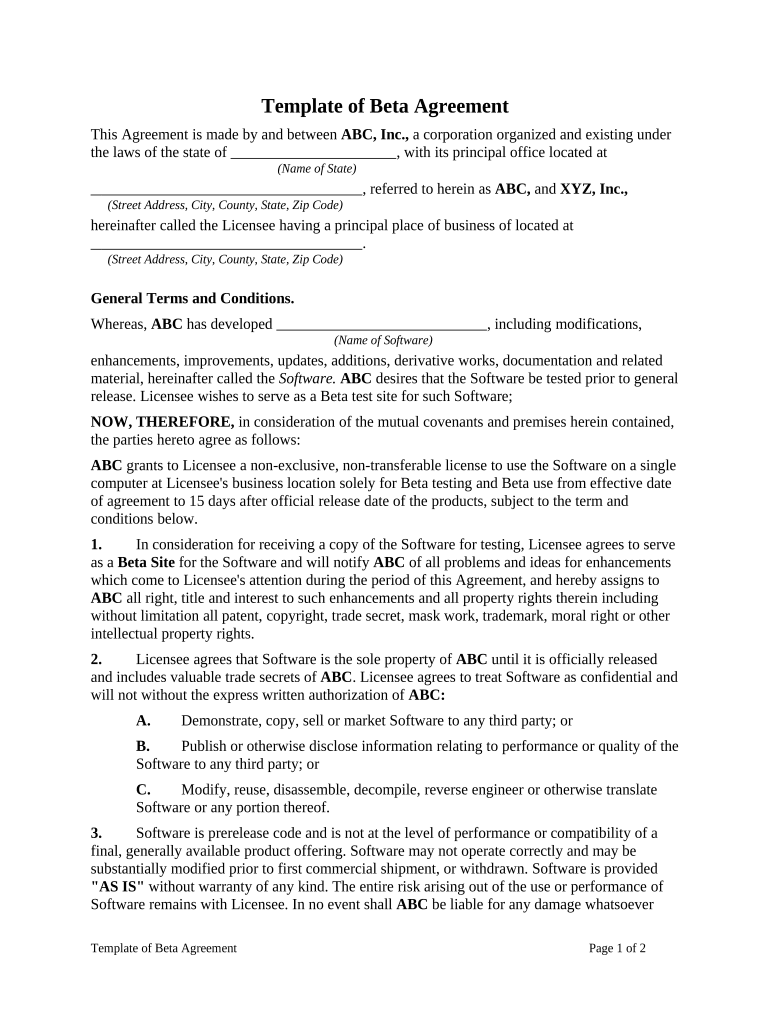
beta contract is missing for the app Preview on Page 1

Here's how it works

01. Edit your beta contract is missing for the app online
Type text, add images, blackout confidential details, add comments, highlights and more.
02. Sign it in a few clicks
Draw your signature, type it, upload its image, or use your mobile device as a signature pad.
03. Share your form with others
Send beta test agreement form via email, link, or fax. You can also download it, export it or print it out.

How to use or fill out beta test agreement sample pdf with our platform

Form edit decoration
9.5
Ease of Setup
DocHub User Ratings on G2
9.0
Ease of Use
DocHub User Ratings on G2
  1. Click ‘Get Form’ to open the beta test agreement sample PDF in the editor.
  2. Begin by filling in the names and addresses of both parties at the top of the document. Ensure that ABC, Inc. and XYZ, Inc. are correctly identified along with their respective locations.
  3. In the 'General Terms and Conditions' section, review the purpose of the agreement. You may want to add any specific software details where indicated.
  4. Proceed to Section 1, where you will need to confirm your role as a Beta Site. Provide any feedback mechanisms you plan to use for reporting issues or suggestions.
  5. In Section 2, acknowledge your understanding of confidentiality obligations by checking off any relevant points regarding the handling of Software information.
  6. Complete Sections 3 through 9 by reading through each clause carefully and ensuring compliance with all terms outlined in the agreement.
  7. Finally, sign and print your name at the bottom of the document for both parties, ensuring that all signatures are dated appropriately.

Start using our platform today to streamline your document editing and signing process for free!

be ready to get more

Complete this form in 5 minutes or less

Get form

Got questions?

We have answers to the most popular questions from our customers. If you can't find an answer to your question, please contact us.
Contact us

Many software solutions are available out there for document modifying and signing. DocHub is one of the most in-demand online solutions that comply with all security and compliance standards and guarantees your electronically signed documentation is legally enforceable. All you need to give it a try is to create an account, upload your beta test agreement template, provide the required details, and click Sign. Create your electronic signature by typing, drawing it, uploading its image to your form, or scanning a unique QR code.

Document editing with DocHub is equally convenient on desktop and mobile devices. You just need an internet browser to modify your beta testing agreement template on Android. Open our site and sign in to access the instruments you require. Add your document and introduce your intended changes. After that, you can keep your form in your document storage or send it out right away.

There are different types of beta testing available in software development. Traditional beta testing. Public beta testing. Technical beta testing. Focused beta. Post-release beta. Performance review. docHubing a wider audience. Discovering new use-case scenarios.
With that said, here are some of the general steps you can follow to make sure that your beta launch goes well and provides ideal results: Set a goal. Plan your approach. Identify testers. Gather feedback. Implement feedback.
There are different types of beta testing available in software development. Traditional beta testing. Public beta testing. Technical beta testing. Focused beta. Post-release beta. Performance review. docHubing a wider audience. Discovering new use-case scenarios.

Security and compliance

At DocHub, your data security is our priority. We follow HIPAA, SOC2, GDPR, and other standards, so you can work on your documents with confidence.

Learn more
ccpa2
pci-dss
gdpr-compliance
hipaa
soc-compliance
be ready to get more

Complete this form in 5 minutes or less

Get form

People also ask

Beta Testing is a user acceptance test in which a group of users tests an almost completed application to assess its performance in a natural environment. This phase of the application development process aims to expose your application to a set of real-life users and gather feedback from them for improvement.
If you want to try experimental features of the Google app before theyre released, you can join the beta tester program.Sign up as a beta tester Go to the testing program opt-in page. If needed, sign in to your Google Account. Select Become a tester. To use the beta version, follow the onscreen instructions.
What is Beta Testing? Beta testing is an opportunity for real users to use a product in a production environment to uncover any bugs or issues before a general release. Beta testing is the final round of testing before releasing a product to a wide audience.
Beta testing is also sometimes referred to as user acceptance testing (UAT) or end user testing. In this phase of software development, applications are subjected to real world testing by the intended audience for the software.
Beta testing is an opportunity for real users to use a product in a production environment to uncover any bugs or issues before a general release. Beta testing is the final round of testing before releasing a product to a wide audience.

Related links