Worksheet - Contingent Worker 2026

Get Form
Worksheet - Contingent Worker Preview on Page 1

Here's how it works

01. Edit your form online
Type text, add images, blackout confidential details, add comments, highlights and more.
02. Sign it in a few clicks
Draw your signature, type it, upload its image, or use your mobile device as a signature pad.
03. Share your form with others
Send it via email, link, or fax. You can also download it, export it or print it out.

How to use or fill out Worksheet - Contingent Worker with DocHub

Form edit decoration
9.5
Ease of Setup
DocHub User Ratings on G2
9.0
Ease of Use
DocHub User Ratings on G2
  1. Click ‘Get Form’ to open the Worksheet - Contingent Worker in our editor.
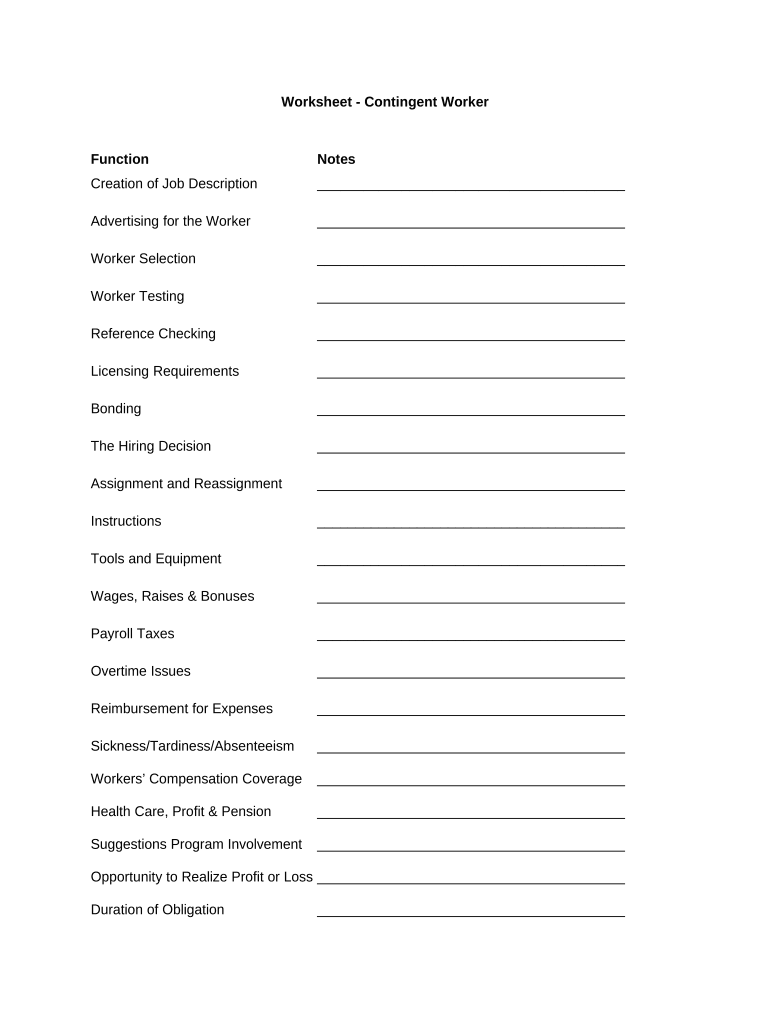
  2. Begin by filling out the 'Creation of Job Description' section. Clearly outline the responsibilities and qualifications required for the position.
  3. Move on to 'Advertising for the Worker.' Specify where and how you plan to advertise the job opening, ensuring a wide reach.
  4. In 'Worker Selection,' detail your criteria for selecting candidates. This may include skills, experience, and cultural fit.
  5. Complete 'Worker Testing' by outlining any assessments or tests that candidates must undergo during the selection process.
  6. Proceed to 'Reference Checking.' List the steps you will take to verify candidate references and background information.
  7. Continue through each section, such as 'Wages, Raises & Bonuses' and 'Health Care, Profit & Pension,' ensuring all fields are filled accurately based on your organization's policies.

Start using our platform today to streamline your document editing and form completion for free!

be ready to get more

Complete this form in 5 minutes or less

Get form

Got questions?

We have answers to the most popular questions from our customers. If you can't find an answer to your question, please contact us.
Contact us
Change Contingent Worker Details A start page will open that has two fillable fields. Fill out the date that you want the change to take effect and select Appointment Extension as the reason for making the change. Click Start. A contract details page will open with the current contract end date.
A contingent worker is someone who works for an organization without being hired as their employee. Contingent workers may provide their services under a contract, temporarily, or on an as-needed basis.
Contingent work, casual work, gig work or contract work, is an employment relationship with limited job security, payment on a piece work basis, typically part-time (typically with variable hours) that is considered non-permanent.
Within the Contingent Workers Profile, select the Actions button located under their name and title on the left-side of the page. Hover over Job Change and choose Convert to Employee.
Contingent workers are employees who do not have an explicit or implicit contract for long-term employment.

Security and compliance

At DocHub, your data security is our priority. We follow HIPAA, SOC2, GDPR, and other standards, so you can work on your documents with confidence.

Learn more
ccpa2
pci-dss
gdpr-compliance
hipaa
soc-compliance

People also ask

A contingent worker does not earn a salary from the employer. Instead, they receive payment per hour worked or commissions for the work they complete. Contract employees who supplement or replace the companys full-time staff get an hourly pay rate and receive payment on a set schedule.

Related links