Type text, add images, blackout confidential details, add comments, highlights and more.
02. Sign it in a few clicks
Draw your signature, type it, upload its image, or use your mobile device as a signature pad.
03. Share your form with others
Send it via email, link, or fax. You can also download it, export it or print it out.
How to use or fill out closing real estate with our platform
Ease of Setup
DocHub User Ratings on G2
Ease of Use
DocHub User Ratings on G2
Click ‘Get Form’ to open the closing real estate document in the editor.
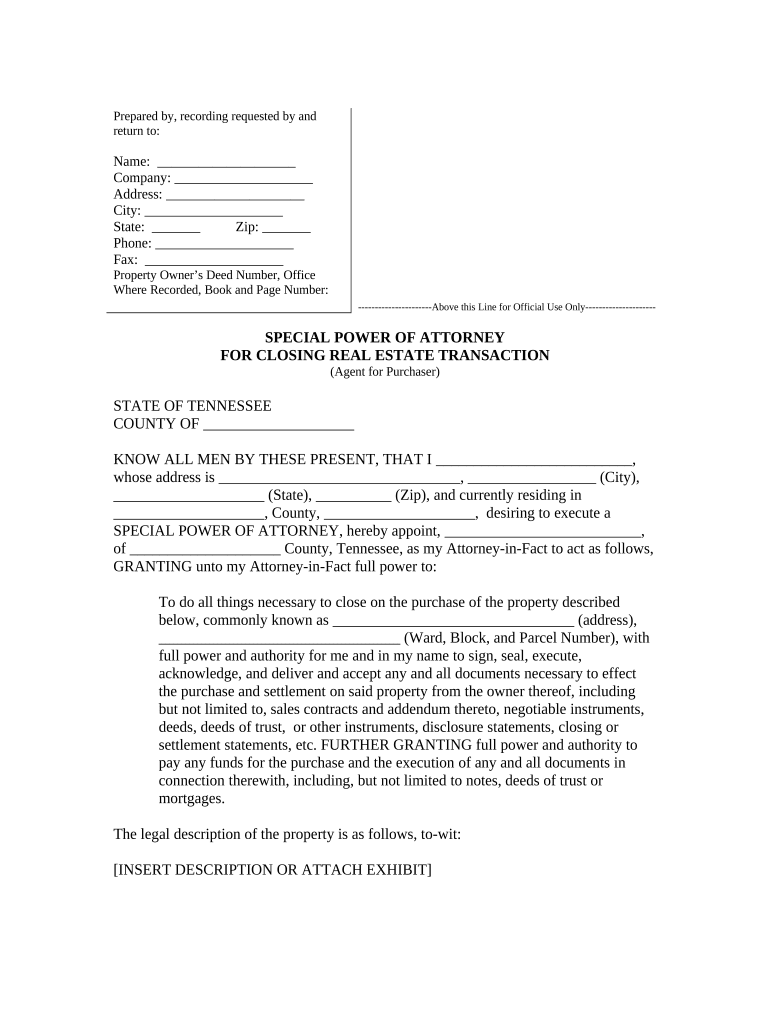
Begin by filling in your name, company, address, city, state, zip code, phone number, and fax number in the designated fields at the top of the form.
In the 'SPECIAL POWER OF ATTORNEY' section, enter your name and address details accurately. Ensure that you specify the county and state where you reside.
Designate your Attorney-in-Fact by entering their name and county. Clearly describe the property involved in the transaction by providing its common address and legal description.
Complete any additional sections regarding powers granted to your Attorney-in-Fact for executing necessary documents related to the property purchase.
Sign and date the document at the bottom. Ensure that a notary public witnesses your signature as required.
Start using our platform today for free to streamline your real estate closing process!
Closing real estate for a houseReal estate closing processWhat does closing on a house mean for sellerReal Estate closing jobsSteps of closing process in orderWhat is the closingWhat happens at closing for sellerHow long after closing on a house can you move in
Security and compliance
At DocHub, your data security is our priority. We follow HIPAA, SOC2, GDPR, and other standards, so you can work on your documents with confidence.
house closing | Wex | US Law | LII / Legal Information Institute
House closing is the step in which the final transfer of the ownership of a house from the seller to the buyer. Closing occurs after both have met all the termsRead more
The contract for sale could require the seller to actually perform repairs or improvements to the property, but the seller fails to do so prior to closing. TheRead more
Cookie consent notice
This site uses cookies to enhance site navigation and personalize your experience.
By using this site you agree to our use of cookies as described in our Privacy Notice.
You can modify your selections by visiting our Cookie and Advertising Notice.