Type text, add images, blackout confidential details, add comments, highlights and more.
02. Sign it in a few clicks
Draw your signature, type it, upload its image, or use your mobile device as a signature pad.
03. Share your form with others
Send it via email, link, or fax. You can also download it, export it or print it out.
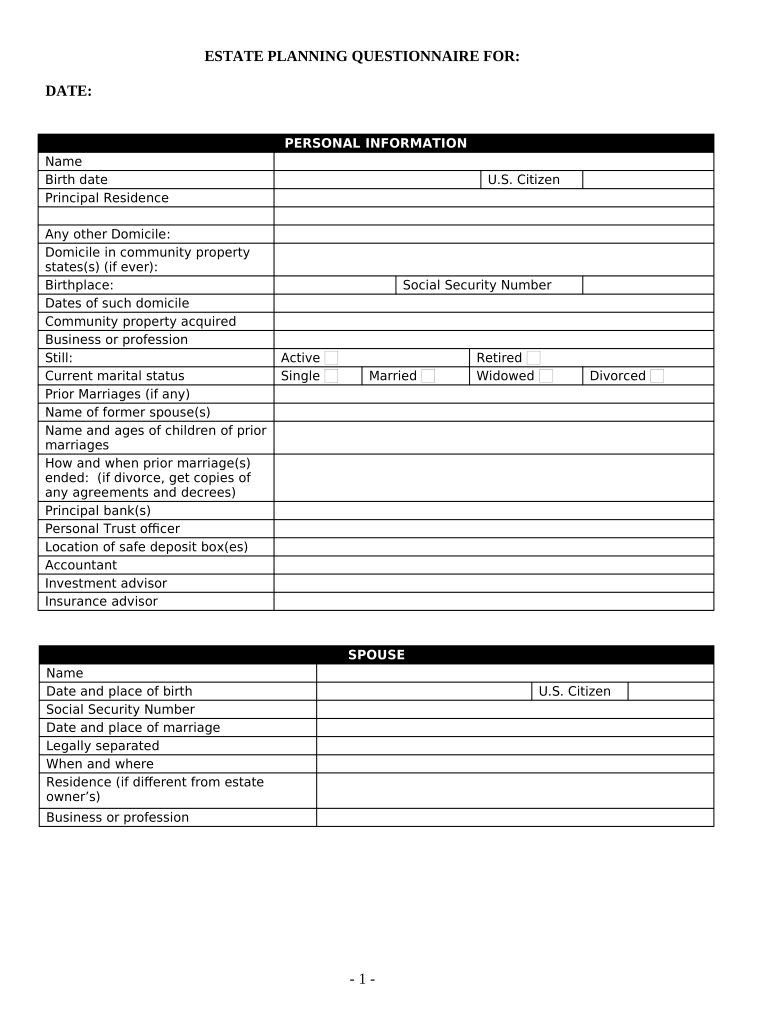
How to use or fill out Estate Planning Questionnaire and Worksheets - West Virginia with our platform
Ease of Setup
DocHub User Ratings on G2
Ease of Use
DocHub User Ratings on G2
Click ‘Get Form’ to open the Estate Planning Questionnaire and Worksheets in the editor.
Begin by filling out the 'Personal Information' section. Enter your name, birth date, principal residence, and any other domicile details. Be sure to include your marital status and information about prior marriages if applicable.
Proceed to the 'Children and Grandchildren' section. Here, designate which children or grandchildren are adopted or from prior marriages, providing their names and birth dates.
In the 'Who Will Benefit Under Will' section, list beneficiaries along with their addresses, ages, and relationship to you.
Complete the 'Fiduciaries' section by entering names and addresses for executors, trustees, and guardians.
Fill out the 'Financial Information' sections thoroughly. Include details about real estate, stocks, bonds, cash accounts, life insurance policies, and any liabilities.
Finally, review all entries for accuracy before saving or sharing your completed questionnaire using our platform's features.
Start filling out your Estate Planning Questionnaire today for free on our platform!
Fill out Estate Planning Questionnaire and Worksheets - West Virginia online It's free
Free estate planning questionnaire and worksheets west virginiaEstate planning questionnaire and worksheets west virginia templateEstate planning questionnaire and worksheets west virginia pdf
Security and compliance
At DocHub, your data security is our priority. We follow HIPAA, SOC2, GDPR, and other standards, so you can work on your documents with confidence.
These forms are not a substitute for legal advice. If you have difficulty completing these forms, then you may wish to consult with an attorney.Read more
Sep 13, 2015 Disclaimer: This publication is provided for the purpose of disseminating information relating to scientific and technical matters.Read more
West Virginia Takes a Step Backward in Elective Share Law
The revised elective share provisions were designed to prevent spousal disinheritance, recognize the surviving spouses contribution to the marriage, andRead more
Cookie consent notice
This site uses cookies to enhance site navigation and personalize your experience.
By using this site you agree to our use of cookies as described in our Privacy Notice.
You can modify your selections by visiting our Cookie and Advertising Notice.