Type text, add images, blackout confidential details, add comments, highlights and more.
02. Sign it in a few clicks
Draw your signature, type it, upload its image, or use your mobile device as a signature pad.
03. Share your form with others
Send it via email, link, or fax. You can also download it, export it or print it out.
How to use or fill out Tennessee Change Name with DocHub
Ease of Setup
DocHub User Ratings on G2
Ease of Use
DocHub User Ratings on G2
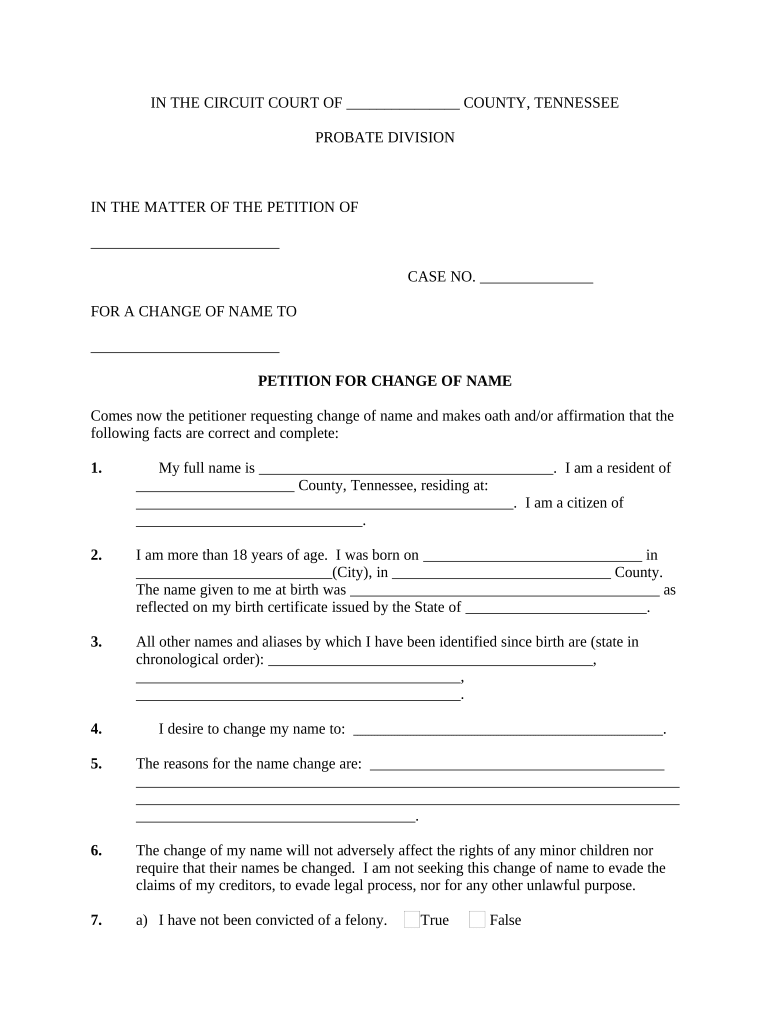
Click ‘Get Form’ to open the Tennessee Change Name document in our editor.
Begin by filling in your full name and current address in the designated fields. Ensure that all information is accurate as it will be used for legal purposes.
Indicate your age and date of birth, along with the city and county of your birth. This information is crucial for verifying your identity.
List any other names or aliases you have used since birth in chronological order. This helps establish a clear history of your identity.
Enter the new name you wish to adopt in the specified field. Make sure this is the name you intend to use moving forward.
Provide a detailed explanation for your name change in the reasons section. Be honest and thorough, as this may be reviewed by authorities.
Confirm whether you have been convicted of a felony by checking the appropriate box and providing details if applicable.
Attach copies of required documents such as your birth certificate, photo ID, and social security card using our platform's upload feature.
Start editing your Tennessee Change Name form online for free today!
Tennessee change name onlineTennessee change name requirementsName change after marriage TNTennessee change name appointmentTennessee change name formTennessee name change petitionHow to legally change your name after marriageName change memphis TN
Security and compliance
At DocHub, your data security is our priority. We follow HIPAA, SOC2, GDPR, and other standards, so you can work on your documents with confidence.
Tenn. Comp. R. Regs. 0880-13-.17 - CHANGE OF NAME AND/OR
(1) Change of Name - Any licensee shall notify the Board in writing within thirty (30) days of a name change and will provide both the old and new names. A name
Cookie consent notice
This site uses cookies to enhance site navigation and personalize your experience.
By using this site you agree to our use of cookies as described in our Privacy Notice.
You can modify your selections by visiting our Cookie and Advertising Notice.