Financial Account Transfer to Living Trust - South Carolina 2026

Get Form
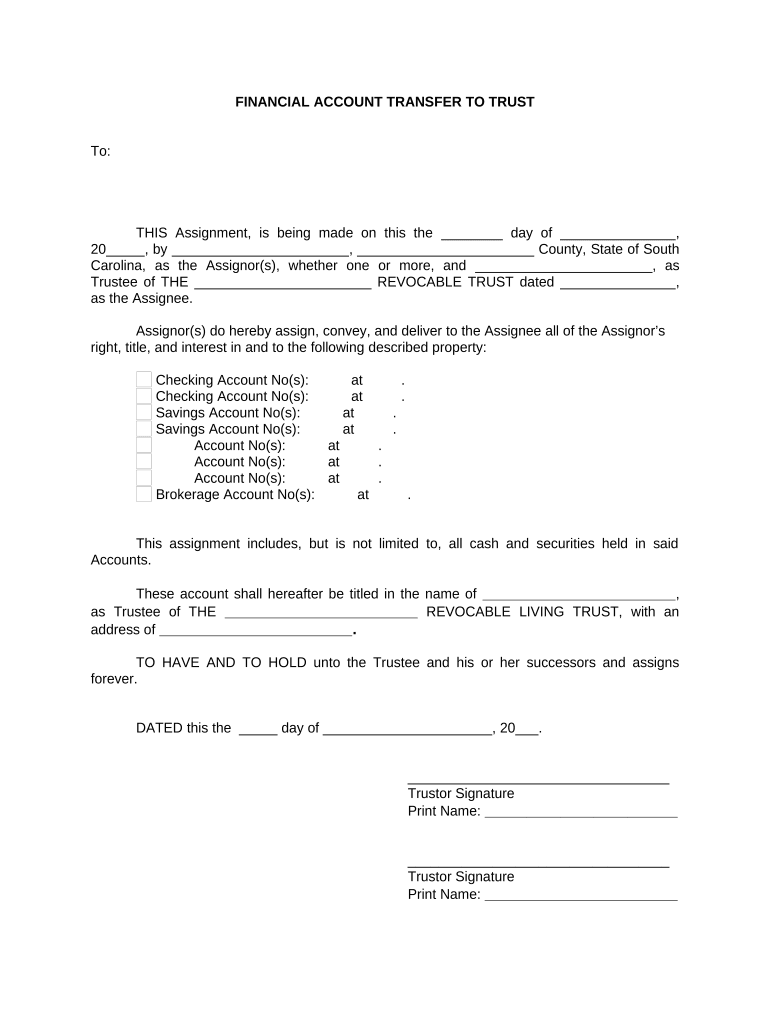
Financial Account Transfer to Living Trust - South Carolina Preview on Page 1

Here's how it works

01. Edit your form online
Type text, add images, blackout confidential details, add comments, highlights and more.
02. Sign it in a few clicks
Draw your signature, type it, upload its image, or use your mobile device as a signature pad.
03. Share your form with others
Send it via email, link, or fax. You can also download it, export it or print it out.

How to use or fill out Financial Account Transfer to Living Trust - South Carolina with DocHub

Form edit decoration
9.5
Ease of Setup
DocHub User Ratings on G2
9.0
Ease of Use
DocHub User Ratings on G2
  1. Click ‘Get Form’ to open it in the editor.
  2. Begin by entering the date of the assignment in the first blank field. This is crucial for establishing the timeline of the transfer.
  3. Fill in your name and county as the Assignor(s) in the designated fields. Ensure accuracy, as this identifies you legally.
  4. Next, specify the Trustee's name and provide details about THE REVOCABLE TRUST, including its date. This section clarifies who will manage the trust.
  5. List all relevant account numbers under Checking and Savings Accounts, ensuring each entry is complete and accurate for a smooth transfer.
  6. In the final section, include your signature(s) as Trustor(s) along with printed names. This step formalizes your consent to the transfer.
  7. Lastly, have a Notary Public acknowledge your signatures by filling out their information at the bottom of the form.

Start using our platform today to streamline your document editing and signing process for free!

be ready to get more

Complete this form in 5 minutes or less

Get form

Got questions?

We have answers to the most popular questions from our customers. If you can't find an answer to your question, please contact us.
Contact us
To transfer bank accounts into your living trust: Contact Your Bank: Inform your bank that you want to transfer your accounts into your living trust. They will provide the necessary forms and instructions. Provide Documentation: You must provide a Certification of Trust or a copy of the trust document.
How to Transfer Bank Accounts to a Trust Contact your bank. Each bank has requirements for transferring your bank accounts to a Trust. Complete the Certificate of Trust. The bank finalizes the change of ownership.
Those with complex estates may find a living trust useful. However, the adoption of the Uniform Probate Code in South Carolina means most people probably wont need one. Nevertheless, enlisting wills and trust services from an experienced attorney can help you choose the best legal instrument for you.
A: Property that cannot be held in a trust includes Social Security benefits, health savings and medical savings accounts, and cash. Other types of property that should not go into a trust are individual retirement accounts or 401(k)s, life insurance policies, certain types of bank accounts, and motor vehicles.
Q: Do I Need a Separate Bank Account for a Trust? A: Providing funds or assets for your trust accounts does not necessarily mean that you will have to establish an entirely new account. However, depending on the type of account, you will likely be required to complete paperwork to transfer ownership.

Security and compliance

At DocHub, your data security is our priority. We follow HIPAA, SOC2, GDPR, and other standards, so you can work on your documents with confidence.

Learn more
ccpa2
pci-dss
gdpr-compliance
hipaa
soc-compliance
be ready to get more

Complete this form in 5 minutes or less

Get form

People also ask

Trusts are subject to income tax, just like individuals or businesses. The tax rates applied to trusts can vary depending on the type and structure of the trust. Generally, a trust is considered a separate taxpayer with its tax identification number in California.

Related links