Type text, add images, blackout confidential details, add comments, highlights and more.
02. Sign it in a few clicks
Draw your signature, type it, upload its image, or use your mobile device as a signature pad.
03. Share your form with others
Send south carolina quit claim deed via email, link, or fax. You can also download it, export it or print it out.
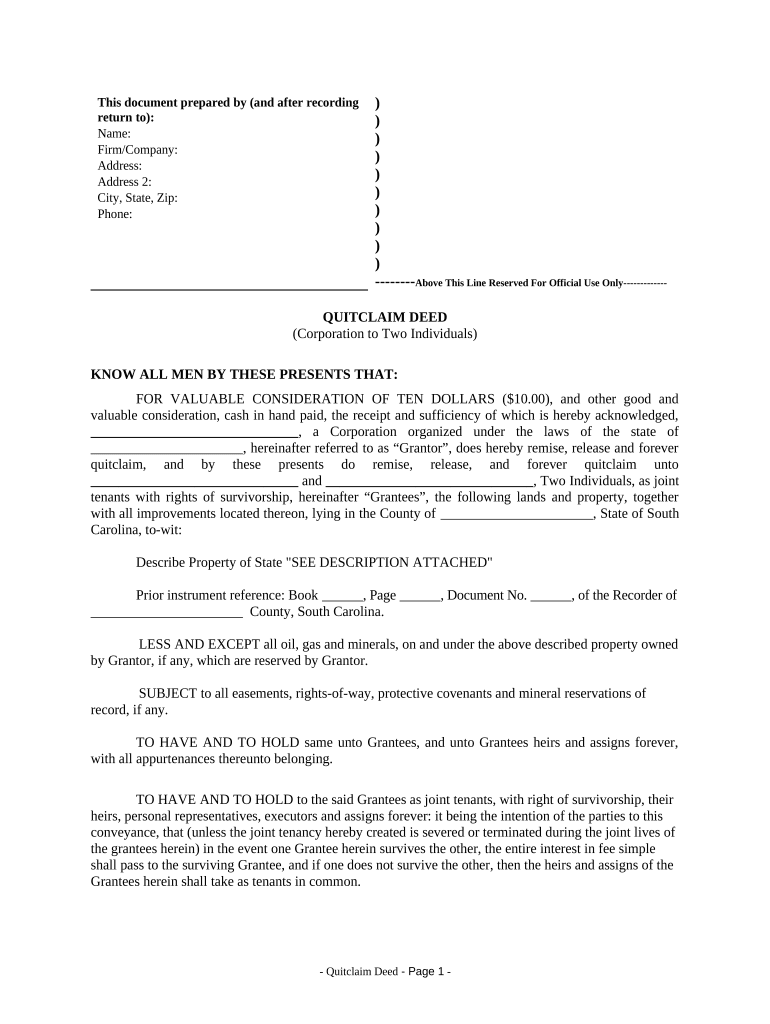
How to use or fill out Quitclaim Deed from Corporation to Two Individuals - South Carolina
Ease of Setup
DocHub User Ratings on G2
Ease of Use
DocHub User Ratings on G2
Click ‘Get Form’ to open it in the editor.
Begin by entering the name of the corporation in the 'Grantor' section, followed by its state of incorporation.
In the 'Grantees' section, input the names of the two individuals receiving the property. Ensure they are listed as joint tenants with rights of survivorship.
Describe the property being transferred in detail, referencing any attached descriptions if necessary.
Fill in prior instrument references, including book and page numbers from previous deeds if applicable.
Complete the execution section by signing on behalf of the corporation and including your title. Don’t forget to have a witness and notary present for validation.
Lastly, complete the Affidavit section, ensuring all required information is filled out accurately regarding fees and liens.
Start using our platform today to streamline your Quitclaim Deed process for free!
Fill out Quitclaim Deed from Corporation to Two Individuals - South Carolina online It's free
How long does a quitclaim deed give you ownershipRepercussions of a quit claim deedQuit claim deed SCQuit claim deed SC form pdfQuit claim deed loopholesTax implications of a quitclaim deedQuitclaim deed formWhat is the purpose of a quit claim deed
Security and compliance
At DocHub, your data security is our priority. We follow HIPAA, SOC2, GDPR, and other standards, so you can work on your documents with confidence.
South Carolina imposes a deed recording fee pursuant to Chapter 24 of Title 12. This fee is composed of two fees a state fee of one dollar thirty cents forRead more
by J DUKEMINIER 1995 In Ortega v. Kingfisher Homeowners Assn the South Carolina Court of. Appeals made it clear that a buyer of a timeshare condominium is bound by.Read more
Cookie consent notice
This site uses cookies to enhance site navigation and personalize your experience.
By using this site you agree to our use of cookies as described in our Privacy Notice.
You can modify your selections by visiting our Cookie and Advertising Notice.