Type text, add images, blackout confidential details, add comments, highlights and more.
02. Sign it in a few clicks
Draw your signature, type it, upload its image, or use your mobile device as a signature pad.
03. Share your form with others
Send it via email, link, or fax. You can also download it, export it or print it out.
How to use or fill out ct statutory with our platform
Ease of Setup
DocHub User Ratings on G2
Ease of Use
DocHub User Ratings on G2
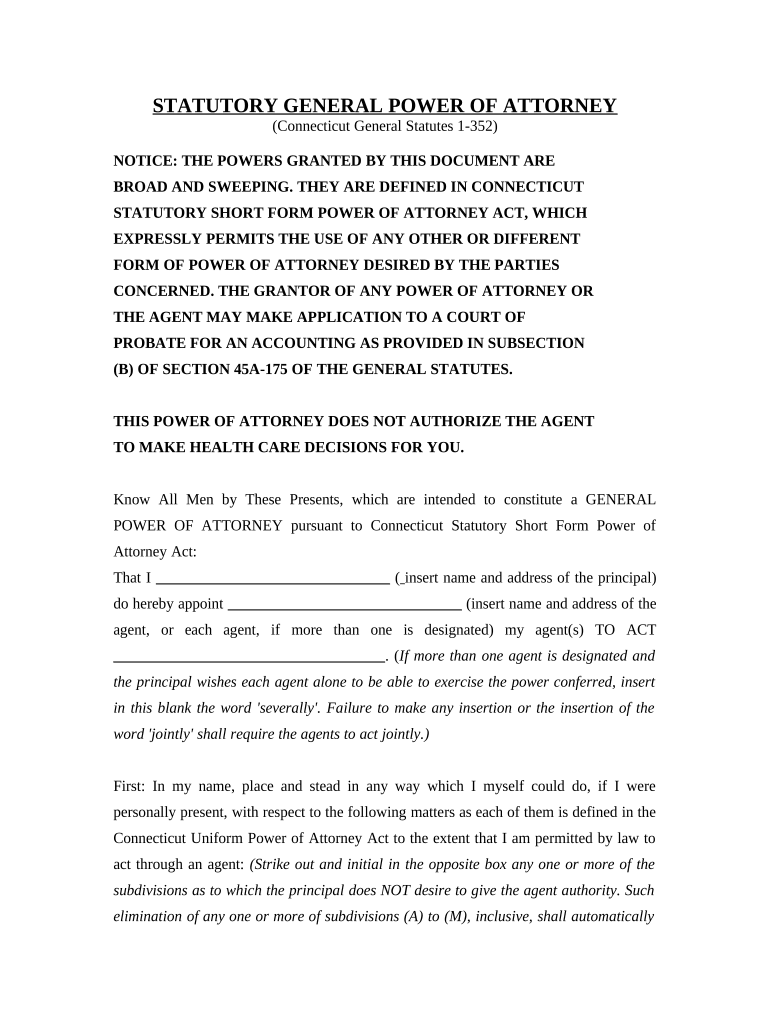
Click ‘Get Form’ to open the ct statutory document in the editor.
Begin by entering your name and address in the designated fields for the principal. This identifies you as the person granting power of attorney.
Next, input the name and address of your chosen agent(s). If you have multiple agents, specify whether they will act jointly or severally.
Review each section carefully. For powers you do not wish to grant, strike through the corresponding subdivision (A-M) and initial in the box provided.
If applicable, designate any successor agents by filling in their names and addresses in the optional section provided.
Finally, sign and date the document at the bottom. Ensure that a notary public witnesses your signature for it to be legally binding.
Start using our platform today to easily complete your ct statutory form online for free!
CT General Statutes searchCT General Statutes 2026Cgs ctCT Law searchCT RegulationsCgs 53aConn gen stat 1-210Connecticut General Statutes section 52-570d
Security and compliance
At DocHub, your data security is our priority. We follow HIPAA, SOC2, GDPR, and other standards, so you can work on your documents with confidence.
Mar 24, 2026 The CT Legislative Service pamphlets published throughout the legislative session provide the text of public and special acts passed during the current session.Read more
GENERAL STATUTES OF CONNECTICUT T I T L E S. (The volume numbers appearing below correspond to the volumes of the printed General Statutes). V O L U M E 1Read more
Cookie consent notice
This site uses cookies to enhance site navigation and personalize your experience.
By using this site you agree to our use of cookies as described in our Privacy Notice.
You can modify your selections by visiting our Cookie and Advertising Notice.