Type text, add images, blackout confidential details, add comments, highlights and more.
02. Sign it in a few clicks
Draw your signature, type it, upload its image, or use your mobile device as a signature pad.
03. Share your form with others
Send it via email, link, or fax. You can also download it, export it or print it out.
How to use or fill out Business Credit Application - Connecticut with our platform
Ease of Setup
DocHub User Ratings on G2
Ease of Use
DocHub User Ratings on G2
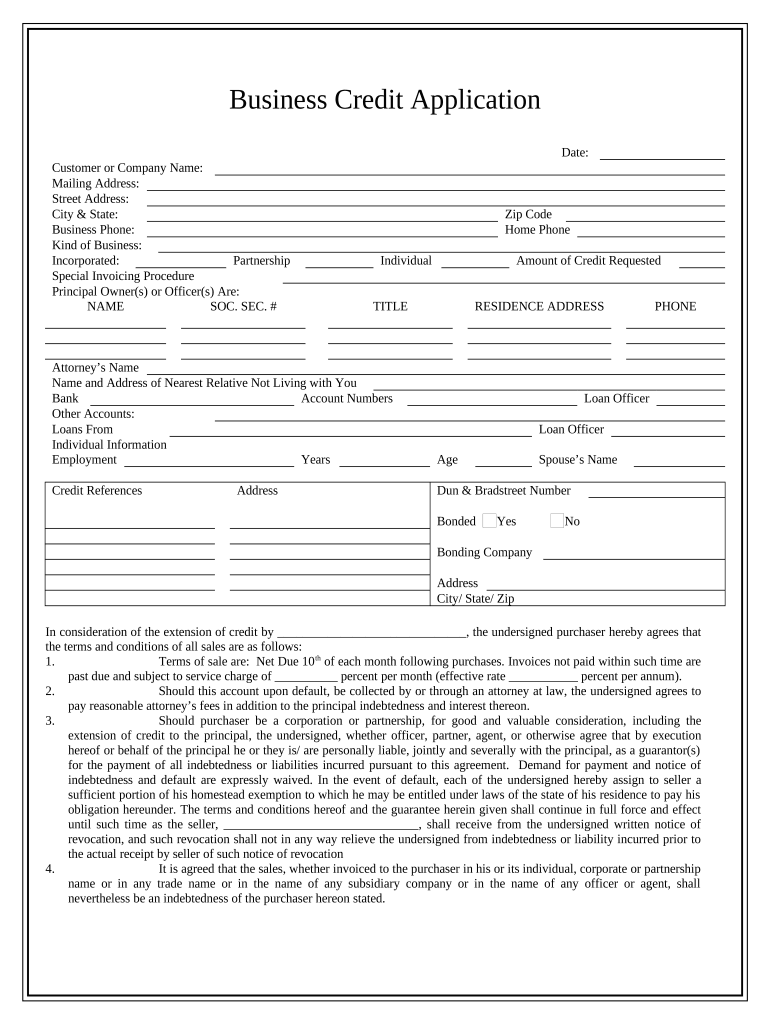
Click ‘Get Form’ to open the Business Credit Application in the editor.
Begin by entering the date at the top of the form. This is essential for record-keeping.
Fill in your Customer or Company Name, followed by your Mailing Address and Street Address. Ensure accuracy for correspondence.
Provide your City & State, Zip Code, and Business Phone number. This information helps establish your business identity.
Indicate the Kind of Business you operate and whether it is Incorporated or a Partnership. This section clarifies your business structure.
List Principal Owner(s) or Officer(s) along with their Social Security Numbers and Home Phone numbers. This personal information is crucial for credit assessment.
Specify the Amount of Credit Requested and include details about any Attorney’s Name, Bank Account Numbers, and other accounts relevant to your financial history.
Complete the Employment section with Years of Employment and Age. This provides insight into stability and reliability.
Finally, review all terms and conditions before signing. Ensure you understand all obligations as outlined in the agreement.
Start filling out your Business Credit Application today using our platform for free!
Fill out Business Credit Application - Connecticut online It's free
Business credit application connecticut pdfBusiness credit application connecticut phone numberBusiness credit application connecticut onlineBusiness credit application connecticut formBusiness credit application connecticut 2022CT small business grants for startupsCT $5,000 grantCT Small Business Boost Fund
Security and compliance
At DocHub, your data security is our priority. We follow HIPAA, SOC2, GDPR, and other standards, so you can work on your documents with confidence.
Letter from Landlord to Tenant as Notice to Tenant of Tenant's Disturbance of Neighbors' Peaceful Enjoyment to Remedy or Lease Terminates - Utah
Letter from Landlord to Tenant as Notice to Tenant of Tenant's Disturbance of Neighbors' Peaceful Enjoyment to Remedy or Lease Terminates - Utah
This document is a notice to a tenant regarding their failure to control the conduct of themselves, their family, or gue ...
Conn. Agencies Regs. 12-217s-7 - Application for tax credit
(b) Qualified corporations shall submit a completed application form to the department by 4:00 p.m. on July 1st (if July 1st is a Saturday, Sunday or holiday,Read more
Sep 16, 2013 Thus, for an employer that meets these requirements, the credit will be calculated at the 50 percent rate (35 percent rate for tax-exemptRead more
Cookie consent notice
This site uses cookies to enhance site navigation and personalize your experience.
By using this site you agree to our use of cookies as described in our Privacy Notice.
You can modify your selections by visiting our Cookie and Advertising Notice.