Ct provisions 2026

Get Form
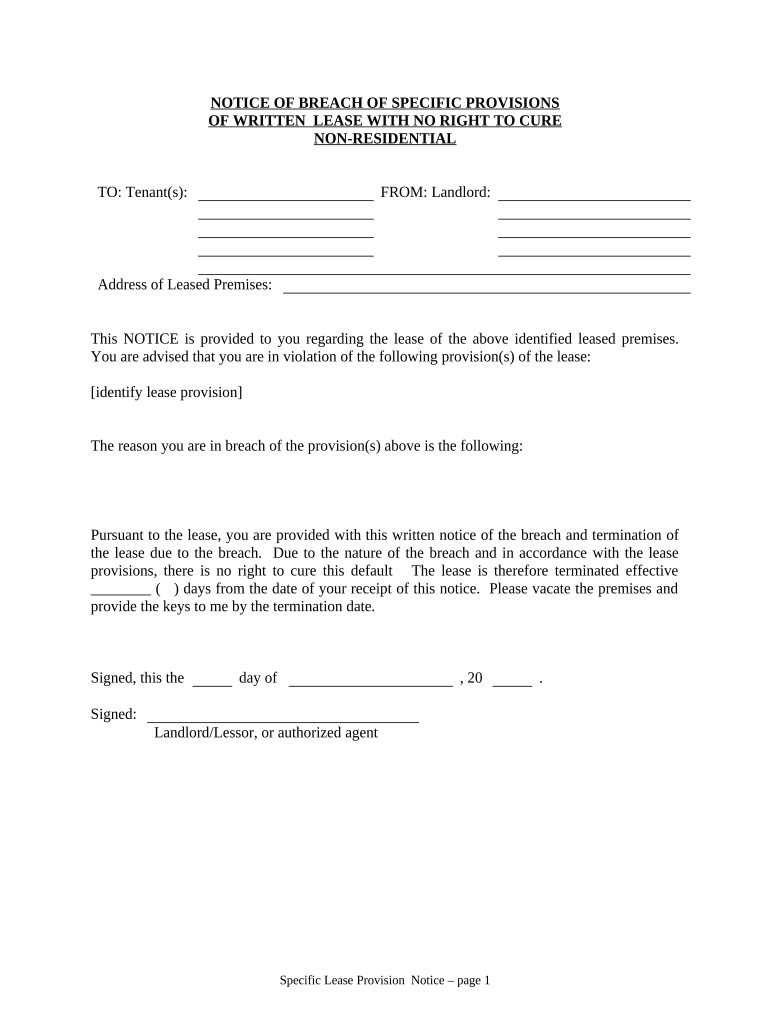
ct provisions Preview on Page 1

Here's how it works

01. Edit your form online
Type text, add images, blackout confidential details, add comments, highlights and more.
02. Sign it in a few clicks
Draw your signature, type it, upload its image, or use your mobile device as a signature pad.
03. Share your form with others
Send it via email, link, or fax. You can also download it, export it or print it out.

How to use or fill out ct provisions with our platform

Form edit decoration
9.5
Ease of Setup
DocHub User Ratings on G2
9.0
Ease of Use
DocHub User Ratings on G2
  1. Click ‘Get Form’ to open the ct provisions document in the editor.
  2. Begin by entering the Tenant(s) name in the designated field at the top of the form. This ensures that the notice is correctly addressed.
  3. Next, input your name as the Landlord in the corresponding section. This identifies you as the sender of this notice.
  4. Fill in the Address of Leased Premises where the breach has occurred. This provides clarity on which property is involved.
  5. Identify and specify the lease provision(s) that have been violated in the provided space. Be precise to avoid any confusion.
  6. Clearly state the reason for the breach in the next section, ensuring it aligns with your lease agreement.
  7. Indicate how many days from receipt of this notice until termination takes effect, filling in that number appropriately.
  8. Finally, sign and date at the bottom of the form to validate your notice before sending it out.

Start using our platform today to streamline your document editing and ensure effective communication!

be ready to get more

Complete this form in 5 minutes or less

Get form

Got questions?

We have answers to the most popular questions from our customers. If you can't find an answer to your question, please contact us.
Contact us
We became known as the Provisions State because of the provisions we supplied to help feed and equip General George Washingtons Continental Army and the Connecticut Militia.
Qui transtulit sustinet Connecticut / Motto
Connecticut colonists hid Connecticuts Royal Charter of 1662 within the trees hollow to thwart its confiscation by the English governor-general. The oak symbolized American independence and was commemorated on the Connecticut State Quarter.
The Connecticut Colony, originally known as the Connecticut River Colony, was an English colony in New England which later became the state of Connecticut. It was organized on March 3, 1636, as a settlement for a Puritan congregation of settlers from the Massachusetts Bay Colony led by Thomas .
Connecticut is the third-smallest state by area after Rhode Island and Delaware, and the 29th most populous with more than 3.6 million residents as of 2024, ranking it fourth among the most densely populated U.S. states. Nicknames: The Constitution State (official) The Nutmeg State.

Security and compliance

At DocHub, your data security is our priority. We follow HIPAA, SOC2, GDPR, and other standards, so you can work on your documents with confidence.

Learn more
ccpa2
pci-dss
gdpr-compliance
hipaa
soc-compliance