Type text, add images, blackout confidential details, add comments, highlights and more.
02. Sign it in a few clicks
Draw your signature, type it, upload its image, or use your mobile device as a signature pad.
03. Share your form with others
Send it via email, link, or fax. You can also download it, export it or print it out.
How to use or fill out ar letter landlord with our platform
Ease of Setup
DocHub User Ratings on G2
Ease of Use
DocHub User Ratings on G2
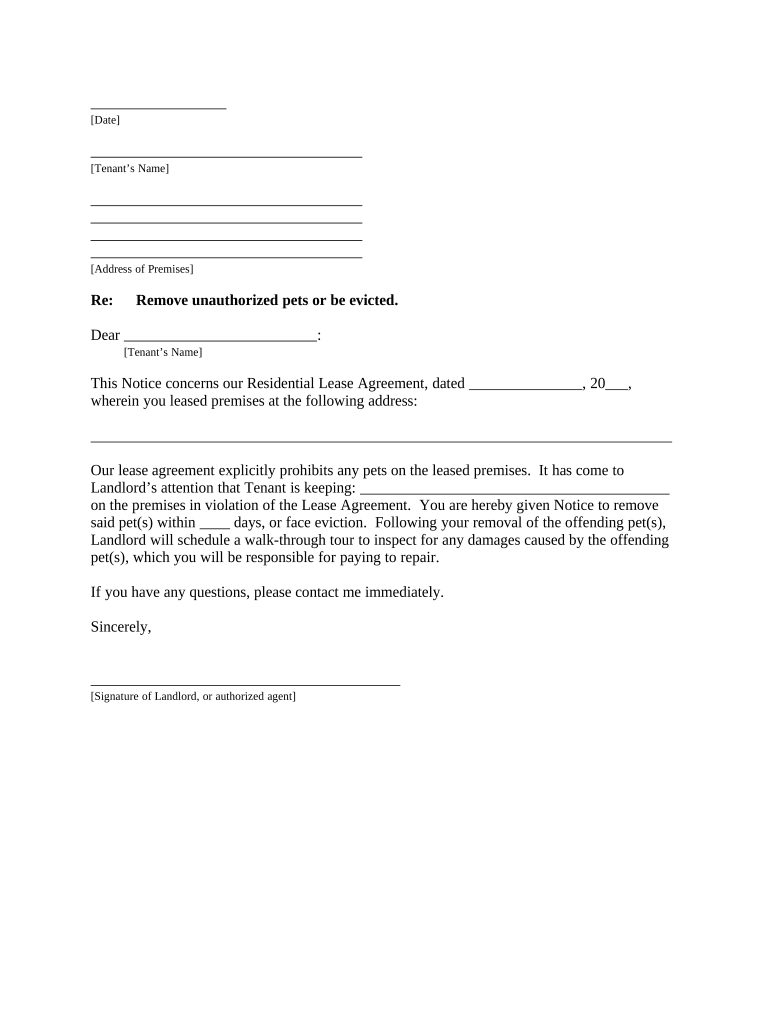
Click ‘Get Form’ to open the ar letter landlord in the editor.
Begin by entering the date at the top of the document. This is essential for record-keeping and establishes when the notice was issued.
Fill in the tenant’s name and their address of premises. Ensure accuracy to avoid any confusion regarding the recipient.
In the body of the letter, specify the lease agreement date and address where the tenant resides. Clearly state that unauthorized pets are not allowed as per your lease agreement.
Indicate what type of pet is in violation and provide a deadline for removal. This section is crucial for compliance and clarity.
Conclude with your signature or that of an authorized agent, along with a note on how you delivered this notice to ensure proper documentation.
Start using our platform today to easily fill out your ar letter landlord for free!
Letter from landlord to tenantLetter from landlord to tenant to move outLetter from landlord confirming tenancy and monthly rentLetter from landlord to tenant to pay rentArkansas landlord tenant HandbookArkansas notice to QuitFree sample letters to tenants from landlords30 day notice to vacate Arkansas
Security and compliance
At DocHub, your data security is our priority. We follow HIPAA, SOC2, GDPR, and other standards, so you can work on your documents with confidence.
Landlord And Tenant Rights - Arkansas Attorney General
Arkansas law provides rights to both residential tenants and landlords. Arkansas laws on such issues apply only to private rental units and not government-Read more
How to Write a Landlord Complaint Letter Explain the problem as clearly as you can. Be polite and respectful in your letter. Suggest ways to resolve theRead more
Cookie consent notice
This site uses cookies to enhance site navigation and personalize your experience.
By using this site you agree to our use of cookies as described in our Privacy Notice.
You can modify your selections by visiting our Cookie and Advertising Notice.