Plea 2026

Get Form
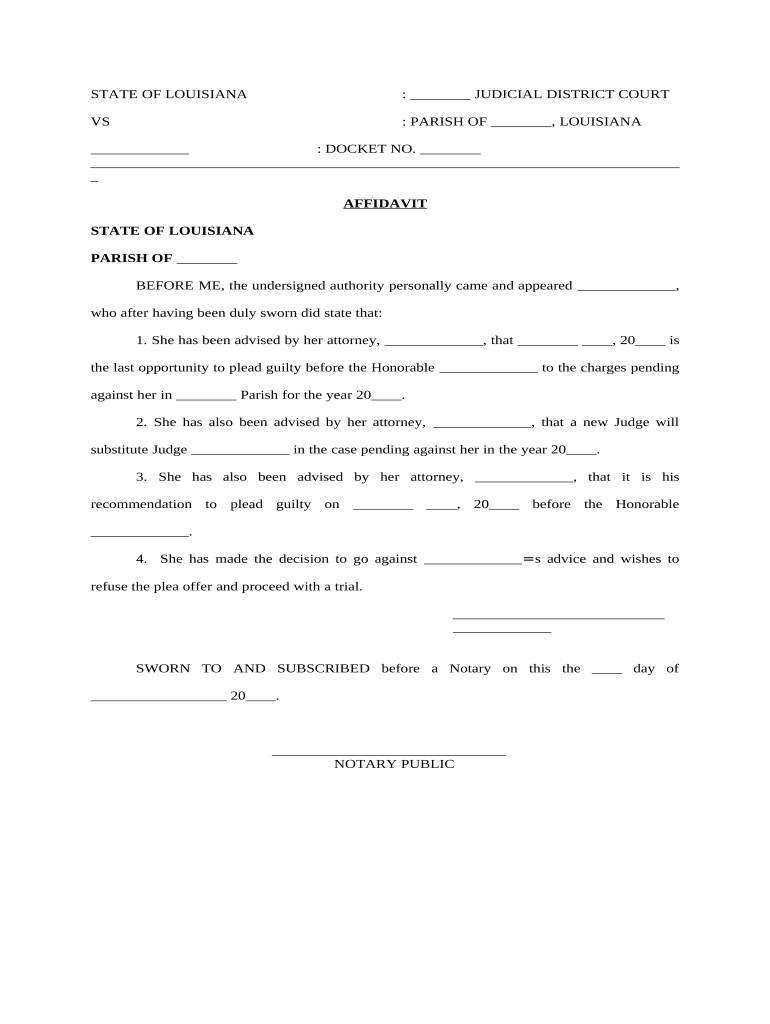
plea Preview on Page 1

Here's how it works

01. Edit your form online
Type text, add images, blackout confidential details, add comments, highlights and more.
02. Sign it in a few clicks
Draw your signature, type it, upload its image, or use your mobile device as a signature pad.
03. Share your form with others
Send it via email, link, or fax. You can also download it, export it or print it out.

How to Use or Fill Out the Plea Form with Our Platform

Form edit decoration
9.5
Ease of Setup
DocHub User Ratings on G2
9.0
Ease of Use
DocHub User Ratings on G2
  1. Click ‘Get Form’ to open the plea document in the editor.
  2. Begin by filling in the judicial district and parish at the top of the form. This information is crucial for identifying your case.
  3. Enter the docket number in the designated field. This number helps track your case within the court system.
  4. In the affidavit section, provide your name where indicated, ensuring it matches your legal documents.
  5. Fill in your attorney's name and the date of your last opportunity to plead guilty. This ensures clarity on legal advice received.
  6. Indicate whether you accept or refuse the plea offer by clearly stating your decision in the provided space.
  7. Finally, sign and date the document before a notary public to validate your affidavit.

Start using our platform today for free to streamline your document editing and signing process!

be ready to get more

Complete this form in 5 minutes or less

Get form

Got questions?

We have answers to the most popular questions from our customers. If you can't find an answer to your question, please contact us.
Contact us

Sure, a typed name is recognized as a legitimate electronic signature when you add it to your paperwork utilizing a compliant solution like DocHub. Simply upload your plea to our editor, click Sign in the top tool pane → Create your signature → Type your name in the proper tab, and decide how it will look on your document.

If you are looking for a state-specific plea sample, you can find it in our DocHub Forms & Templates catalog. Use the search field, enter your form’s name, and search through the results for your state. You may also filter out irrelevant results while exploring our catalog by groups.

Security and compliance

At DocHub, your data security is our priority. We follow HIPAA, SOC2, GDPR, and other standards, so you can work on your documents with confidence.

Learn more
ccpa2
pci-dss
gdpr-compliance
hipaa
soc-compliance
be ready to get more

Complete this form in 5 minutes or less

Get form