Type text, add images, blackout confidential details, add comments, highlights and more.
02. Sign it in a few clicks
Draw your signature, type it, upload its image, or use your mobile device as a signature pad.
03. Share your form with others
Send plaintiff vs defendant via email, link, or fax. You can also download it, export it or print it out.
How to use or fill out ga plaintiff with our platform
Ease of Setup
DocHub User Ratings on G2
Ease of Use
DocHub User Ratings on G2
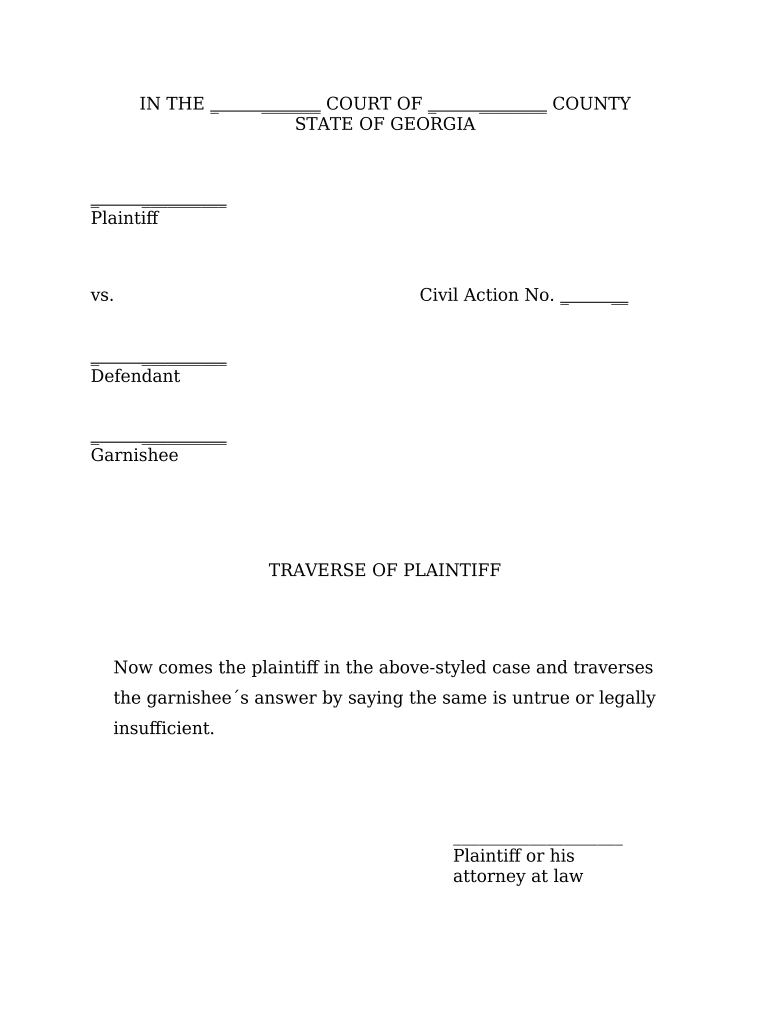
Click ‘Get Form’ to open the ga plaintiff document in the editor.
Begin by filling in the court name and county at the top of the form. This information is crucial for identifying the jurisdiction of your case.
Next, enter the names of the plaintiff and defendant in their respective fields. Ensure that you spell names correctly to avoid any legal complications.
In the Civil Action No. section, input your case number as assigned by the court. This helps in tracking your case efficiently.
For the traverse section, clearly state your reasons for contesting the garnishee's answer. Be concise yet thorough in your explanation.
Fill in the date and time for the hearing as ordered by the court, ensuring accuracy to comply with legal requirements.
Finally, sign and date where indicated, either electronically or by printing out and signing manually before submitting.
Start using our platform today to fill out your ga plaintiff form easily and for free!
How to file a civil lawsuit in GeorgiaPlaintiff vs defendantHow much does it cost to take someone to small claims court in GeorgiaSmall claims court macon GASmall claims Court forsyth County gaGA small claims court limitsSmall Claims Court McDonough gaHow to file small claims Court in Cobb County GA
Security and compliance
At DocHub, your data security is our priority. We follow HIPAA, SOC2, GDPR, and other standards, so you can work on your documents with confidence.
Other Options for Resolving Your Dispute | Georgia Attorney
The person filing a claim in magistrate court is called the plaintiff. The person or business against whom the claim is brought is called the defendant. TheRead more
Determining eligibility. To be eligible, the plaintiff must have substantially prevailed in the litigation. For a party to have substantially prevailed,Read more
Apr 4, 2025 Practice areas include civil rights, environmental law, personal injury, employment law, consumer protection, medical malpractice, securitiesRead more
Cookie consent notice
This site uses cookies to enhance site navigation and personalize your experience.
By using this site you agree to our use of cookies as described in our Privacy Notice.
You can modify your selections by visiting our Cookie and Advertising Notice.